Playwright vs. Puppeteer: Which is Better for AI Agent Control?

By Salome KoshadzeMarch 5, 202618 min read

When developing intelligent web agents that can navigate, extract information, and interact with dynamic online environments, the choice of a browser automation framework is a major consideration. Both Playwright and Puppeteer are widely used for browser automation, but their architectural differences and capabilities can greatly influence an AI agent's performance, adaptability, and reliability. Selecting the right tool involves aligning the framework's strengths with the goals for the agent's performance and future scalability.

Quick Comparison: Playwright vs. Puppeteer for AI Agents

Playwright supports Chromium, Firefox, and WebKit - ideal for agents that must work across multiple browsers.

Puppeteer is Chromium-only but offers deep, low-level control via the Chrome DevTools Protocol - best for precision tasks on Chrome/Edge.

Playwright's auto-waiting makes it more reliable on dynamic pages; Puppeteer requires manual wait logic.

Playwright's Browser Contexts allow many isolated agent sessions in one browser instance - more efficient for large-scale deployments.

Choose Playwright for versatility, scale, and rich debugging tools. Choose Puppeteer for granular Chromium control and a mature ecosystem.

Playwright: A Deep Dive

Playwright is an open-source framework developed by Microsoft that facilitates cross-browser automation. It provides a unified API to control Chromium, Firefox, and WebKit, making it a suitable option for testing web applications across various platforms. Playwright supports multiple programming languages, including TypeScript, JavaScript, Python, .NET, and Java, offering flexibility for development teams with diverse technical backgrounds.

Technical Architecture

Playwright's architecture is designed to align with modern browser structures, operating out-of-process to avoid the limitations of in-process test runners. This design enhances flexibility and control over browser actions. Communication between the client and server is handled through a WebSocket connection, which is more efficient than traditional HTTP communication, allowing for faster and more effective real-time interactions.

The core components of Playwright's architecture include:

  • Client: This is where test scripts are written using Playwright's API bindings for various programming languages.
  • Playwright Server: Acting as an intermediary, the server translates client commands into instructions that the browser can understand and manages browser instances. It is powered by Node.js.
  • WebSockets: Playwright uses WebSockets for efficient, bidirectional communication between the client and server over a TCP connection. This persistent connection improves speed compared to the request-response model of HTTP.

Key Features for AI Agent Control

Playwright offers several features that are particularly advantageous for controlling AI agents. Its ability to handle multiple isolated contexts within a single browser instance is a major benefit for AI agent fleets that need to operate at scale. This allows for efficient parallel processing of tasks without interference between sessions.

Other notable features include:

  • Auto-wait mechanisms: Playwright automatically waits for elements to be ready before performing actions, which helps to eliminate flaky tests and improves the reliability of automation scripts.
  • Advanced debugging tools: The framework comes with tools like the Playwright Inspector for inspecting pages and generating selectors, and Trace Viewer for capturing detailed information to investigate test failures.
  • Network interception: Playwright allows for the interception and modification of network requests, which can be useful for simulating different network conditions or testing edge cases.
  • Mobile emulation: It provides capabilities to emulate mobile devices, allowing AI agents to be tested on different screen sizes and orientations.
  • AI-driven components: The introduction of Playwright Test Agents brings intelligent collaboration between AI and Playwright. These agents can understand goals, plan browser actions, and execute them autonomously.

Build smarter AI agents for the web

Webfuse gives your AI agents structured access to any website - no scraping fragility, no DOM chaos. Connect your agent to live web environments in minutes.

No credit card required
14-day free trial

Puppeteer: A Focused Approach

Puppeteer is a Node.js library developed by Google that provides a high-level API to control Chrome or Chromium over the DevTools Protocol. Its primary focus on the Chromium engine allows for deep integration and highly stable automation for browsers like Google Chrome and Microsoft Edge. This tight coupling makes it a popular choice for tasks that require precise and reliable browser interaction.

Technical Architecture

Puppeteer's architecture is centered around the Chrome DevTools Protocol (CDP), which provides a direct line of communication to the browser's core functionalities. This allows for granular control over nearly every aspect of the browser, from DOM manipulation and network interception to performance monitoring. The architecture consists of the Node.js library, a controlled browser instance, and the DevTools Protocol interface that facilitates communication.

Scripts written with the Puppeteer API send commands through the CDP to a headless or full instance of Chrome or Chromium. This direct communication channel is a key factor in its performance and reliability, as it avoids additional layers of abstraction that could introduce instability. Developers can even bypass the high-level API and use the CDP directly for more highly specialized tasks.

Key Features for AI Agent Control

For AI agent development, Puppeteer offers a set of features that makes it a strong contender, particularly when the target environment is Chromium-based. Its ability to run in headless mode is efficient for large-scale deployments where a visible UI is unnecessary.

Key features that benefit AI agent control include:

  • Direct Chrome DevTools Protocol Access: This allows for highly detailed control and inspection of the browser, enabling agents to monitor network traffic, analyze performance, and debug issues with precision.
  • Performance Profiling: The ability to capture timeline traces helps in identifying and optimizing performance bottlenecks in web applications the agent interacts with.
  • Screenshot and PDF Generation: AI agents can visually capture web pages as screenshots or save them as PDFs for documentation, analysis, or reporting purposes.
  • Extensive Community and Tooling: Being one of the earlier tools in this space, Puppeteer has a sizeable community and a wide range of third-party tools and integrations, including those specifically designed to connect AI models with browser control.
  • Integration with AI Frameworks: Projects have emerged that use Puppeteer to give multimodal AI models, like GPT-4V, direct control over a web browser, allowing them to "see" the web page via screenshots and interact with elements programmatically.

Direct CDP access is where Puppeteer's low-level control stands out. The following example opens a raw CDP session to monitor every API call an agent makes during a session — something that requires dropping below Playwright's abstraction layer to replicate:

const browser = await puppeteer.launch();
const page = await browser.newPage();

// Open a raw Chrome DevTools Protocol session
const client = await page.createCDPSession();
await client.send('Network.enable');

client.on('Network.responseReceived', ({ response }) => {
  if (response.url.includes('/api/')) {
    console.log(`[Agent] ${response.url} → HTTP ${response.status}`);
  }
});

await page.goto('https://example.com/dashboard');
// All background API calls are logged as the page loads

This is useful when an agent needs to observe network-level events in real time — for example, detecting when a background data fetch has completed before proceeding with the next action.

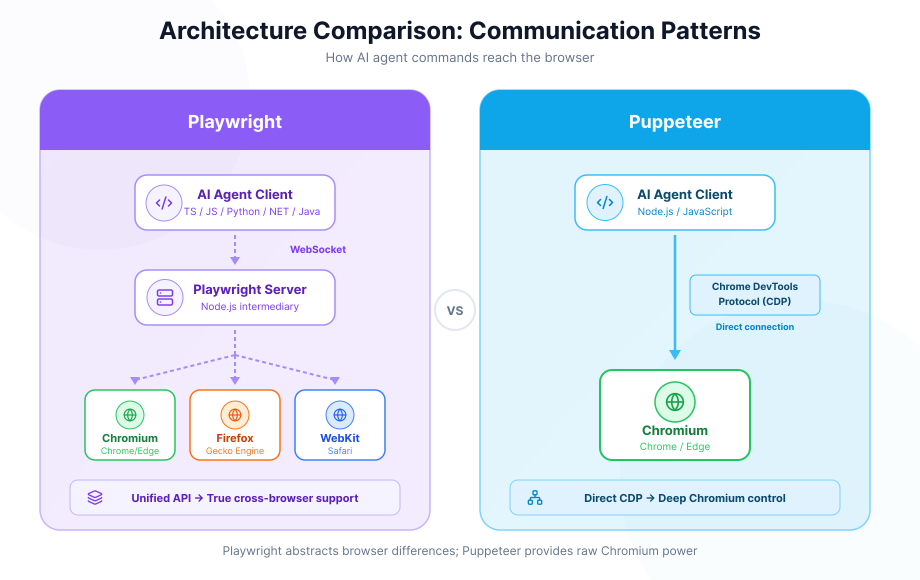
Diagram illustrating Puppeteer's architecture and its direct connection to Chrome via the DevTools Protocol

Playwright vs. Puppeteer: A Head-to-Head Comparison

The decision between Playwright and Puppeteer for AI agent control depends on the specific requirements of the project, including the need for cross-browser support, the complexity of agent interactions, and the desired development experience. While both frameworks are highly capable, they present different advantages.

Browser Support and Scope

A major distinction lies in their approach to browser compatibility. Playwright provides a single, unified API to control Chromium (Google Chrome, Microsoft Edge), Firefox, and WebKit (Safari). This makes it a suitable choice for AI agents that must operate reliably across different browser environments, ensuring consistent behavior regardless of the underlying engine.

Puppeteer, on the other hand, is primarily focused on the Chromium family of browsers. While there is experimental support for Firefox through puppeteer-firefox, it is not as mature or integrated as Playwright's native multi-browser support. If the AI agent's operational environment is exclusively Chrome or other Chromium-based browsers, Puppeteer's focused approach provides deep and stable control.

API Design and Reliability

When building AI agents to navigate the modern web, handling dynamic content is a common challenge. Playwright addresses this with a built-in auto-waiting mechanism. It automatically waits for elements to be interactive before performing actions, which can reduce the flakiness of scripts and simplify the code required for the agent to interact with web pages where content loads asynchronously.

Puppeteer generally requires more manual handling of waiting conditions. Developers often need to explicitly write code to wait for selectors, network responses, or specific timing events. While this offers granular control, it can also lead to more complex and potentially brittle logic for an AI agent that must adapt to unpredictable page load times.

The contrast is visible in code. Both snippets below complete the same task — clicking a button and reading a dynamically loaded value — but the Puppeteer version requires explicit waits at each step:

// Playwright — auto-waiting handles timing automatically
const browser = await chromium.launch();
const page = await browser.newPage();
await page.goto('https://example.com/products');

await page.click('#load-more');                      // waits for element to be ready
const price = await page.textContent('.price');      // waits for content to appear
console.log(price);
// Puppeteer — each interaction requires an explicit wait
const browser = await puppeteer.launch();
const page = await browser.newPage();
await page.goto('https://example.com/products');

await page.waitForSelector('#load-more', { visible: true });
await page.click('#load-more');
await page.waitForSelector('.price');
const price = await page.$eval('.price', el => el.textContent);
console.log(price);

For an AI agent navigating hundreds of different sites, the Playwright version degrades more gracefully — a missing waitForSelector call in the Puppeteer version is a common source of agent failures on pages with slower or variable load times.

Debugging and Developer Tools

Effective debugging is important when developing complex agent behaviors. Playwright offers a highly set of integrated tools designed to streamline this process.

  • Playwright Inspector: A GUI tool that allows developers to step through script execution, inspect the page, and generate selectors on the fly.
  • Trace Viewer: A powerful tool that captures a complete trace of an automation run, including screenshots for each action, network logs, and a full DOM snapshot. This is very useful for post-mortem analysis of why an agent failed a particular task.
  • Codegen: A feature that records user interactions in the browser and automatically generates the corresponding Playwright script.

Puppeteer relies more on standard browser and Node.js debugging tools, such as the Chrome DevTools. While these tools are powerful, they are not as tightly integrated into a single, cohesive debugging experience as what Playwright provides for automation scripts.

Performance and Architecture

Both frameworks are engineered for high performance. Puppeteer's direct communication with the browser via the Chrome DevTools Protocol (CDP) is extremely fast for Chromium-specific tasks. Playwright communicates with the browser through a WebSocket connection, which is also highly efficient and supports persistent, bidirectional communication.

A key architectural difference is Playwright's concept of Browser Contexts. This allows for the creation of multiple, isolated browser sessions within a single browser instance. For AI applications requiring the parallel operation of many agents (for example, scraping multiple sites or managing different user accounts simultaneously), this can be more memory-efficient than launching a separate browser instance for each agent, a common pattern in Puppeteer.

The difference in resource usage becomes significant at scale:

// Playwright — 50 isolated agents share a single browser process
const browser = await chromium.launch();

const results = await Promise.all(
  targetUrls.map(async (url) => {
    const context = await browser.newContext(); // isolated: cookies, storage, auth state
    const page = await context.newPage();
    await page.goto(url);
    const data = await page.textContent('h1');
    await context.close(); // release resources without killing the browser
    return { url, data };
  })
);

await browser.close();
// Puppeteer — each isolated agent typically requires its own browser process
const results = await Promise.all(
  targetUrls.map(async (url) => {
    const browser = await puppeteer.launch(); // new OS process per agent
    const page = await browser.newPage();
    await page.goto(url);
    const data = await page.$eval('h1', el => el.textContent);
    await browser.close();
    return { url, data };
  })
);

Running 50 parallel Playwright agents in a single browser process uses considerably less memory than spawning 50 separate Puppeteer browser instances, each carrying the full overhead of a Chromium process.

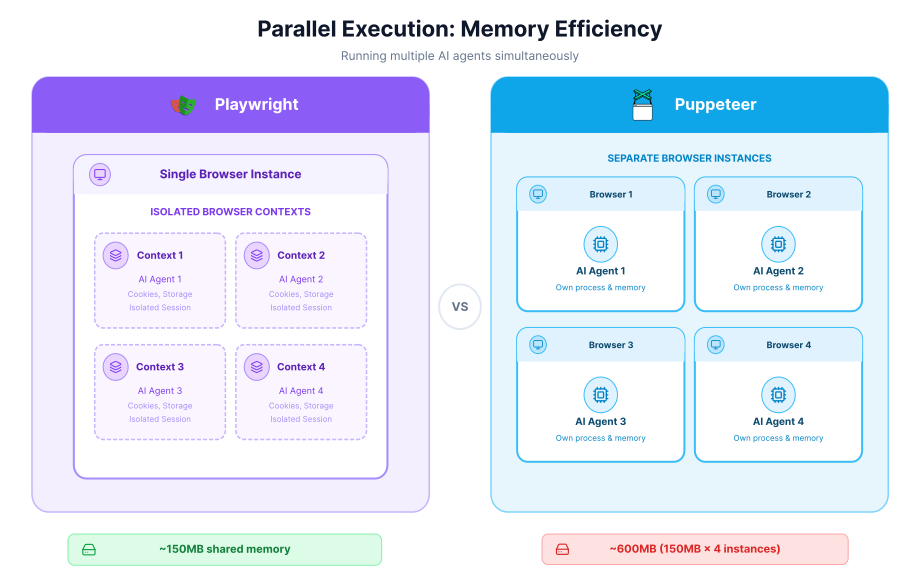
Visualization of Playwright's Browser Contexts enabling multiple isolated sessions within a single browser instance

AI-Specific Integrations

Both frameworks serve as a foundation for AI-driven browser control. Puppeteer's established presence means there are numerous community projects and examples of integrating it with AI models to perform tasks. Its direct access to the CDP offers a low-level, flexible platform for building custom integrations.

Playwright is also seeing growing adoption in the AI space and has started to introduce features with AI in mind. The development of experimental Playwright Test Agents, which can interpret a goal and plan browser actions, shows a commitment to providing higher-level, intelligent abstractions directly within the framework.

A Minimal AI Agent: Playwright in Practice

To make the comparison concrete, here is a minimal agent loop using Playwright that navigates to a product page, extracts structured data, and passes it to an LLM for analysis:

import { chromium } from 'playwright';
import Anthropic from '@anthropic-ai/sdk';

const client = new Anthropic();

async function runProductAgent(url) {
  const browser = await chromium.launch({ headless: true });
  const context = await browser.newContext();
  const page = await context.newPage();

  await page.goto(url);

  // Extract structured data from the page
  const pageData = await page.evaluate(() => ({
    title: document.title,
    price: document.querySelector('.price')?.textContent?.trim(),
    description: document.querySelector('.product-description')?.textContent?.trim(),
  }));

  // Pass to the LLM for analysis
  const response = await client.messages.create({
    model: 'claude-opus-4-6',
    max_tokens: 256,
    messages: [{
      role: 'user',
      content: `Analyze this product and flag any pricing anomalies:\n${JSON.stringify(pageData, null, 2)}`,
    }],
  });

  await browser.close();
  return response.content[0].text;
}

const analysis = await runProductAgent('https://example.com/product/123');
console.log(analysis);

The same pattern works with Puppeteer by swapping chromium.launch() for puppeteer.launch() and updating the evaluate call — the LLM integration layer is identical regardless of which framework you choose. The difference shows up in reliability: on pages where .price loads asynchronously, Playwright's auto-waiting means the agent retrieves the correct value, while a Puppeteer agent may capture an empty string without an explicit waitForSelector first.

Comparison Summary

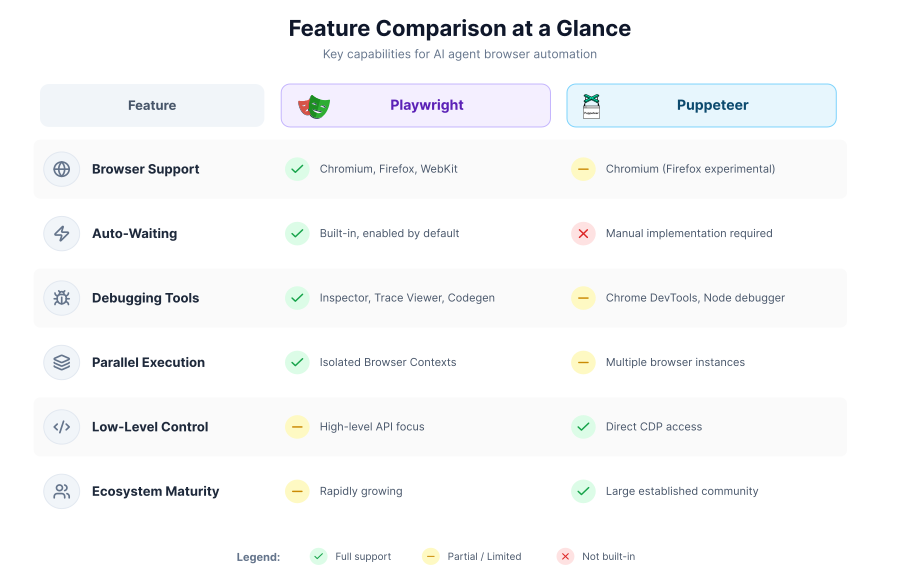
Side-by-side comparison table of Playwright vs Puppeteer covering browser support, API design, debugging, and performance

Making the Right Choice: Which Framework Suits Your AI Agent?

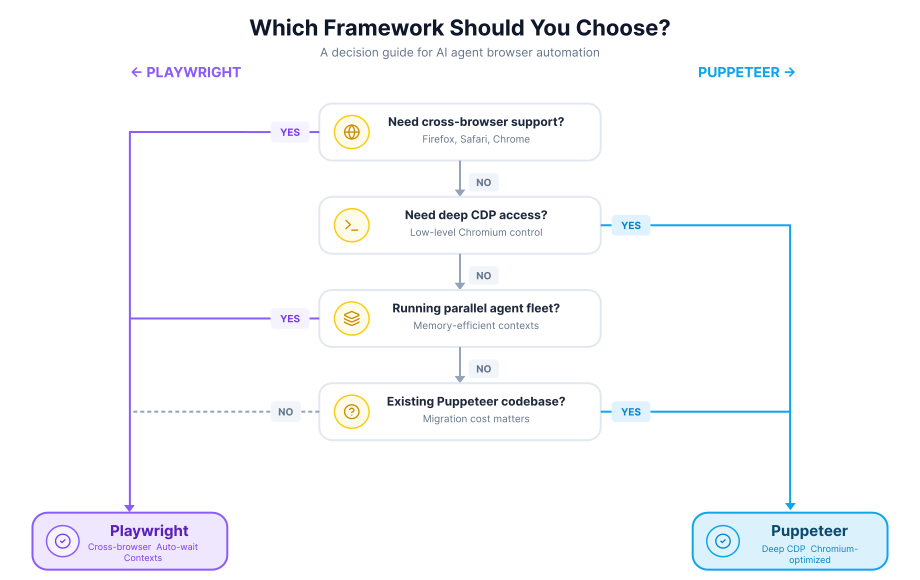
Selecting the most suitable browser automation framework is a major decision in the development of an AI agent. The choice is not about finding a universally superior tool, but about aligning a framework's strengths with the specific operational goals of the agent. Factors like the target web environments, the complexity of interactions, and the need for scalability should guide the selection process.

Decision flowchart helping developers choose between Playwright and Puppeteer based on their AI agent use case

When to Choose Playwright for Your AI Agent

Playwright presents a compelling option for a variety of AI agent use cases, particularly where versatility and ease of development are high priorities. Its design choices cater well to the challenges of the modern web.

Consider using Playwright if your project involves:

  • Cross-Browser Operation: If the AI agent must function consistently across Google Chrome, Mozilla Firefox, and Apple's Safari, Playwright is the more direct choice. Its unified API eliminates the need to maintain separate codebases or rely on experimental support for different browsers.
  • Interaction with Dynamic User Interfaces: For agents designed to navigate single-page applications (SPAs) built with frameworks like React, Angular, or Vue, Playwright's auto-waiting capabilities are a sizeable advantage. This feature simplifies the agent's logic, as it automatically handles delays in element loading, leading to more reliable performance on complex, asynchronous websites.
  • Large-Scale, Concurrent Agent Deployment: When deploying a fleet of AI agents to perform tasks in parallel, efficiency is key. Playwright's Browser Contexts allow for multiple isolated sessions within a single browser instance. This approach is generally more memory-efficient than launching a new browser for each agent, which is a common pattern when scaling with Puppeteer.
  • A Need for Advanced Debugging Tools: Developing and maintaining a sophisticated AI agent involves diagnosing failures. Playwright's integrated Trace Viewer and Inspector provide deep insights into every step of an agent's execution, including network requests, console logs, and DOM snapshots. These tools can greatly accelerate the process of identifying and fixing issues.

When Puppeteer is the Better Fit

Puppeteer's focused approach on the Chromium ecosystem makes it a highly effective tool for agents that operate within that specific environment. Its deep integration with the browser's core offers a level of control that can be advantageous for certain tasks.

Puppeteer is likely the more suitable framework when:

  • The Target Environment is Exclusively Chromium: If the AI agent will only ever need to interact with Google Chrome, Microsoft Edge, or other Chromium-based browsers, Puppeteer provides a stable and highly optimized solution. Its close ties to the Chromium development team ensure reliability.
  • Requiring Deep, Low-Level Browser Control: For agents that need to perform highly specialized tasks like performance profiling, intercepting service workers, or directly manipulating security settings, Puppeteer's ability to provide direct access to the Chrome DevTools Protocol (CDP) is a major benefit. This allows for a level of granular control that is not always exposed through higher-level APIs.
  • Leveraging a Mature Ecosystem: As one of the original major players in this space, Puppeteer benefits from a large community and a vast collection of tutorials, third-party libraries, and existing integrations. This can be valuable for projects that need to build on established patterns or find solutions to common problems quickly.
  • Prioritizing Simplicity for Focused Tasks: For simpler agents designed for straightforward data scraping or automation on known Chromium-based websites, Puppeteer offers a lightweight and direct path to achieving the goal without the additional complexity of a multi-browser abstraction layer.

The Future Outlook: AI and Browser Automation

Both frameworks are continuously evolving, with the needs of AI-driven automation influencing their development roadmaps. Playwright has begun to introduce experimental, AI-powered features like Test Agents, which aim to understand high-level goals and translate them into browser actions. This indicates a move towards embedding intelligence directly within the framework.

At the same time, Puppeteer's robust and low-level control makes it a flexible foundation for custom AI integrations. Many research projects and innovative tools that connect large language models (LLMs) to browser control have been built using Puppeteer, demonstrating its power as a core engine for AI-web interaction. The choice today is between Playwright's growing set of built-in conveniences and Puppeteer's proven flexibility for custom solutions.

Final Considerations for AI Agent Development

The landscape of web automation is shifting, with the capabilities of AI agents redefining what is possible. Both Playwright and Puppeteer stand out as powerful enablers for this transformation, each offering a distinct set of advantages. The choice between them is less about determining a definitive winner and more about selecting the tool that best aligns with your agent's purpose and operational context.

Playwright's strengths lie in its versatility and developer-centric features. Its native support for Chromium, Firefox, and WebKit makes it the clear choice for AI agents that need to operate across diverse browser environments. Features like auto-waiting and a highly integrated suite of debugging tools, such as the Trace Viewer and Inspector, simplify the creation of reliable agents that can navigate the complexities of modern, dynamic web applications. For projects involving large-scale, parallel operations, Playwright's memory-efficient browser contexts offer a major architectural advantage. Furthermore, the introduction of Playwright Test Agents, which can autonomously generate and heal tests, signals a strong commitment to integrating AI directly into the framework's core.

Puppeteer, with its deep roots in the Chrome DevTools Protocol, offers unparalleled control and performance within the Chromium ecosystem. This makes it a highly reliable and efficient choice for AI agents targeted specifically at Chrome or Edge. Its maturity has fostered a sizeable community and a wealth of existing integrations, providing a solid foundation for developers building custom AI solutions. For tasks requiring granular control over browser internals, such as detailed performance analysis or security protocol manipulation, Puppeteer's direct CDP access remains a key differentiator.

Ultimately, the decision rests on a trade-off. If the primary goal is to build a highly adaptable agent that can function consistently across the web's major browsers, with a development experience supported by advanced debugging tools, Playwright is a suitable choice. If the agent's domain is strictly Chromium-based and the project would benefit from deep, low-level control and a mature ecosystem, Puppeteer presents a powerful and focused alternative. Both tools are actively maintained and are increasingly being shaped by the demands of AI-driven automation, ensuring they will remain important technologies in the future of agentic web interaction.

Frequently Asked Questions

Is Playwright better than Puppeteer for AI agents? +
Does Playwright support multiple browsers? +
Can Puppeteer be used with AI models like GPT-4? +

Related Articles