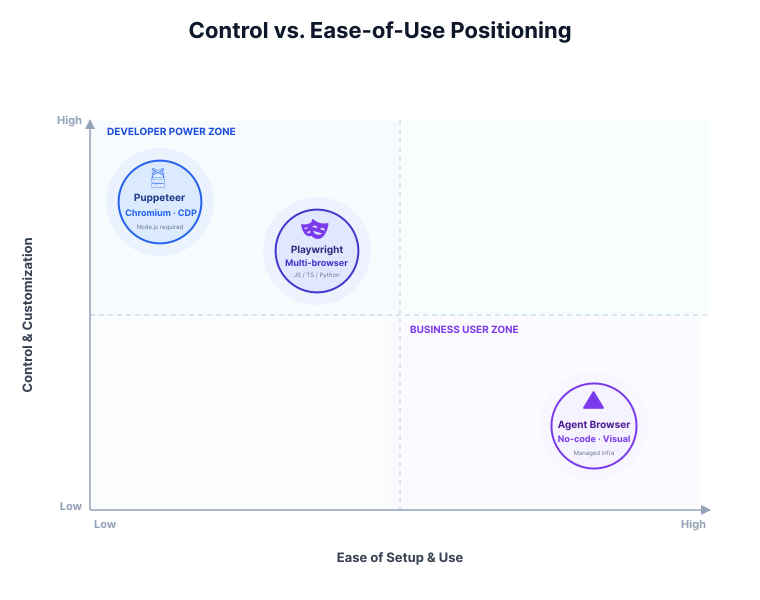
Choosing between Agent Browser, Puppeteer, and Playwright comes down to one question: are you building deterministic browser automation, or an AI agent that needs to interpret and adapt to live web pages?
Here is the short version:
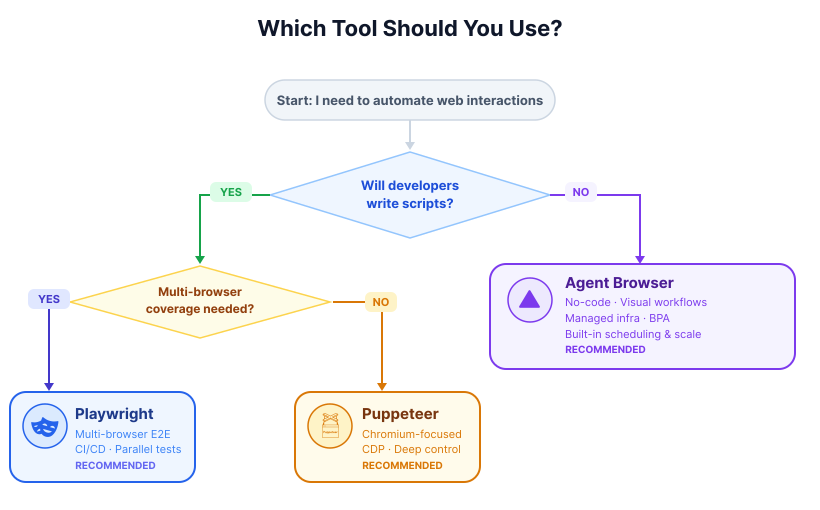
- Choose Playwright if you need the most reliable option for testing, cross-browser automation, and repeatable multi-step workflows.
- Choose Puppeteer if you want lightweight Chromium automation with direct Chrome DevTools Protocol control.
- Choose Vercel agent-browser if you are building LLM-driven agents and care about compact page state, persistent sessions, and lower token overhead.
This guide compares all three tools across architecture, browser support, developer ergonomics, LLM-readiness, and real-world tradeoffs so you can choose the right one for your workflow.
Tool Overviews & Key Facts
Web automation tools currently show a division between those that require precise, scripted commands and those built for higher-level, goal-oriented interactions, often working with artificial intelligence agents. This section details the core characteristics and capabilities of Puppeteer and Playwright, alongside the newer "Agent Browser" solution from Vercel Labs, providing an initial understanding of each tool.
Puppeteer

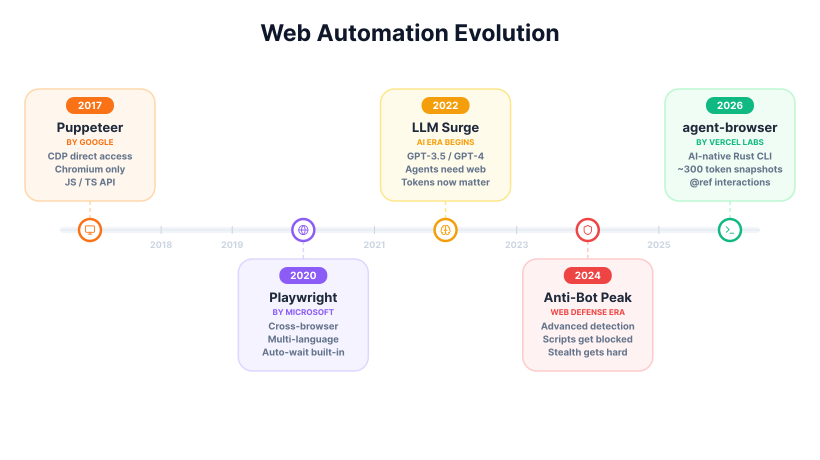
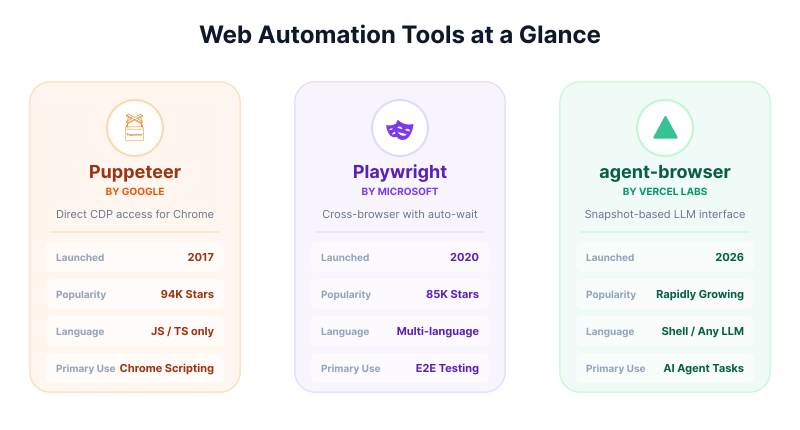
Google launched Puppeteer in 2017 as a Node.js library designed for controlling Chrome and Chromium browsers. It operates by communicating directly with the browser through the Chrome DevTools Protocol (CDP), offering low-level access to browser functions. While primarily focused on Chromium, it also extended support to Firefox later. Its API is exclusive to JavaScript and TypeScript development environments.
The tool has a sizable community, reflected by approximately 94,000 stars on GitHub and millions of weekly npm downloads for its various core packages. Puppeteer is recognized for its maturity, its relatively light operational footprint when performing Chromium-specific tasks, and its direct access to browser internals. Its common uses include web scraping, generating PDF documents or screenshots, and performing basic, repeatable browser automation routines.
Playwright

Microsoft introduced Playwright in 2020, aiming to provide a unified API for browser automation and testing across multiple browser engines. It supports Chromium, Firefox, and WebKit (Safari), allowing developers to write code once and run it across these different browsers. Playwright extends its API language support beyond JavaScript and TypeScript to include Python, Java, and .NET, serving a broader developer audience.
Playwright has achieved considerable growth, with about 85,000 stars on GitHub and over 3.2 million weekly npm downloads, indicating its increasing adoption. Its major capabilities include automatic waiting for elements, which helps reduce script flakiness, and the use of browser contexts for efficient and lightweight session isolation. It also features a built-in test runner, tracing tools for debugging, and extensive device emulation options. Playwright is frequently used for end-to-end testing, automating complex web workflows, and ensuring cross-browser compatibility.
Vercel agent-browser

Vercel agent-browser is a native Rust-based command-line interface (CLI) and daemon, specifically designed for AI agents. Released in 2026, it undergoes rapid development, with version 0.23.x available as of late March 2026. This tool establishes direct communication via CDP, removing dependencies on Node.js or Playwright, although it can detect and use existing browser installations. Its client-daemon architecture allows for persistent browsing sessions.
The tool's main innovation lies in its snapshot capability. This command generates a compact accessibility tree, which is a lightweight representation of the page content. Within this tree, interactive elements are assigned @refs (e.g., @e1), allowing AI agents to refer to and interact with them precisely. This method can use substantially fewer tokens than passing raw DOM or verbose page output into a large language model. Optional annotated screenshots provide visual context. While newer, its GitHub presence suggests strong early community interest. Its primary application is to enable LLM-driven agents, such as those powered by Claude or Cursor, to perform web tasks with a page representation that is easier for models to consume.
Adoption Snapshot (2026)
As of 2026, Puppeteer and Playwright maintain a major share in scripted automation and testing, together accumulating over 170,000 GitHub stars and millions of weekly downloads. Vercel's Agent Browser is quickly gaining acceptance, particularly in AI agent, Robotic Process Automation (RPA), and specialized scraping fields, partly due to the increasing difficulty of bypassing anti-bot systems. Vercel's tool focuses on agent-first designs that require minimal context.
Agent Browser vs Playwright
For most teams, Playwright is the better choice for deterministic automation, while Vercel agent-browser is the better fit for open-ended AI agent workflows.
Playwright is designed for engineers who want repeatable scripts, strong debugging tools, and support across Chromium, Firefox, and WebKit. If your workflow can be described as a stable sequence of steps-open page, click selector, fill form, assert result-Playwright is usually the safer and more maintainable option.
Vercel agent-browser takes a different approach. Instead of exposing the full browser primarily through selectors and scripted assertions, it is designed to give language models a compact representation of the page and stable references to interactive elements. That makes it more natural for agents that need to inspect, decide, and adapt from step to step.
In practice, the tradeoff looks like this:
- Choose Playwright for end-to-end testing, CI pipelines, cross-browser coverage, trace-based debugging, and deterministic production automation.
- Choose agent-browser for agent loops, research assistants, adaptive form completion, and workflows where the next action depends on interpreting live page state.
The key question is not which tool is universally better. It is whether your system is driven by predefined scripts or by model reasoning over changing page context.
Agent Browser vs Puppeteer
The difference between Puppeteer and Vercel agent-browser is narrower at the browser-engine level, but wider at the workflow level.
Puppeteer gives developers direct programmatic control over Chromium through a JavaScript API. That makes it a strong fit for scraping jobs, PDF generation, screenshots, and scripted browser tasks where you want tight control over each step.
Vercel agent-browser is aimed at a different layer. Instead of asking a developer to manage selectors and browser actions directly in code, it exposes page state in a way that is easier for language models to interpret and act on. That makes it better suited to agent workflows where the path is not fully known in advance.
In practical terms:
- Choose Puppeteer if your automation is Chromium-only, code-driven, and best expressed as a deterministic script.
- Choose agent-browser if your workflow is agent-driven, changes from page to page, or needs a browser interface optimized for model reasoning rather than raw DOM control.
If your question is whether agent-browser can replace Puppeteer, the answer is not entirely. Puppeteer remains the better tool for low-level scripted automation, while agent-browser is more useful when the browser is just one part of an adaptive AI system.
Feature Comparison Matrix
Selecting the most suitable web automation tool often depends on specific project needs, ranging from simple scripting to complex, agent-driven tasks. The following table offers a detailed comparison across various features, highlighting how each tool addresses different aspects of browser automation.
| Feature | Puppeteer | Playwright | Vercel agent-browser |
|---|---|---|---|
| Browser Support | Chromium primary (Firefox) | Chromium, Firefox, WebKit | Chromium (CDP; detects others) |
| Languages/API | JS/TS only | Multi-language | Shell/CLI (any LLM that runs commands) |
| Control Style | Imperative selectors/steps | Imperative + auto-wait | Ref-based snapshots + semantic find |
| Stealth/Anti-Bot | Manual (plugins, proxies, custom hardening) | Manual (plugins, proxies, custom hardening) | Agent-oriented workflow; anti-bot claims vary by setup |
| Session Management | Manual (cookies, storage) | Contexts + manual | Persistent daemon + storage commands |
| AI/LLM Optimization | Limited by default; often needs custom abstraction | Moderate; can expose structured page state | High; designed for compact agent-readable page state |
| Scalability | Self-managed instances | Browser contexts (efficient) | Local daemon; can be paired with browser infrastructure |
| Performance Overhead | Low for Chromium-only workflows | Low-medium depending on browser and tooling | Low at the tooling layer; overall runtime depends on agent loop |
| Offline/Local | Yes | Yes | Yes (local daemon) |
| Pricing | Free | Free | Free (open-source) |
The table above illustrates distinct approaches each tool takes regarding core capabilities like browser compatibility and control mechanisms. It also brings attention to differences in stealth features, AI optimization, and deployment models, which range from local open-source solutions to managed cloud services.
Performance & Reliability Data
Understanding the speed and dependability of web automation tools is important for any project, particularly when dealing with large-scale operations or time-sensitive tasks. The performance characteristics vary considerably across Puppeteer, Playwright, and Vercel agent-browser, influenced by their design and deployment models.
Speed Benchmarks
Various tests conducted between 2025 and 2026 provide insights into the execution speed of these tools. The data indicates different strengths based on the complexity of the automation task.
- Simple Chrome Scripts/Navigation: Puppeteer is often viewed as lean and effective for straightforward Chromium automation, especially when you do not need cross-browser support.
- Complex/End-to-End/Multi-page: Playwright is widely regarded as the more robust option for larger automation suites because of its auto-waiting, tracing, and browser context model.
- Vercel agent-browser: This tool adds overhead from model-driven decision-making and snapshot generation, but its workflow can be more adaptive when tasks are not easily expressed as a fixed selector script.
- Scaling: Playwright's browser contexts prove more efficient for scaling than Puppeteer's approach of launching separate browser instances. Vercel agent-browser, when integrated with cloud providers like Browserbase, can also support increased concurrency.
Reliability
The dependability of web automation tools is strongly influenced by how they handle dynamic web content and anti-bot measures. Traditional scripting tools often face challenges when website interfaces change, while agentic tools aim for greater resilience.
Traditional automation scripts can be brittle, with manual selectors frequently breaking due to UI alterations. Vercel agent-browser, with its use of references or AI reasoning based on snapshots, can be more adaptive to such changes. This adaptability, however, can also introduce non-determinism or errors linked to AI processing. On highly protected sites, both Puppeteer and Playwright usually require extra work around proxies, fingerprinting, and traffic patterns rather than succeeding out of the box.
Pros & Cons
Each web automation tool offers a distinct set of advantages and disadvantages, making them more or less suitable for different project requirements. Understanding these points is important for choosing the right solution.
Puppeteer
- Pros: It is fast and straightforward for tasks involving Chromium, benefits from a mature ecosystem, and provides deep control through the Chrome DevTools Protocol.
- Cons: Its focus is primarily on Chromium, it is limited to JavaScript environments, and it requires manual effort for waits and stealth features, making it difficult to scale while maintaining stealth.
Playwright
- Pros: Offers cross-browser compatibility, includes auto-wait capabilities which lead to less flaky scripts, supports multiple programming languages, provides excellent testing tools, and uses efficient browser contexts.
- Cons: Still requires additional plugins or custom setups for robust stealth and proxy integration at scale; it also has a slightly heavier startup overhead compared to Puppeteer.
Vercel agent-browser
- Pros: Optimized for Large Language Models (LLMs) with low token usage, element references, and semantic locators; delivers native speed due to its Rust implementation; features a persistent daemon for continuous operation; includes security measures; and has no Node.js dependency.
- Cons: It is a newer tool, which means it is less mature than Puppeteer or Playwright; its focus is CLI-centric, providing less of a traditional "library" feel; and its primary browser support is for Chromium.
Hands-On Code Examples
To illustrate the practical application of each tool, the following code snippets demonstrate basic actions such as navigating to a web page and extracting content. These examples highlight the different syntaxes and approaches taken by Puppeteer, Playwright, and Vercel agent-browser.
Puppeteer (basic navigation + content)
This example shows how to launch a Chromium browser, open a new page, navigate to a URL, and retrieve the page's HTML content using Puppeteer.
const puppeteer = require("puppeteer");
(async () => {
const browser = await puppeteer.launch();
const page = await browser.newPage();
await page.goto("https://example.com");
const html = await page.content();
console.log(html);
await browser.close();
})();
Playwright (cross-browser + auto-wait)
The Playwright example demonstrates launching a Chromium browser, navigating to a URL with a waitUntil option to ensure page load completeness, and extracting the page title. Playwright's API is designed for consistency across different browsers.
const { chromium } = require("playwright");
(async () => {
const browser = await chromium.launch();
const page = await browser.newPage();
await page.goto("https://example.com", { waitUntil: "networkidle" });
const title = await page.title();
console.log(title);
await browser.close();
})();
Playwright (accessibility snapshot for LLM input)
When feeding page state to a language model, use ariaSnapshot() instead of page.content(). It returns a compact YAML accessibility tree rather than raw HTML, which is significantly more token-efficient.
const { chromium } = require("playwright");
(async () => {
const browser = await chromium.launch();
const page = await browser.newPage();
await page.goto("https://example.com", { waitUntil: "networkidle" });
// Pass this to your LLM instead of page.content()
const snapshot = await page.locator("body").ariaSnapshot();
console.log(snapshot);
// - heading "Example Domain" [level=1]
// - paragraph: This domain is for use in illustrative examples in documents.
// - link "More information..."
await browser.close();
})();
Vercel agent-browser (AI-friendly snapshot + ref interaction)
Vercel agent-browser operates via shell commands, making it suitable for direct execution by LLMs or in scripts. This example shows opening a URL, taking a snapshot with references, and performing a click using one of these references.
# Terminal/LLM shell commands
agent-browser open https://example.com
agent-browser snapshot -i # Returns: heading "Example Domain" [ref=e1] ...
agent-browser click @e2 # Deterministic click via ref
agent-browser screenshot result.png
Batch/AI workflow (Vercel)
Vercel agent-browser supports chaining commands across multiple steps, which is the natural pattern for an agent loop. Each snapshot call reflects the current DOM state, and @ref labels remain stable within the session, so the agent can act on a ref it received two steps earlier without re-parsing.
# Multi-step agent loop: switch pricing tier and extract updated values
agent-browser open https://example-saas.com/pricing
agent-browser snapshot -i
# Output (~260 tokens):
# heading "Pricing" [ref=e1]
# button "Monthly" [ref=e2]
# button "Annual" [ref=e3]
# text "Starter - $29/mo" [ref=e4]
# text "Pro - $99/mo" [ref=e5]
agent-browser click @e3 # Switch to annual billing
agent-browser snapshot -i # Re-snapshot after DOM update
# text "Starter - $290/yr" [ref=e4]
# text "Pro - $990/yr" [ref=e5]
agent-browser screenshot pricing-annual.png
Because the daemon stays alive between commands, there is no browser startup cost per step and cookie/session state persists automatically.
What each format produces
The token efficiency argument is easier to evaluate with a concrete example. Here is the same contact-form page represented in each format.
Raw HTML - page.content() in Puppeteer
<!DOCTYPE html>
<html lang="en">
<head>
<meta charset="UTF-8">
<meta name="viewport" content="width=device-width, initial-scale=1.0">
<title>Contact Us</title>
<link rel="stylesheet" href="/styles/main.css">
<!-- scripts, analytics tags, icon fonts ... -->
</head>
<body>
<div class="page-wrapper" id="root">
<nav class="navbar navbar-expand-lg">
<!-- full navigation markup -->
</nav>
<main class="container mt-5">
<div class="row justify-content-center">
<div class="col-md-6">
<form id="contact-form" action="/submit" method="POST">
<div class="form-group mb-3">
<label for="name" class="form-label">Your Name</label>
<input type="text" class="form-control" id="name" name="name">
</div>
<!-- email, message, button ... -->
</form>
</div>
</div>
</main>
</div>
</body>
</html>
<!-- Typical result: 20,000–100,000+ tokens for a real-world page -->
Playwright ariaSnapshot()
- heading "Contact Us" [level=1]
- text: Fill in the form below and we will get back to you.
- textbox "Your Name"
- textbox "Email Address"
- textbox "Message"
- button "Send Message"
# Typical result: ~500–2,000 tokens
Vercel agent-browser snapshot -i
heading "Contact Us" [ref=e1]
textbox "Your Name" [ref=e2]
textbox "Email Address" [ref=e3]
textbox "Message" [ref=e4]
button "Send Message" [ref=e5]
# Typical result: ~200–400 tokens
The practical difference between Playwright and agent-browser here is not just token count. Playwright's snapshot requires a separate locate-and-act step to do anything with the output. Agent-browser @ref labels feed directly back into CLI commands with no additional parsing.
Use Cases & When to Choose
Selecting the appropriate web automation tool largely depends on the specific requirements of a project, including factors like performance, stealth, scalability, and integration with AI.
Each tool or service is designed with particular strengths that make it suitable for different scenarios.
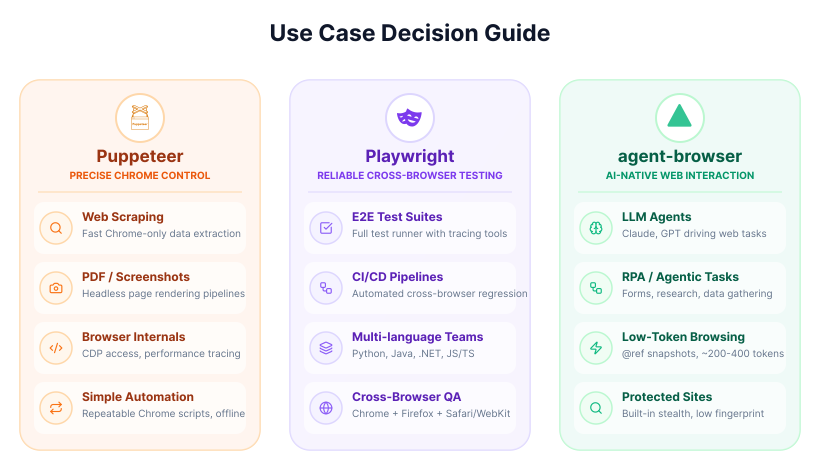
- Puppeteer: Choose Puppeteer for quick Chrome-specific tasks such as web scraping or generating PDFs and screenshots. It is also a good choice for local and offline automation needs where only Chromium is required.
- Playwright: This tool is well-suited for cross-browser end-to-end testing and building reliable multi-page automation workflows. Its comprehensive features and multi-language support make it a strong option for continuous integration/continuous deployment (CI/CD) pipelines.
- Vercel agent-browser: Opt for Vercel agent-browser when developing Large Language Model (LLM) agents for tasks like research, form-filling, or other autonomous web interactions. Its design focuses on low-context web interaction and minimal token usage for AI.
Choosing Guide
When making a selection, consider the primary objectives of your automation project. If the main concern is precise control, high speed, and local operation, Puppeteer or Playwright are generally more suitable. For projects that prioritize adaptability for AI agents, Vercel agent-browser becomes a more fitting choice, especially for development and specific agent tasks.
Additional Data & Trends
The landscape of web automation is continually shaped by new technologies and evolving web defense mechanisms. Staying informed about current trends and limitations helps in planning future automation strategies.
Stealth/Security
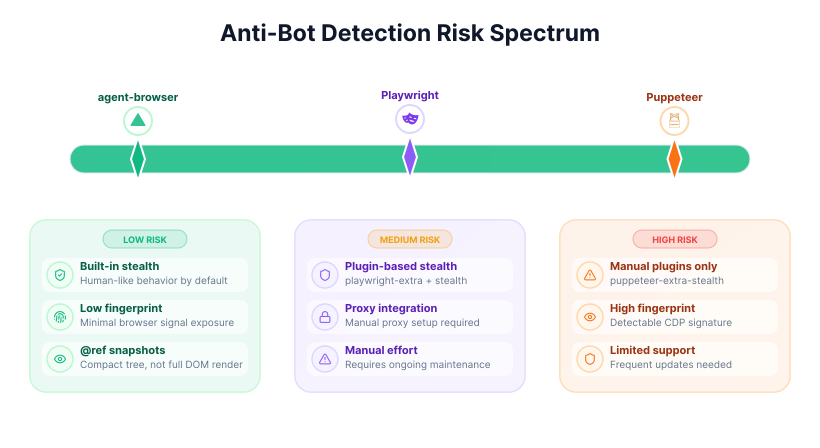
Traditional automation tools, such as Puppeteer and Playwright, rely on manual configurations and third-party plugins for stealth features.
These plugins often require regular updates and fine-tuning to counter the increasingly sophisticated anti-bot systems. The effectiveness of these manual approaches can diminish quickly as websites adapt their defenses.
In contrast, Vercel agent-browser is positioned around agent-oriented interaction rather than traditional scripted browser control. Its snapshot-and-reference workflow may reduce how much raw page data needs to be passed through an LLM, but real-world detectability still depends heavily on browser configuration, infrastructure, and target-site defenses.
Community/Ecosystem
Puppeteer and Playwright benefit from large, established communities and extensive ecosystems, offering many plugins, extensions, and shared solutions for various automation challenges. This broad support base can be helpful for troubleshooting and finding pre-built components.
Vercel agent-browser, while newer, is developing its own ecosystem. It integrates with cloud providers like Browserbase for enhanced capabilities and works with AI coding tools.
Limitations
Traditional web automation tools face challenges with brittleness and high maintenance requirements when scaled, especially on dynamic or protected websites. Small UI changes can break scripts, needing constant adjustments.
Vercel agent-browser, while offering adaptability, can introduce potential overhead from AI processing and may exhibit non-deterministic behavior depending on the AI's reasoning.
2026 Trend
The year 2026 sees a growing trend toward agentic automation, where AI agents are increasingly moving away from brittle, precisely scripted interactions.
This shift is driven by the need for more adaptive and resilient web task execution. Tools like Vercel agent-browser exemplify this movement by focusing on LLM-optimized interactions. Additionally, hybrid solutions, such as those combining Playwright with LLM-powered "Multi-modal Control Planes" (MCPs), are starting to emerge, aiming to blend the precision of traditional automation with the adaptability of AI agents.
Sources
The comparison in this article is based primarily on official product documentation and repository materials reviewed in April 2026, with secondary context from industry comparison articles and community discussions.
- Official sources reviewed:
- Playwright documentation:
playwright.dev - Puppeteer documentation:
pptr.dev - Vercel agent-browser repository and docs:
github.com/vercel-labs/agent-browserandagent-browser.dev
- Playwright documentation:
- Secondary sources:
- Comparison articles from browser automation vendors and tooling blogs
- Community discussions about automation reliability, scraping maintenance, and agent workflows
Because these tools are evolving quickly, especially in the AI-agent category, it is worth checking the latest official docs before making architecture decisions based on version-specific features.
Conclusion
If you need a simple decision, use this:
- Choose Playwright when reliability, cross-browser coverage, and repeatable automation matter most.
- Choose Puppeteer when you want direct Chromium automation with a lighter, Chrome-focused workflow.
- Choose Vercel agent-browser when you are building LLM-driven agents that need compact page state and more adaptive interaction patterns.
Playwright remains the strongest default for engineering teams building test automation or stable browser workflows. Puppeteer still makes sense for focused Chromium scripting where deep CDP control is useful. Agent-browser is most compelling when the browser is part of a larger agent loop rather than a fixed script.
In other words, the choice is less about which tool is universally best and more about what kind of system you are building: a scripted automation stack, a testing platform, or an AI agent that must interpret changing web pages as it works.
Frequently Asked Questions
Related Articles
DOM Downsampling for LLM-Based Web Agents
We propose D2Snap – a first-of-its-kind downsampling algorithm for DOMs. D2Snap can be used as a pre-processing technique for DOM snapshots to optimise web agency context quality and token costs.
A Gentle Introduction to AI Agents for the Web
LLMs only recently enabled serviceable web agents: autonomous systems that browse web on behalf of a human. Get started with fundamental methodology, key design challenges, and technological opportunities.