If you want the short answer first: Browser-Use is the better default for autonomous, goal-driven agents, while Playwright is the better default for deterministic, production-grade automation - and the strongest production systems combine the two.
TL;DR
Pick Browser-Use when the task is open-ended, the UI changes often, or writing selectors is the bottleneck.
Pick Playwright when the flow is well-defined and you need speed, cost control, and clear debugging.
Combine them when most of the script can be deterministic and only the messy parts need an LLM.
In 2026, AI agents driving real browsers have moved from novelty to standard component of modern software. These agents handle data extraction, QA, research, and personal-assistant workflows that traverse the open web. Two names dominate the conversation: Browser-Use, a high-level framework designed for agent autonomy, and Playwright, the established browser automation library from Microsoft, now with its own AI extensions.
Choosing between them is not a simple matter of one being better than the other. They represent different philosophies and serve different developer needs. Browser-Use prioritizes goal-oriented, autonomous operation with minimal code, letting an LLM handle the planning. Playwright offers deterministic, low-level control and extreme reliability - a solid base on which agentic logic can be built. This article compares them from a developer's perspective: architecture, performance trade-offs, and ideal use cases.
Core Philosophies: Autonomy vs. Control
The primary distinction lies in their approach to automation. Browser-Use is designed with an "agent-first" mentality. A developer provides a high-level objective in natural language - "Research the top three competitors for our product and summarize their pricing" - and the framework, powered by an LLM, plans and executes the steps: opening tabs, searching Google, navigating to pricing pages, identifying the relevant tables, and compiling the result. It is a goal-oriented system where the "how" is largely determined by the AI.
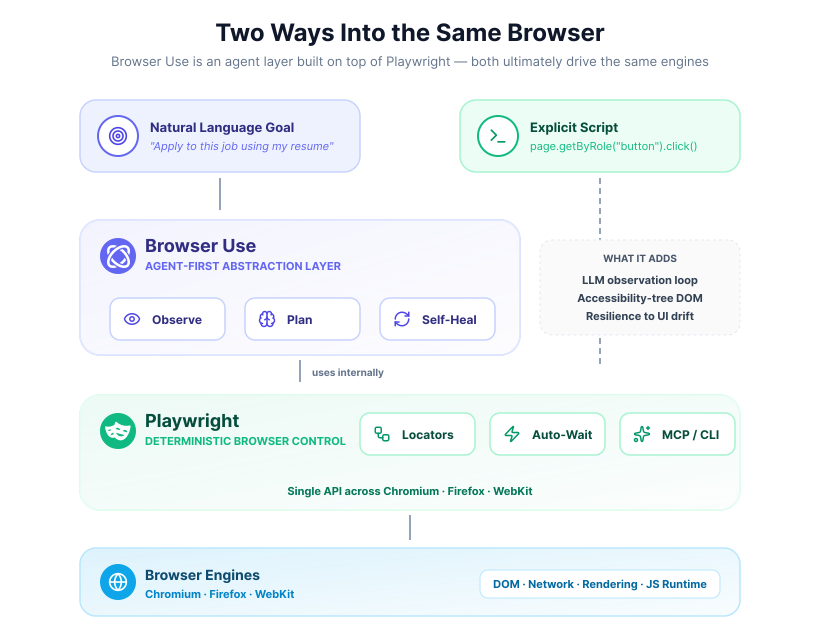
Playwright, in contrast, originates from end-to-end testing and deterministic scripting. Its core philosophy is precise, reliable control over every browser action. You write explicit code to navigate, locate elements, and perform actions. The newer AI extensions - most notably the Model Context Protocol (MCP) server - do not replace this philosophy; they extend it. MCP lets an AI "see" the page in a structured, efficient form and request actions, but the developer still wires the system and retains control over the execution loop. It offers a path to agentic behavior without sacrificing the granular control and testability that define the library.
Architecture and Key Features
To see the practical differences, look at the architecture of each tool and the features they offer for building AI agents.
Browser-Use: The High-Level Abstraction Layer

Browser-Use positions itself as an intelligent layer that sits atop a powerful engine. It uses Playwright (and Patchright in some configurations) for underlying browser interactions - launching browsers, executing JavaScript, taking screenshots. Its contribution is the agent-oriented abstraction built on top.
The design centers on simplifying the interaction between an LLM and a web page. When the agent observes a page, Browser-Use does not just send a raw DOM tree or a screenshot. Instead, it processes the page and extracts a clean, structured list of interactive elements - buttons, inputs, links - annotated with accessibility information, text content, and a unique identifier. This structured data is far more token-efficient and easier for an LLM to parse than raw HTML, which lets the model make more accurate decisions about which action to take next. (For background on why this matters, see DOM downsampling for LLM web agents.)
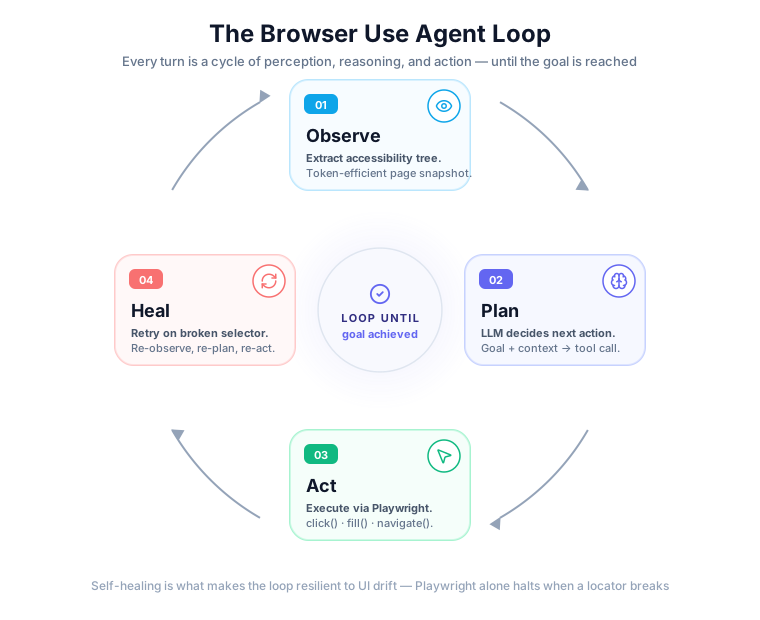
Key components of the Browser-Use architecture include:
- Agent-first interface. The primary interaction model is giving the agent a natural-language task. The internal loop handles planning, observation, and action execution until the task is complete.
- LLM integration. Broad compatibility with major providers - OpenAI, Anthropic, Google - plus local models through services like Ollama, and its own
ChatBrowserUseLLM class for the hosted models. - Self-healing harness. Web pages are dynamic and selectors break. When an action fails, the agent can re-observe the page and select a new element from context, which makes it resilient to minor UI changes.
- Cloud platform. The open-source version can be self-hosted, which means you manage your own browser infrastructure and LLM API keys. The Browser-Use Cloud offering adds fingerprint spoofing, a global residential proxy network, and integrated CAPTCHA-solving for production workloads.
- Extensible tools. Developers can equip the agent with custom tools beyond standard browser actions - calling a private API, querying a database, or writing files locally - which expands the agent's capabilities.
This architecture suits tasks where the exact workflow is not known in advance or is likely to change. The Browser-Use team has reported strong WebVoyager benchmark results for complex, adaptive multi-step tasks, though benchmark numbers move quickly and are best treated as a directional signal rather than a fixed score.
Playwright: Precision Control with AI Extensions

Playwright's core is a mature, battle-tested library for reliable browser automation. Its architecture is built around three pillars: cross-browser compatibility, reliability features, and a rich API for granular control. It supports Chromium, Firefox, and WebKit through a single API, which makes it the standard for QA and cross-browser testing.
For AI agent development, its native features - auto-waiting (Playwright waits for an element to be actionable before proceeding) and resilient locators like getByRole and getByLabel - eliminate much of the flakiness common in browser automation. The AI-specific extensions build on this foundation.
Playwright's AI-centric features:
- Model Context Protocol (MCP) server. MCP runs alongside the browser and provides a structured snapshot of the page's accessibility tree to an LLM - element roles, names, and references. An LLM can reason about its next action without a vision model, which is slower and more expensive. The agent responds with a tool call like
click("ref-123")orfill("ref-456", "some text"), which Playwright executes. The protocol is integrated into editors like VS Code and Cursor for AI-assisted coding. - Command-line interface. A token-efficient CLI is available for coding agents (for example, those built on GitHub Copilot) to drive a browser during development tasks - verifying that a code change had the intended effect on a web application.
- Test Agents. A suite of AI tools focused on the testing lifecycle. The Planner explores an application to understand its functionality. The Generator writes test plans and Playwright code. The Healer analyzes test failures, proposes fixes, and repairs broken tests. This suite is newer and evolving - capabilities depend on the Playwright release you are on.
Playwright's approach enables a hybrid model. You can write a deterministic script for a login sequence and then hand control to an LLM via MCP to navigate a dynamic dashboard. That combination of precise scripting and AI-driven exploration is flexible enough for most production systems. For a deeper look at the underlying protocols, see CDP vs Playwright vs Puppeteer.
browser-use and Playwright both open a fresh browser.
Webfuse opens the live one.
A Developer's Look at Performance and Trade-offs
The choice between Browser-Use and Playwright comes down to balancing autonomy against predictability and performance. Each has a profile better suited to certain projects.
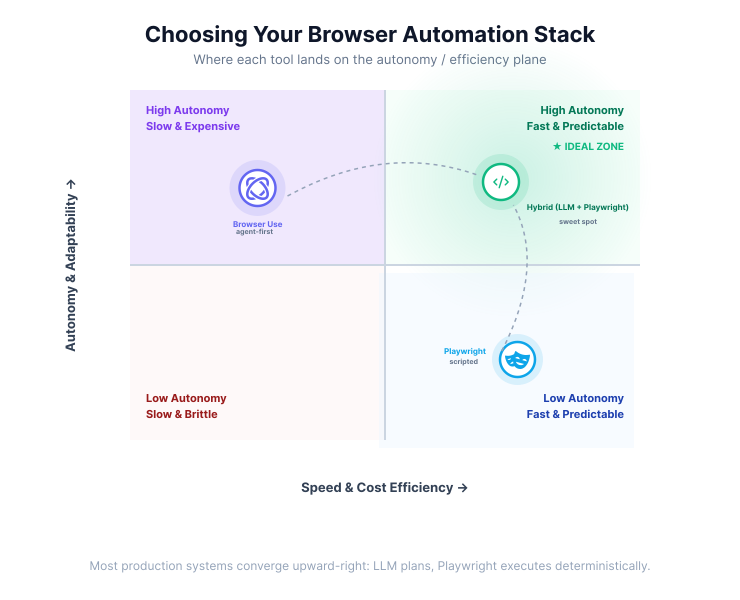
For rapid prototyping of autonomous agents, Browser-Use is hard to beat. Expressing a complex goal in a single line of English and having an agent attempt it immediately is a major accelerator. It excels in dynamic environments where layouts change - e-commerce checkout flows, social media sites - because the self-healing mechanism and the LLM's ability to adapt mean the agent is less likely to fail on a small front-end change. That adaptability makes it a strong choice for open-ended research tasks or personal assistants.
The trade-offs are real. The agent's performance is directly tied to the quality of the underlying LLM; a weaker model generates poor plans or gets stuck in loops. The reasoning step at each turn adds latency and token consumption, which becomes expensive for high-volume, repetitive tasks. Scraping thousands of product pages with an identical structure will be slower and costlier with a fully autonomous agent than with a deterministic script. The open-source version also puts the burden of managing infrastructure (browsers, proxies, LLMs) on the developer; the cloud version trades that for a service fee.
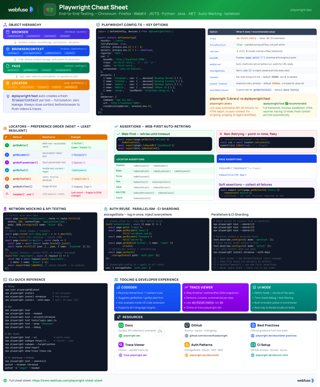
Playwright Cheat Sheet
Quick reference for Playwright locators, contexts, debugging tools, and best practices.
View cheat sheetPlaywright, on the other hand, is built for speed and reliability in scripted or hybrid flows. When you have a defined, repeatable process, a Playwright script will execute it faster and more predictably than an LLM-driven agent. Its debugging tools - particularly the Trace Viewer, which captures DOM snapshots, console logs, and network requests for every run - make failure inspection straightforward. That is a major benefit for maintaining automation in a CI/CD pipeline.
The MCP extension makes Playwright more agent-friendly without the full overhead of an autonomous loop. Because it relies on the accessibility tree, it avoids the cost and latency of vision models for many interactions, which makes it a cost-efficient way to add intelligence to deterministic scripts. The main drawback from a pure agentic perspective is increased development effort. Building a fully autonomous agent requires more code - developers often wrap Playwright in a framework like LangChain or CrewAI and write the observation-planning-action loop themselves.
Practical Use Cases and Code Philosophy
The right tool depends heavily on the problem. Concrete scenarios make the trade-offs easier to feel.
When to Reach for Browser-Use
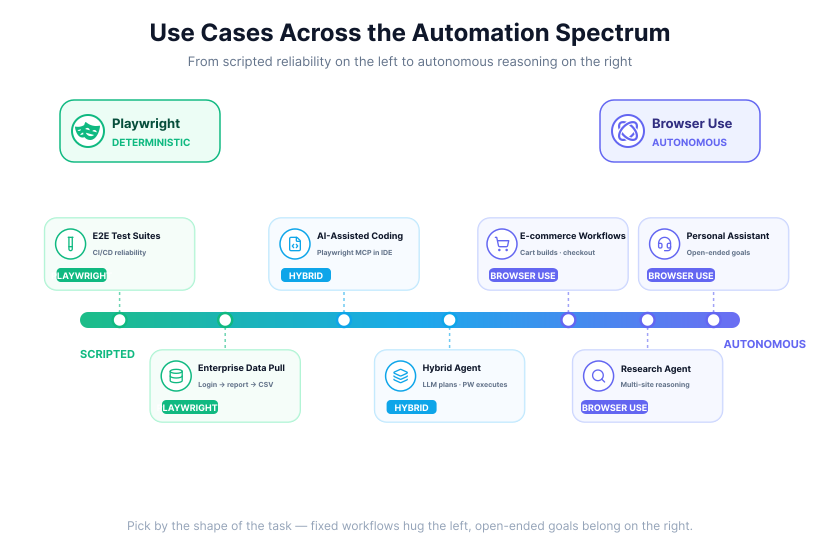
Browser-Use is the go-to choice when the task is defined by a goal rather than a sequence of steps - when the agent needs to reason, research, and adapt.
Example scenarios:
- Automated job applications. "Fill in the job application at this URL using the information from my resume." The agent navigates the multi-page form, identifies fields for name, email, and work experience, and handles the file upload.
- E-commerce and research. "Go to pcpartpicker.com, build a gaming PC with an NVIDIA 4080 GPU and an Intel CPU under $2000, and save the build link." The agent navigates categories, applies filters, makes constrained selections, and finds the shareable URL.
- Personal assistants. "Find reviews for the top three Italian restaurants in downtown San Francisco, check their availability for two this Friday at 7pm, and send me the options." Multi-site searching, navigation, and structured extraction.
The developer mindset is one of delegation: define the desired outcome and trust the agent to figure out the path. A typical interaction looks like this:
# Browser-Use: define a task, run the agent
from browser_use import Agent, Browser, ChatBrowserUse
import asyncio

async def main():
    browser = Browser()
    agent = Agent(
        task="Add three boxes of organic pasta and a jar of marinara sauce to my Instacart cart.",
        llm=ChatBrowserUse(),
        browser=browser,
    )
    await agent.run()

asyncio.run(main())
When to Reach for Playwright
Playwright excels where reliability, speed, and testability matter. It is the tool of choice for production-grade automation of well-defined workflows and for hybrid systems where AI assists a deterministic process. (For a side-by-side with Puppeteer in the same space, see Playwright vs. Puppeteer for AI agent control.)
Example scenarios:
- E2E test generation and maintenance. In a QA pipeline, Playwright's Test Agents can explore a new feature, generate corresponding E2E code, and commit it. When a test fails later because of a UI change, the Healer can attempt to fix the broken locators automatically.
- Enterprise data automation. Logging into a legacy financial portal, navigating to a report generator, filling in date ranges, and downloading a CSV - a Playwright script executes this with high reliability, using persistent authentication state to handle logins efficiently.
- AI-assisted coding. A developer using an AI coding assistant asks it to verify a change. The assistant, using Playwright with MCP, opens a browser, navigates to the local dev server, and confirms a new button renders correctly - immediate feedback without leaving the editor.
The developer mindset is one of precise instruction: define each step explicitly to ensure a consistent outcome. The code is direct:
# Playwright: explicit steps, resilient locators
from playwright.sync_api import sync_playwright

with sync_playwright() as p:
    browser = p.chromium.launch()
    page = browser.new_page()
    page.goto("https://shopping.example.com")

    page.get_by_label("Search products").fill("organic pasta")
    page.get_by_role("button", name="Search").click()
    page.get_by_alt_text("Image of organic pasta box").first.click()

    browser.close()
Combining Strengths: The Hybrid Approach
Many production agentic systems do not use one tool exclusively. They combine the strengths of both philosophies. A developer might build a custom agent that uses an LLM for high-level planning but relies on Playwright for executing actions.
In such a system, the agent observes a page using Playwright's MCP. The LLM receives the structured accessibility data and decides the next logical step is to "click the login button." Instead of letting the LLM generate a brittle selector, the system maps that intent to a robust, predefined Playwright call like page.get_by_role("button", name="Login").click(). This combines the reasoning capability of an LLM with the reliability of Playwright's execution engine and reduces the chance of errors. Frameworks like Stagehand from Browserbase formalize this pattern - a managed Playwright infrastructure with an AI layer on top. For a closer look, see Lightpanda vs Browser-Use vs Stagehand.
Key Decision Factors for Your Project
To choose the right tool, consider the requirements of your project:
- Autonomy vs. precision. Is the task open-ended and requires adaptation, or is it a fixed, repeatable workflow? Exploratory research and personal assistants need Browser-Use's flexibility; CI/CD testing and fixed business processes are a better fit for Playwright.
- Speed and cost. How sensitive is the application to latency and operational cost? Playwright scripts are faster and cheaper to run at scale for deterministic work. Browser-Use's LLM reasoning loop adds latency and token cost, which can be prohibitive at high volume.
- Developer experience and prototyping speed. How quickly do you need a working prototype? Browser-Use allows very fast iteration on natural-language tasks. Playwright requires more initial code to set up a full agentic loop, though its codegen tools speed up basic script creation.
- Stealth and scaling. Do you need to automate sites protected by services like Cloudflare? Browser-Use Cloud provides built-in stealth - fingerprint spoofing and residential proxies. With Playwright you would set up that infrastructure yourself or integrate a third-party service.
The space is moving quickly. Both Browser-Use and Playwright are under active development, with new features and models landing regularly. The best choice today may be different tomorrow. A practical strategy for most teams is to start with Playwright for its reliable foundation and progressively introduce agentic layers - Browser-Use, Playwright MCP, or custom abstractions - as the project's need for autonomy grows.
Frequently Asked Questions

Next Steps
Connect an agent to any web app
No signup, runs in your browser
Ready to let your AI agent act on the live web?
Headless browsers give your agent a copy of the web. Webfuse gives it the session your user is actually in — over MCP, with no install.
- No credit card
- Free forever plan
- Quick setup
Related Articles