TL;DR
Pick Lightpanda when you need a lighter CDP target than Chrome and can tolerate a few SPAs that won't render.
Pick Browser-Use when the task is open-ended and writing selectors is the bottleneck.
Pick Stagehand when you want most of the script deterministic and only the messy parts driven by AI.
Stack them when performance matters and you want AI on top.
Browser automation is shifting from selector-based scripting to intent-driven workflows powered by AI. Instead of manually defining every click and selector, developers can now rely on agents to interpret goals and execute tasks.
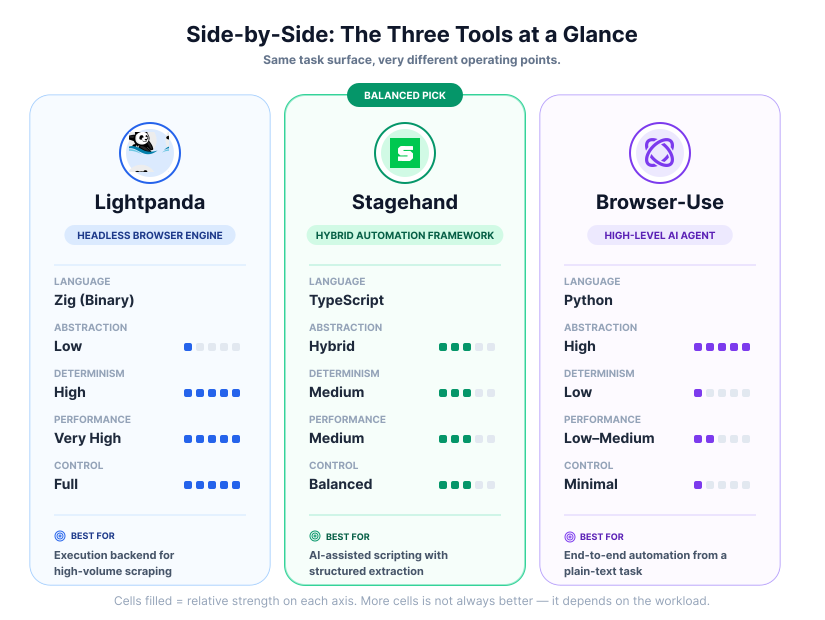
Three tools sit at different layers of this shift: Lightpanda, a high-performance browser engine; Browser-Use, a Python-based AI agent; and Stagehand, a hybrid TypeScript framework. Each solves a different part of the problem, and they can be stacked.
Lightpanda: The High-Performance Browser Engine

Lightpanda is a headless browser engine built in Zig, designed as a fast and memory-efficient alternative to Chrome Headless. It is compatible with the Chrome DevTools Protocol (CDP), allowing it to act as a drop-in backend for tools like Puppeteer and Playwright.
Its main appeal is reduced resource usage. In benchmark scenarios, its documentation reports up to 16x lower memory usage and 9-16x faster performance on certain workloads compared to Chrome. These gains depend heavily on the type of page and workload.
Lightpanda runs as a standalone server, accessible via CDP.
Quick Start with Docker:
docker run -d --name lightpanda -p 127.0.0.1:9222:9222 lightpanda/browser:nightly
Or run the binary directly:
curl -L -o lightpanda https://github.com/lightpanda-io/browser/releases/download/nightly/lightpanda-x86_64-linux && chmod a+x ./lightpanda
./lightpanda serve --host 127.0.0.1 --port 9222
You can then connect using standard tools:
import puppeteer from 'puppeteer-core';

const browser = await puppeteer.connect({ browserWSEndpoint: "ws://127.0.0.1:9222" });
const page = await browser.newPage();
await page.goto('https://example.com');
console.log(await page.title());
await browser.disconnect();
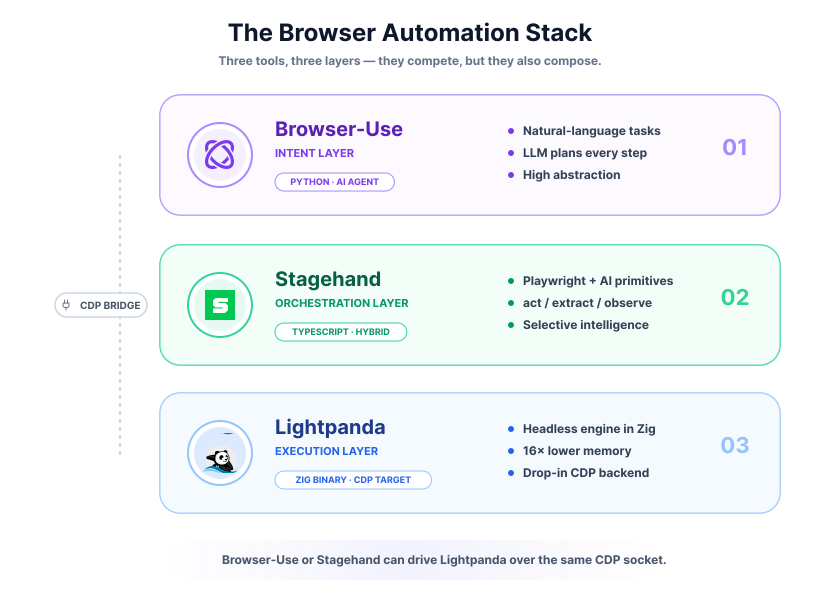
Lightpanda is the execution layer: a fast, lightweight CDP target that other automation tools drive.
Lightpanda is not a full Chrome replacement. Expect compatibility gaps on complex pages, edge cases in rendering and JavaScript APIs, and a less mature ecosystem.
Our benchmark: Lightpanda vs Chrome on 15 real sites
We ran the same CDP task - navigate, extract title, count links, capture body text - across fifteen public targets on both Lightpanda (nightly) and Chrome 147 Headless. Memory is reported as resident set size across the entire process tree, so Chrome's renderer and GPU processes are counted fairly against Lightpanda's single process.
Lightpanda, browser-use and Stagehand each spin up their own browser.
Webfuse uses the live one.
Lightpanda fully rendered fourteen of the fifteen targets, including Vite and Nuxt's marketing sites, three e-commerce demo rigs (Sauce Demo, DemoBlaze, automationexercise.com), both TodoMVC implementations, and content sites like Wikipedia, MDN, Hacker News, and dev.to. One target - Stripe's documentation SPA - loaded with a valid HTTP 200 and an extracted title, but rendered effectively no body text. The browser log surfaced the cause: a hydration failure originating from indexedDB is not defined and Element.scrollTo is not a function. Both are Web APIs Lightpanda's beta does not yet implement, and Stripe's bundle assumes them during the first paint.
| Metric | Lightpanda | Chrome 147 Headless |
|---|---|---|
| Targets rendered cleanly | 14 / 15 | 15 / 15 |
| Median navigation time | 308 ms | 461 ms |
| p95 navigation time | 1,638 ms | 4,085 ms |
| Cold-start RSS | 17 MB | 931 MB |
| Peak RSS across the run | 324 MB | 1,365 MB |
The vendor's "16x less memory" claim is workload-specific. On a heterogeneous mix of real pages we measured a roughly 4x peak-memory advantage and a much larger cold-start advantage. Cold start matters for high-concurrency scraping, where you pay Chrome's fixed per-instance overhead hundreds of times over. The compatibility tax is real but narrow: it shows up as silent rendering failures on SPAs whose hydration paths touch APIs Lightpanda has not implemented yet. When a workload includes one of those targets, fall back to Chrome for that specific job rather than working around the gap.
Browser-Use: High-Level Python AI Agent

Browser-Use is a Python library for automating browser tasks using natural language. Instead of writing selectors and interaction logic, you define a task and an AI agent determines the steps required.
Setup is handled with uv, and Python 3.11+ is required:
uv init && uv add browser-use && uv sync
uvx browser-use install
A typical run defines a browser, an agent, and a language model:
from browser_use import Agent, Browser, ChatBrowserUse
import asyncio

async def main():
    browser = Browser()
    agent = Agent(
        task="Find the number of stars of the browser-use repo on GitHub",
        llm=ChatBrowserUse(),
        browser=browser
    )
    await agent.run()

asyncio.run(main())
This abstraction removes the need for manual selector management and enables rapid automation of multi-step tasks.
However, this flexibility comes with tradeoffs:
- Lower determinism compared to scripted automation
- Slower execution due to model reasoning
- Potential failure on complex or ambiguous interfaces
Browser-Use works best for exploratory or open-ended tasks, where defining exact steps upfront is difficult. It is less suited for strict, repeatable pipelines.
Stagehand: Hybrid TypeScript Automation Framework

Stagehand is a TypeScript framework that combines traditional Playwright automation with AI-powered actions. It allows you to write deterministic scripts while delegating complex interactions or extraction tasks to an AI model.
You can scaffold a project with:
npx create-browser-app my-stagehand-project
Core primitives include:
stagehand.act()- perform actions via natural languagestagehand.extract()- extract structured data with schema validationstagehand.observe()- describe page statestagehand.agent()- run multi-step workflows
Example:
import { Stagehand } from "@browserbasehq/stagehand";
import { z } from "zod";

const stagehand = new Stagehand({ env: "LOCAL" });
await stagehand.init();

const page = stagehand.context.pages()[0];
await page.goto("https://github.com/browserbase/stagehand");

await stagehand.act("click on the link for the latest pull request");

const prData = await stagehand.extract(
  "extract the author and title of the PR",
  z.object({
    author: z.string(),
    title: z.string()
  })
);

console.log(prData);
The hybrid model lets you use Playwright for precise, repeatable steps and AI where selectors or structure are unclear. Stagehand is more predictable than fully agent-driven tools, with room for AI where it actually helps.
Synergy: Combining Lightpanda with AI Frameworks
Both Browser-Use and Stagehand can connect to Lightpanda via CDP, replacing Chromium as the execution engine. The result is AI-driven automation on a more resource-efficient backend.
Stagehand with Lightpanda:
const stagehand = new Stagehand({
  env: "LOCAL",
  localBrowserLaunchOptions: { cdpUrl: "ws://127.0.0.1:9222" },
});
Browser-Use with Lightpanda:
from browser_use import Agent, Browser, ChatBrowserUse

browser = Browser(cdp_url="http://127.0.0.1:9222")
agent = Agent(
    task="Find the number of stars of the lightpanda-io/browser repo",
    llm=ChatBrowserUse(),
    browser=browser,
)
await agent.run()
When this combination makes sense:
- High-concurrency scraping
- Resource-constrained environments
- Cost-sensitive workloads
When it may not:
- If you rely on full Chrome compatibility
- If performance is not your bottleneck
- If debugging complexity is already high
Bottom Line
Lightpanda fits performance-critical workloads, Browser-Use fits exploratory automation, and Stagehand fits production scripts that mix deterministic steps with AI. When performance matters and you want AI on top, run Browser-Use or Stagehand against Lightpanda over CDP.
Frequently Asked Questions

Connect an agent to any web app
No signup, runs in your browser
Ready to let your AI agent act on the live web?
Headless browsers give your agent a copy of the web. Webfuse gives it the session your user is actually in — over MCP, with no install.
- No credit card
- Free forever plan
- Quick setup
Related Articles