Browser automation tools often get compared as if they solve the same problem, but they operate at different levels. CDP is the low-level protocol for controlling Chromium-based browsers directly. Puppeteer is a higher-level library built mainly around Chromium automation. Playwright is a broader automation framework designed for reliability and cross-browser support.
The useful question is not just what each tool is, but which one fits the kind of work you actually need to do.
Which Tool Should You Choose?
In practice, the decision usually comes down to this:
- Choose Playwright for testing, CI workflows, and automation that must stay stable over time.
- Choose Puppeteer for focused Chromium automation, lightweight scraping, and internal scripts.
- Choose CDP for custom tooling, low-level performance analysis, and direct control over browser internals.
The important nuance is that this is not always a strict either-or choice. Many teams use Playwright or Puppeteer by default, then drop down to CDP only when they need lower-level control.
The Chrome DevTools Protocol (CDP)
CDP is the protocol that exposes Chromium browser internals. It gives you direct access to browser domains, events, and commands for things like network inspection, debugging, performance analysis, and low-level automation.
Puppeteer is built mainly around CDP, which is why it feels close to Chromium. Playwright works at a higher level and focuses more on reliability and cross-browser automation, though it can still connect to Chromium over CDP in some workflows.
That matters because CDP is usually not the first choice for everyday automation. It is most useful when you need direct browser control that higher-level tools do not handle well.
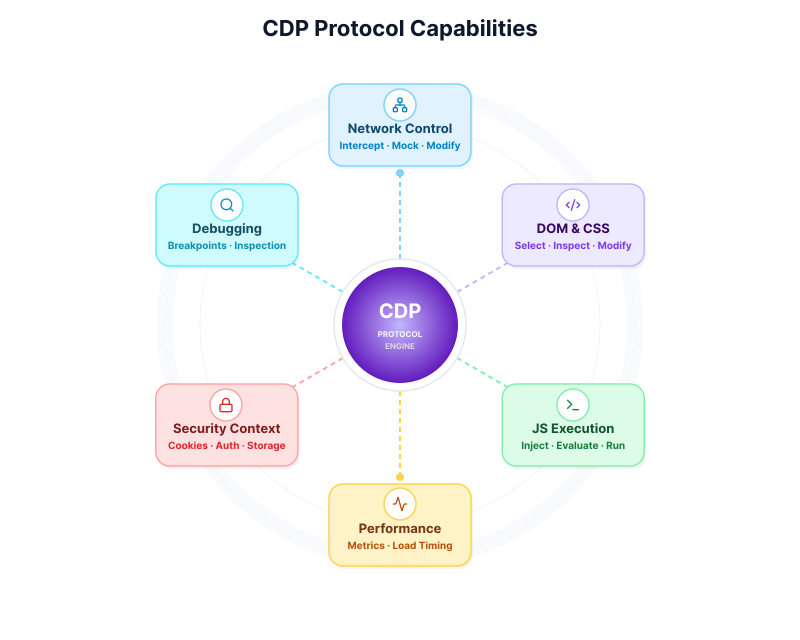
Where CDP stands out:
- Network control: inspect, intercept, block, or modify requests and responses.
- Browser instrumentation: collect performance data, trace runtime behavior, and inspect rendering activity.
- Debugging hooks: access protocol events and browser state directly.
- Custom tooling: build workflows around browser capabilities that sit below ordinary page actions.
For most application testing and browser workflows, higher-level tools are easier to work with. CDP becomes the better fit when the browser itself is the thing you need to control closely.
Core Differences
The main difference between these tools is the level they operate at.
CDP works at the protocol level. You send commands directly to a Chromium-based browser and handle more of the timing, state, and browser behavior yourself.
Puppeteer gives you a higher-level API for browser automation, mainly in Chromium. It removes much of the protocol-level work, but still stays relatively close to the browser.
Playwright adds a broader automation model on top of browser control. It supports Chromium, Firefox, and WebKit through one API and includes stronger built-in handling for waiting, isolation, and debugging.
That difference affects day-to-day work in a few practical ways:
- Browser coverage: CDP and Puppeteer are mainly Chromium-centered, while Playwright is designed for cross-browser automation.
- Reliability: lower-level control gives you more flexibility, but usually requires more manual handling. Higher-level tools reduce that work.
- Debugging workflow: CDP exposes browser internals directly, while Playwright and Puppeteer package common automation tasks into easier APIs.
WebDriver BiDi
WebDriver BiDi is a browser automation protocol designed for bidirectional communication between tools and browsers across multiple engines.
CDP remains the protocol most closely tied to Chromium. It is better suited to tracing, network inspection, debugging hooks, and other browser-level capabilities exposed through Chrome and Chromium.
BiDi is more relevant where cross-browser protocol standardization matters. It is part of the broader shift toward a shared automation layer across browser engines.
For tool selection:
- Playwright remains the strongest general choice for teams that need reliability, browser coverage, and strong debugging workflow.
- Puppeteer remains a good fit for focused automation in Chromium-heavy environments.
- CDP remains the right fit when direct browser instrumentation is the requirement.
Which One Fits Best for Agentic Work?
Agentic workflows change the emphasis slightly. The question is less about traditional test coverage and more about how well the tool supports an observe-decide-act loop inside the browser.
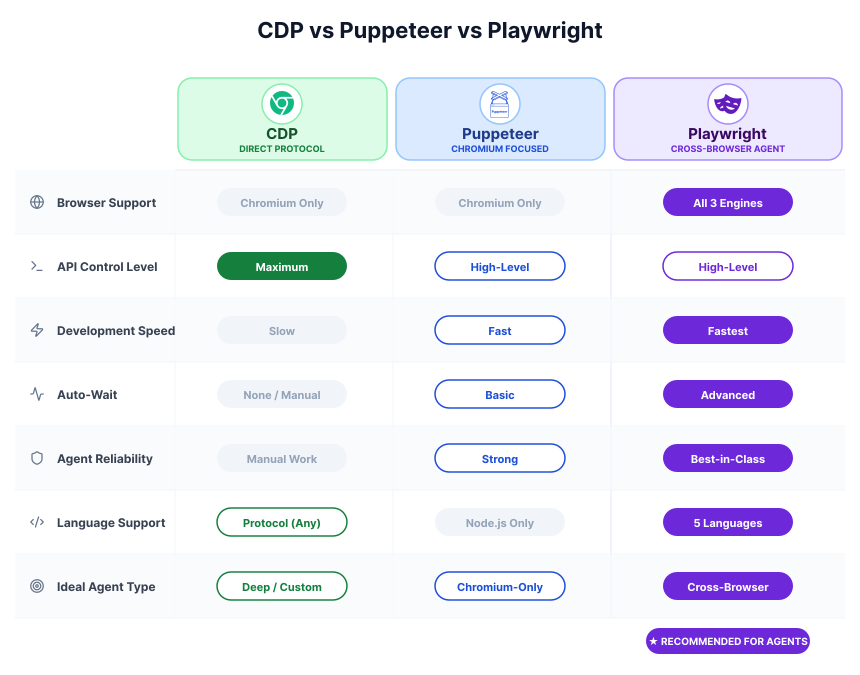
Playwright is usually the easiest place to start. It gives agents a stable automation layer, good locator support, and stronger debugging tools when workflows break.
Puppeteer fits better when the environment is Chromium-only and the agent workflow is relatively narrow. It can work well, but it usually asks for more manual handling around timing and page state.
CDP is most useful when the agent needs direct access to browser events, network activity, or lower-level instrumentation that higher-level APIs do not expose clearly.
For most browser agents, the practical default is still Playwright. CDP matters more when browser internals are part of the task, not just the page workflow.
CDP, Puppeteer and Playwright all drive a browser you launch.
Webfuse drives the live one.
Where Each Tool Fits Best
The examples below keep the comparison grounded in real work. They are intentionally small. The goal is to show where each tool feels natural, not to build a full framework.
CDP for Low-Level Browser Control
CDP is most useful when you need to manipulate the browser below the level of ordinary user actions. A common example is custom network handling for testing, replay, or protocol experimentation.
- Connect to a browser instance via CDP.
- Enable the
Networkdomain to listen for network events. - Set up an event listener for
Network.requestWillBeSentandNetwork.responseReceived. - Intercept requests targeting a specific URL pattern.
- Instruct the browser to block the original request if it matches.
- Provide a local, cached version of the resource using
Network.respondWithor similar commands.
This is the kind of task where CDP earns its complexity. It exposes behavior that higher-level tools may only partially support.
Puppeteer for Chromium Automation
Puppeteer is a good fit for focused Chromium automation such as scraping, report generation, or internal browser scripts.
const puppeteer = require('puppeteer');

async function getProductInfo(url) {
  const browser = await puppeteer.launch();
  const page = await browser.newPage();
  await page.goto(url, { waitUntil: 'networkidle2' });

  const productDetails = await page.evaluate(() => {
    const title = document.querySelector('h1.product-title').innerText;
    const price = document.querySelector('.product-price').innerText;
    // Further elements can be extracted here
    return { title, price };
  });

  await browser.close();
  return productDetails;
}

// Example usage:
// getProductInfo('https://example.com/product/123').then(console.log);
This is the kind of job where Puppeteer remains efficient: one browser engine, a clear workflow, and little abstraction overhead.
Playwright for Reliable Cross-Browser Automation
Playwright fits best when the same workflow needs to succeed across browser engines, not just on one local Chromium build.
const { chromium, firefox, webkit } = require('playwright');

async function verifyLoginAcrossBrowsers(url, username, password) {
  const browsers = [chromium, firefox, webkit];
  const results = {};

  for (const browserType of browsers) {
    const browser = await browserType.launch();
    const page = await browser.newPage();
    await page.goto(url);

    await page.fill('input[name="username"]', username);
    await page.fill('input[name="password"]', password);
    await page.click('button[type="submit"]');

    const successMessage = await page.textContent('.welcome-message');
    results[browserType.name()] = successMessage !== null;

    await browser.close();
  }
  return results;
}

// Example usage:
// verifyLoginAcrossBrowsers('https://example.com/login', 'agentUser', 'securePass')
//   .then(console.log);
That is why Playwright is widely used for testing and browser agents: one API, cleaner waiting behavior, and fewer cross-browser surprises.
Integrating Web Automation Tools into Agentic Systems
In an agentic system, the browser tool is the layer that lets the agent observe the page, take actions, and check results before continuing.
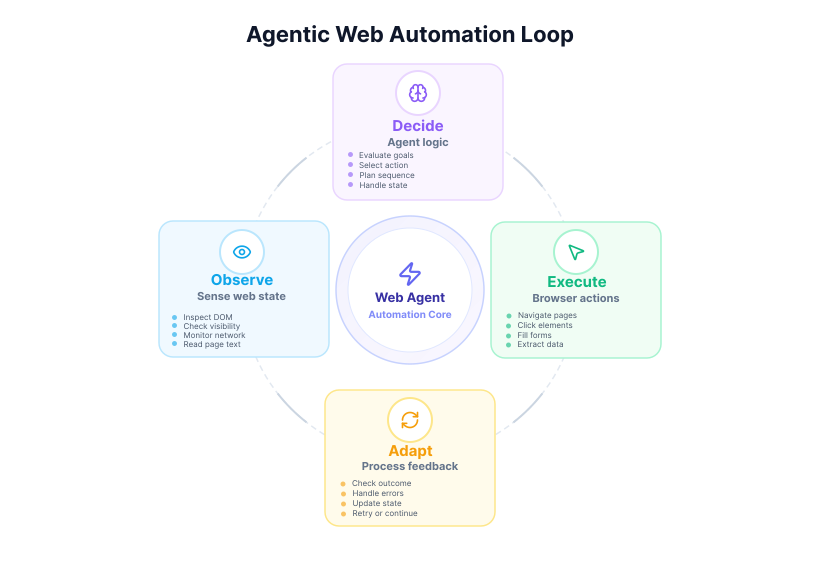
Observation loop: inspect the DOM, read visible text, track state, and monitor network activity.
Action execution: translate a decision into navigation, clicking, typing, extraction, or browser-level control.
Feedback loop: capture success, failure, and updated page state so the agent can decide what to do next.
Closing Takeaway
For most teams, the practical path is to start with a higher-level tool and only drop lower when the task demands it: Playwright for broad automation, Puppeteer for focused Chromium work, and CDP when direct browser internals are the real requirement.
Frequently Asked Questions

Connect an agent to any web app
No signup, runs in your browser
Ready to let your AI agent act on the live web?
Headless browsers give your agent a copy of the web. Webfuse gives it the session your user is actually in — over MCP, with no install.
- No credit card
- Free forever plan
- Quick setup
Related Articles