If you're choosing between Playwright and Selenium in 2026, the right pick depends on three things: the browsers you need to support, the language your team works in, and how modern your application stack is. Both tools are strong, but they solve slightly different problems.
For most new projects that target modern browsers, Playwright is the better default. It is faster to set up, includes built-in auto-waits, and offers a smoother debugging experience. Selenium is the better choice when you need wider browser coverage, broader language support, or you already maintain a large Selenium suite that would be expensive to replace.
This guide compares Playwright vs Selenium across architecture, speed, browser support, debugging, and long-term fit so you can choose the right browser automation tool for your team.
Playwright vs Selenium: Quick Comparison
| Category | Playwright | Selenium |
|---|---|---|
| Best for | New, modern apps | Legacy or enterprise suites |
| Browsers | Chromium, Firefox, WebKit | Chrome, Firefox, Safari, Edge, IE |
| Languages | JS/TS, Python, Java, .NET | Java, Python, C#, JavaScript, Ruby, Kotlin |
| Setup | Simpler | More setup-heavy |
| Speed | Faster | Slower |
| Waits | Auto-waits | Manual waits |
| Debugging | Built-in tracing | More external tooling |
| Network mocking | Built-in | BiDi/proxy-based |
| Best choice if | You want speed and DX | You want coverage and maturity |
Choose Playwright if...
- you are starting a new automation project
- you test modern SPAs on evergreen browsers
- you want auto-waits, tracing, and easier debugging out of the box
- fast CI pipelines matter more than legacy browser coverage
Choose Selenium if...
- you need support for older browsers or unusual environments
- your team works mainly in Java, Ruby, PHP, or long-running enterprise stacks
- you already have a large Selenium suite that is expensive to migrate
- standards-based, broad ecosystem support matters more than developer convenience
Playwright vs Selenium: Key Differences
The biggest architectural difference is how the tools communicate with the browser. Selenium relies on WebDriver and browser-specific drivers, while Playwright maintains a more direct persistent connection. In practice, that usually means less setup friction and lower command overhead for Playwright.
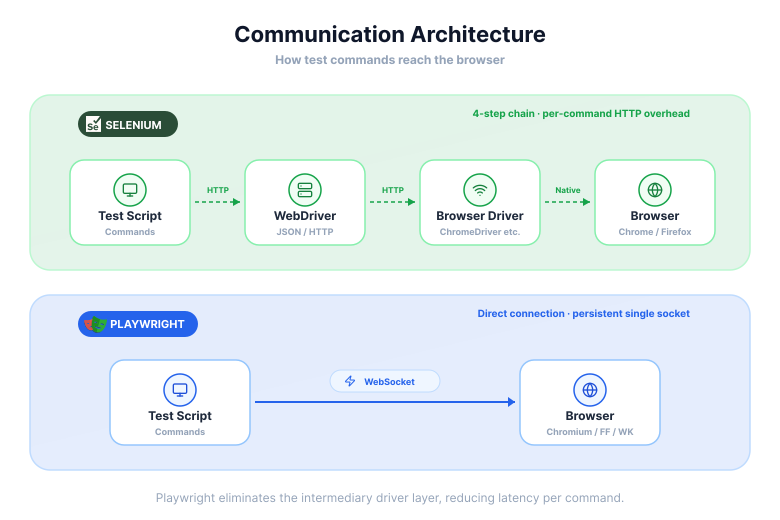
Here are some of the major architectural and feature distinctions:
- Communication Protocol: Selenium uses the WebDriver API with HTTP requests, while Playwright employs a WebSocket connection for more direct communication.
- Setup and Configuration: Setting up Selenium traditionally requires the separate management of browser drivers. Playwright simplifies this by bundling the necessary browser binaries with its installation, making the setup process more straightforward.
- Execution Speed: Due to its architecture, Playwright's execution is generally considered to be faster than Selenium's. The persistent WebSocket connection reduces the overhead associated with HTTP requests.
- Auto-Waits: A notable feature in Playwright is its built-in auto-waiting mechanism. It automatically waits for elements to be ready before interacting with them, which can help in reducing the flakiness of tests. Selenium often requires manual implementation of explicit waits to achieve similar stability.
- Headless Execution: Playwright is designed with built-in support for headless browser testing, whereas Selenium may require additional configuration to run tests in a headless mode.
Playwright vs Selenium: Language and Browser Support
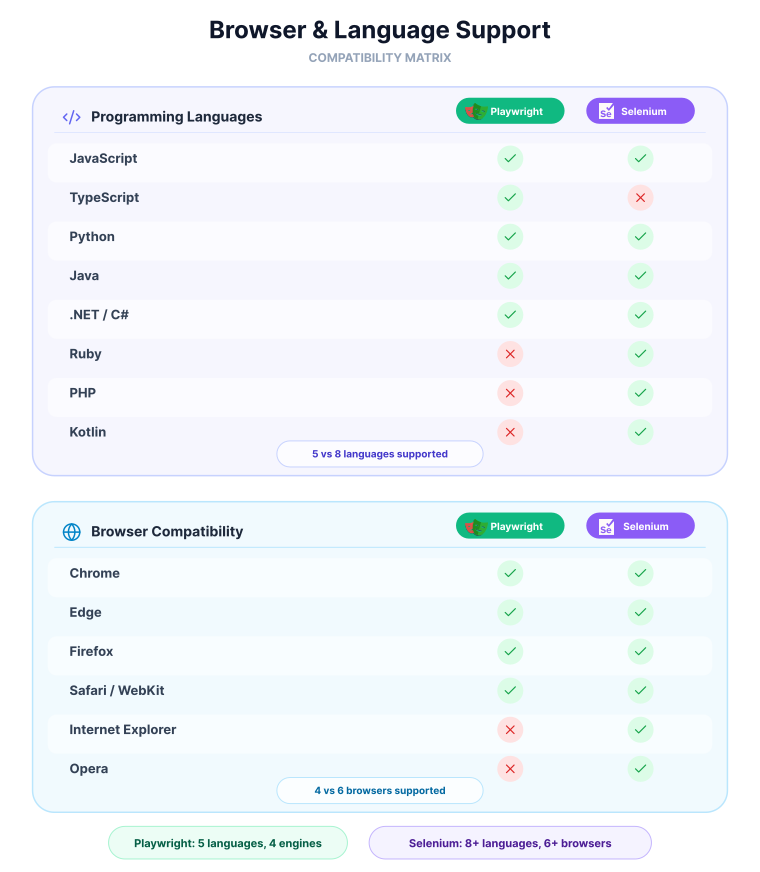
Support is one of Selenium's biggest advantages. It covers more languages and a broader set of browsers, while Playwright focuses on modern stacks and modern rendering engines.
Programming Languages:
- Selenium: Offers broad support for languages including Java, Python, C#, JavaScript, Ruby, PHP, and Kotlin.
- Playwright: Primarily supports JavaScript, TypeScript, Python, Java, and .NET.
Browser Compatibility:
- Selenium: Supports a wide range of browsers, including Chrome, Firefox, Safari, Edge, and even legacy browsers like Internet Explorer.
- Playwright: Focuses on modern browsers, with support for Chromium (which includes Google Chrome and Microsoft Edge), Firefox, and WebKit (the engine for Safari).
Installation, Setup, and Noteworthy Features
Selenium requires managing browser-specific drivers separately. For Chrome you need ChromeDriver, for Firefox you need GeckoDriver - and each must match your installed browser version. Selenium Manager automates the download, but the driver layer still exists.
Playwright takes a different approach: it bundles its own versions of Chromium, Firefox, and WebKit directly. After installing the package, one command downloads everything and keeps versions in sync automatically.
Here is what installation looks like in practice for both tools using Python:
# Playwright: one command installs the package and downloads all bundled browsers
pip install playwright
playwright install

# Selenium: install the package, then handle browser drivers separately
pip install selenium
# Selenium Manager (4.6+) auto-downloads ChromeDriver, but the driver layer still exists
# For older setups you'd download and manage ChromeDriver manually
Is Playwright Faster Than Selenium?
Playwright is generally faster than Selenium, and the reason comes down to how each tool talks to the browser.
Selenium sends each command as a separate HTTP request - translate to JSON, send to the driver, wait for a response, repeat. Every action pays that round-trip cost.
Playwright keeps a single WebSocket connection open for the entire test session. Commands flow over that persistent channel with no per-action HTTP overhead.
The difference is most noticeable in large local test suites. On cloud-based testing grids, where network latency dominates, the gap tends to shrink.
Playwright and Selenium both drive a browser you start.
Webfuse drives the live one.
Auto-Waits and Test Stability
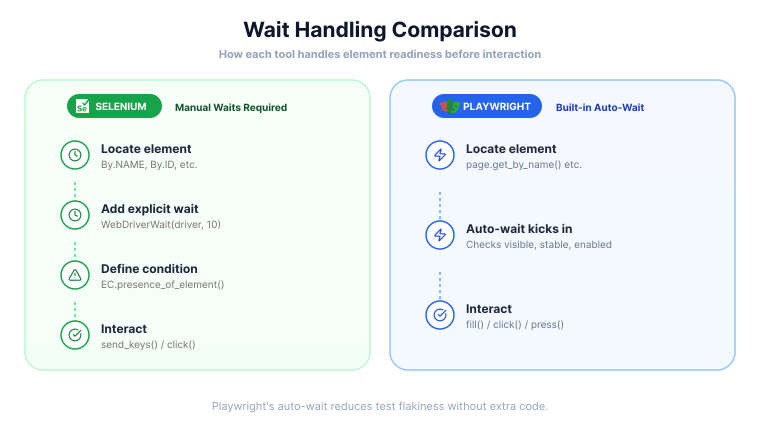
Modern apps are dynamic, so waiting behavior matters. Selenium usually needs explicit waits to avoid flaky interactions, while Playwright auto-waits for elements to become actionable before most actions.
The difference becomes clear when clicking a button that appears after a short delay:
# Selenium: you must explicitly wait for the button to become clickable
from selenium.webdriver.support.ui import WebDriverWait
from selenium.webdriver.support import expected_conditions as EC
from selenium.webdriver.common.by import By

button = WebDriverWait(driver, 10).until(
    EC.element_to_be_clickable((By.ID, "submit-btn"))
)
button.click()

# Playwright: auto-waits for the element to be visible, enabled, and stable
page.get_by_test_id("submit-btn").click()
Forgetting the WebDriverWait in Selenium results in an immediate ElementNotInteractableError if the button isn't ready yet. Playwright handles this automatically for every action.
Debugging and Developer Experience
The ease of debugging failing tests is another important consideration. Playwright offers a suite of tools designed to improve the developer experience in this area. One of its standout features is the official Trace Viewer, which provides a detailed look at test execution, including screenshots, DOM snapshots, and action logs. This can make it much easier to diagnose the cause of a test failure.
Selenium, being more of a library than a comprehensive framework, relies more on external tools and the test runner for debugging and reporting. While there is a vast ecosystem of third-party tools that can be integrated with Selenium for these purposes, Playwright's built-in debugging capabilities offer a more integrated experience out of the box.
Enabling the Trace Viewer takes just a few lines:
from playwright.sync_api import sync_playwright

with sync_playwright() as p:
    browser = p.chromium.launch()
    context = browser.new_context()

    # Start recording a trace before the test
    context.tracing.start(screenshots=True, snapshots=True, sources=True)

    page = context.new_page()
    page.goto("https://example.com")
    # ... rest of your test ...

    # Save the trace on completion (or on failure in a pytest fixture)
    context.tracing.stop(path="trace.zip")
    browser.close()
Once saved, open the trace in a local browser-based viewer:
playwright show-trace trace.zip
This gives you a step-by-step timeline with screenshots, network requests, and DOM snapshots at each action - no third-party tooling required.
Should You Choose Playwright or Selenium?
There is no universal winner here. The better tool depends on browser requirements, team language preferences, and whether you are starting fresh or maintaining an existing suite.
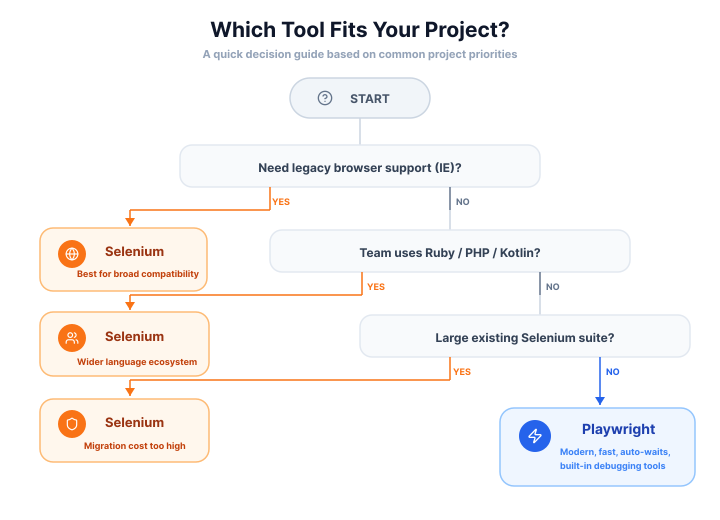
If you need older browsers, wider language support, or maximum ecosystem maturity, Selenium has the edge. If you care more about fast setup, built-in debugging, and modern browser automation, Playwright is usually the better fit.
When Should You Choose Selenium?
Selenium has been a cornerstone of web automation for many years, and its maturity and stability are proven. There are several scenarios where it remains a highly suitable choice.
- Extensive Cross-Browser Needs: For applications that must support a wide spectrum of browsers, including legacy versions, Selenium's unparalleled browser compatibility is a major asset.
- Broad Language Requirements: Teams with deep expertise in languages that are not in Playwright's primary supported list (like Ruby or PHP) will find Selenium a more natural fit.
- Large-Scale, Existing Test Suites: For organizations with a sizeable investment in existing Selenium test suites, migrating to a new tool could be a major undertaking. Continuing to build upon a stable and familiar platform is often the more practical approach.
- Reliance on a Mature Ecosystem: The vast community and extensive third-party integrations available for Selenium mean that a solution for almost any problem can likely be found with a quick search.
When Should You Choose Playwright?
Playwright's modern architecture and focus on the developer experience make it an attractive option, especially for new projects or teams looking to modernize their testing stack.
- Focus on Modern Web Applications: Its excellent support for single-page applications (SPAs) and its ability to handle dynamic content with ease make it well-suited for testing applications built with frameworks like React, Angular, or Vue.js.
- Need for Speed: In environments where test execution time is a major bottleneck, Playwright's performance advantages can lead to faster CI/CD pipelines and quicker feedback for developers.
- Complex Scenarios and Debugging: The built-in network interception capabilities are invaluable for testing complex scenarios that involve API interactions. Furthermore, tools like the Trace Viewer can drastically reduce the time it takes to debug failed tests.
- Simplified Setup and Parallelism: Teams that want a more "out-of-the-box" experience with easier setup and straightforward configuration for parallel testing will appreciate Playwright's integrated approach.
Best Choice by Team and Use Case
If your team is still undecided, these real-world scenarios are a better guide than generic feature lists:
Choose Playwright for modern product teams
Playwright is usually the better fit for startups, SaaS teams, and product engineering groups working on React, Vue, or Angular apps. If your stack is modern, your browsers are evergreen, and fast CI feedback matters, Playwright gives you the shortest path to stable tests.
Choose Selenium for enterprise and legacy coverage
Selenium remains the safer pick for enterprise environments that need broader browser coverage, older infrastructure compatibility, or language flexibility beyond Playwright's official set. It is also the pragmatic choice when a company already has a large Selenium investment.
Choose Playwright for Python or JavaScript-heavy new projects
If you are starting from scratch in Python or JavaScript/TypeScript, Playwright often delivers a better day-one experience: simpler setup, built-in tracing, and fewer explicit waits to maintain.
Choose Selenium for long-lived Java ecosystems
If your testing stack is tightly coupled to Java tooling, enterprise runners, grid infrastructure, or existing QA workflows, Selenium may still produce better organizational ROI even when Playwright looks cleaner on paper.
Playwright vs Selenium in Python: Syntax and Workflow Differences
To make the distinctions between the two tools more concrete, it's helpful to see a side-by-side comparison of how they accomplish a common task. Following that, a look at the future development of both Selenium and Playwright can provide insight into their long-term viability and direction.
Playwright vs Selenium Python Example
Let's examine a simple test case: navigating to a website, searching for a term, and asserting that the search results are displayed. This example will use Python, a language well-supported by both frameworks.
Selenium Example (with PyTest):
from selenium import webdriver
from selenium.webdriver.common.by import By
from selenium.webdriver.common.keys import Keys
from selenium.webdriver.support.ui import WebDriverWait
from selenium.webdriver.support import expected_conditions as EC

def test_google_search():
    driver = webdriver.Chrome()
    driver.get("https://www.google.com")

    # Wait for the search box to be present and then interact
    search_box = WebDriverWait(driver, 10).until(
        EC.presence_of_element_located((By.NAME, "q"))
    )
    search_box.send_keys("Playwright vs Selenium")
    search_box.send_keys(Keys.RETURN)

    # Wait for the results to appear
    WebDriverWait(driver, 10).until(
        EC.presence_of_element_located((By.ID, "search"))
    )

    assert "Playwright vs Selenium" in driver.title
    driver.quit()
Playwright Example (with PyTest):
from playwright.sync_api import sync_playwright, expect

def test_google_search():
    with sync_playwright() as p:
        browser = p.chromium.launch()
        page = browser.new_page()
        page.goto("https://www.google.com")

        # Auto-waiting is built-in, no explicit wait needed for presence
        page.get_by_name("q").fill("Playwright vs Selenium")
        page.get_by_name("q").press("Enter")

        # Use expect for assertions, which also has built-in waiting
        expect(page).to_have_title("Playwright vs Selenium - Google Search")

        browser.close()
Even in this simple example, some key differences are apparent. The Selenium code requires explicit waits to ensure elements are ready before interaction. The Playwright code is more concise, as its auto-waiting mechanism handles this implicitly. Playwright also provides its own assertion library (expect) that is integrated with its auto-waiting capabilities, which can lead to more stable and readable tests.
Network Interception: A Playwright-Native Capability
A more significant practical difference shows up when you need to mock or inspect network requests - a common need when testing pages that depend on external APIs. Playwright has first-class support for this built in:
from playwright.sync_api import sync_playwright, expect

def test_with_mocked_api():
    with sync_playwright() as p:
        browser = p.chromium.launch()
        page = browser.new_page()

        # Intercept any request matching the pattern and return mock data
        page.route("**/api/products", lambda route: route.fulfill(
            status=200,
            content_type="application/json",
            body='[{"id": 1, "name": "Mock Product", "price": 29.99}]'
        ))

        page.goto("https://myshop.example.com")

        # The page renders using our mock data - no real API call made
        expect(page.get_by_text("Mock Product")).to_be_visible()

        browser.close()
With classic Selenium, achieving the same requires routing traffic through a third-party proxy like BrowserMob Proxy, which adds setup complexity and a separate process to manage. WebDriver BiDi is bringing native network interception to Selenium, but it is still maturing at the time of writing.
Is Selenium Still Relevant in 2026?
The world of web development is constantly changing, and automation tools must evolve to keep up. Both Selenium and Playwright are under active development, with roadmaps that point to the future of browser automation.
Selenium and WebDriver BiDi:
A major development in the Selenium ecosystem is WebDriver BiDi (Bidirectional) - a new W3C standard protocol that upgrades how Selenium communicates with browsers. Selenium also documents its own BiDi support for logging and network features.
Classic WebDriver is one-directional: your script sends a command, the browser responds. BiDi adds a WebSocket layer, enabling the browser to push events to your script in real time - console logs, network requests, DOM mutations - without polling.
In practice, this brings Selenium capabilities it previously lacked out of the box:
- Native network interception - mock or inspect requests without a proxy
- Real-time log capture - catch console errors as they happen
- Cross-browser consistency - built on an open W3C standard, not a Chrome-only protocol like CDP
Some low-level BiDi features are already available in Selenium 4.x, but a complete high-level API is still in progress. The gap with Playwright is closing, but it is not fully closed yet.
Playwright's Direction:
Playwright continues to evolve quickly, with a strong emphasis on developer experience, debugging, and modern browser automation workflows. In practical terms, that means it remains a strong choice for teams that value fast setup, built-in tooling, and tight support for modern applications.
Final Considerations in the Automation Journey
Beyond features and benchmarks, the decision usually comes down to three practical questions:
- What does your team already know? A Selenium-fluent Java team will ship faster staying in that ecosystem, even if Playwright is technically superior for the stack.
- What browsers do you actually need? If the answer is "Chrome, Firefox, and Safari on modern versions," Playwright covers you completely. If you need IE or uncommon mobile browsers, Selenium's driver ecosystem is the safer bet.
- Are you starting fresh or maintaining existing tests? New projects benefit from Playwright's lower setup friction. Large existing suites rarely justify a full migration - incremental adoption or staying the course is usually more pragmatic.
Choose Selenium if:
- You need legacy or broad browser coverage (IE, older Safari)
- Your team works primarily in Ruby, PHP, or Kotlin
- You have a large existing Selenium suite and migration cost outweighs the gains
- You want a W3C-standard tool with long-term multi-vendor browser support
Choose Playwright if:
- You're building or testing modern web apps (React, Vue, Angular, SPAs)
- Fast CI/CD feedback loops are a priority
- You want network interception, tracing, and auto-waits without third-party add-ons
- You're starting fresh and want the lowest-friction setup
Both tools are actively maintained and will continue to evolve. Whichever you choose, the investment pays off most when the tool fits your team's workflow - not when it matches a benchmark.
Frequently Asked Questions

Connect an agent to any web app
No signup, runs in your browser
Ready to let your AI agent act on the live web?
Headless browsers give your agent a copy of the web. Webfuse gives it the session your user is actually in — over MCP, with no install.
- No credit card
- Free forever plan
- Quick setup
Related Articles