WebMCP is an experimental browser API proposal that lets websites expose structured tools directly to AI agents.
Instead of making an agent guess what buttons, forms, and page elements do, WebMCP gives the page a machine-readable way to expose actions and accept structured inputs.
The simplest way to think about it is this: WebMCP is for live browser interactions on a webpage, while MCP is for tools and services beyond the page.
As of 2026, WebMCP is still experimental and mainly available through Chrome early preview tooling.
That framing matches current public materials from Chrome's early preview announcement, the Chrome Platform Status entry, and the evolving WebMCP community-group draft.
If you only need the quick answer, here it is:
- What WebMCP is: a browser-side way for a live webpage to expose structured tools to an AI agent.
- What WebMCP is not: a replacement for all MCP servers, backend APIs, or headless automation.
- Best fit: user-visible, human-in-the-loop tasks on a live webpage.
- Current status: experimental, early preview, and not yet a broadly supported web standard.
- Key benefit: agents can call defined tools with structured inputs instead of guessing from the DOM.
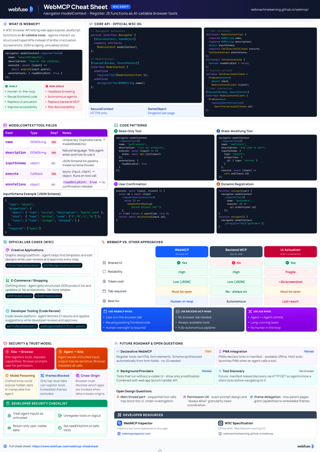
WebMCP Cheat Sheet
Complete quick reference to the navigator.modelContext API - registerTool, provideContext, the Declarative API, security guidance, and code examples.
View cheat sheetWebsites are primarily built for human interaction, with visual layouts, buttons, and forms designed for manual input. As AI agents become more capable of performing tasks on our behalf, they face a major challenge: they must interpret these human-centric interfaces, often leading to slow and unreliable performance. WebMCP is designed to solve this problem by creating a direct, structured communication channel between websites and AI agents.
What Is WebMCP and How Does It Work?
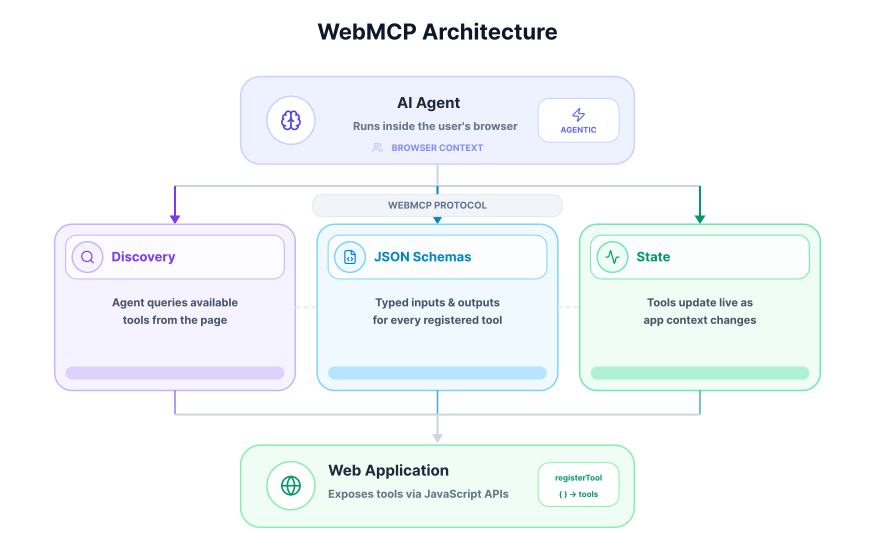
At a high level, WebMCP gives a live webpage a structured way to expose actions to an AI agent. Instead of forcing the agent to infer meaning from the DOM and visual layout, the page can expose machine-readable tools, inputs, and current state.
You can think of WebMCP as a contract between the webpage and the agent: the page explicitly tells the agent what actions exist, what inputs those actions need, and when those actions are available.
The Bridge Between Websites and AI Agents
At its core, WebMCP provides a standardized "contract" that allows a website to explicitly declare its functionality to a browser's AI agent. Instead of forcing an agent to guess the purpose of a form field or the action of a button by analyzing the page's visual structure, a website can publish a set of defined "tools" that the agent can use directly.
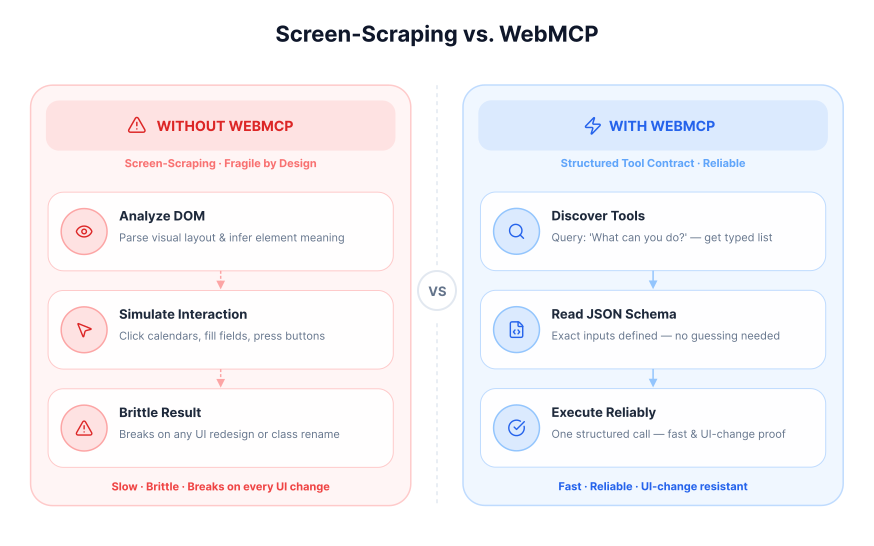
This approach marks a major shift away from the current common practice of screen-scraping, where an agent programmatically "looks" at a webpage to simulate human actions. That problem is closely related to the challenges discussed in How Voice Agents See and Act: A Guide to DOM Tools and DOM Downsampling for LLM-Based Web Agents.
Life Without WebMCP: The Limits of Screen-Scraping
Today, an AI agent trying to complete a task on a website operates with limited information. It must analyze the Document Object Model (DOM) and visual layout to infer meaning.
Consider an agent tasked with booking a flight. It would have to:
- Identify input fields for "Origin" and "Destination" based on nearby text labels.
- Locate a calendar widget and programmatically click through months and days to select dates.
- Find a dropdown or stepper for the number of passengers.
- Locate and trigger the "Search Flights" button.
This process is not only inefficient but also highly fragile. A small change in the website's design, like renaming a button or restructuring a form, could easily break the agent's workflow, requiring a complete reprogramming of its logic for that specific site.
The WebMCP Solution: A Contract for Interaction
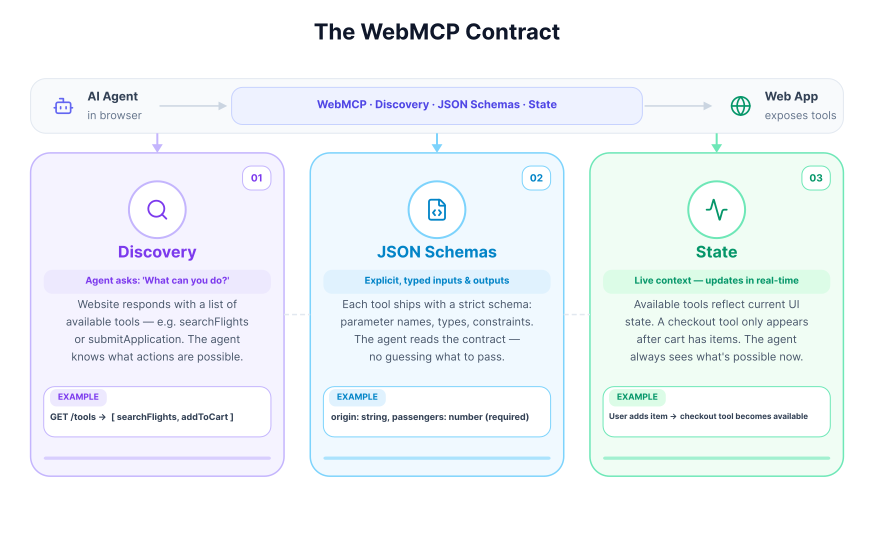
WebMCP replaces this guesswork with a clear, machine-readable interface. A website can use JavaScript to register tools and their specific parameters, providing a stable API for agents. This contract defines three main areas for interaction.
It establishes a shared understanding through these key components:
- Discovery: A standard way for an agent to query a webpage and ask, "What can you do?" The site responds with a list of available tools, such as
searchFlightsorsubmitApplication. - JSON Schemas: Each tool comes with an explicit definition of its required inputs and expected outputs. For a flight search, the schema would clearly state it needs parameters like
origin,destination, andoutboundDate, preventing the agent from providing incorrect or incomplete data. - State: The protocol creates a shared context, allowing the agent to know which tools are available in real-time as the user navigates the application. For example, a
checkouttool would only become available after items have been added to a shopping cart.
With WebMCP, the same flight booking task becomes a single, direct action. The website exposes a searchFlights tool. The agent can then call this tool with a structured data object, like the one below, to execute the search instantly and reliably.
{
  "origin": "LON",
  "destination": "NYC",
  "tripType": "round-trip",
  "outboundDate": "2026-06-10",
  "inboundDate": "2026-06-17",
  "passengers": 2
}
This method is faster, more resilient to UI changes, and opens the door for more complex, collaborative workflows between humans and AI agents on the web.
With that foundation in place, the next question is where WebMCP fits relative to other approaches developers already know.
WebMCP vs. MCP vs. OpenAPI
One reason WebMCP can be confusing is that it sits next to other AI integration approaches rather than replacing them. The shortest explanation: WebMCP is for live, in-browser interaction with a webpage, while MCP is for connecting AI systems to external tools and services, and OpenAPI is for describing HTTP APIs.
| Approach | Where it runs | Browser required? | Best for |
|---|---|---|---|
| WebMCP | In the user's browser on a live webpage | Yes | User-in-the-loop tasks on websites |
| MCP | Between an AI system and external tools/services | No | Structured tool access across backend systems |
| OpenAPI | Between clients and HTTP APIs | No | Stable API integrations and service endpoints |
| Screen-scraping | Through the DOM and rendered UI | Yes | Sites with no structured interface |
In practice, the most capable setups use both: MCP for backend data and services, WebMCP for browser-side interactions on the live page. For a deeper look at the architectural differences, when to use each, and how to wire them together, see WebMCP vs MCP: What's the Difference, and When to Use Each.
How WebMCP Works: The Imperative and Declarative APIs
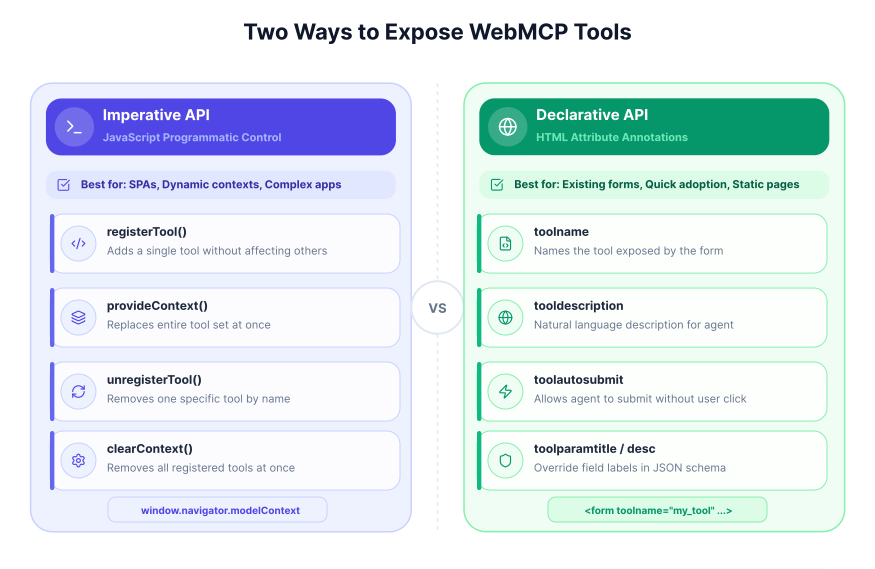
WebMCP currently shows up in two main forms: an Imperative API that uses JavaScript and a more exploratory Declarative API direction for annotating forms. The imperative approach is the clearer reference point today. The declarative approach is promising, but public drafts and explainers are still evolving.
The Imperative API: Defining Tools with JavaScript
The Imperative API allows developers to programmatically expose tools available to an agent. It works best in dynamic applications where available actions change with the current page state. In a document editor, for example, tools like formatText or insertImage could be registered or removed as the user changes selection.
In current public materials, the most concrete API surface is centered on navigator.modelContext.registerTool(...). Some older examples and preview discussions also describe broader lifecycle helpers, but those details should be treated as preview-specific rather than stable standards text.
For the most current API wording, see the WebMCP community-group draft and the broader proposal explainer.
registerTool
This function adds a single tool to the current set of available tools without affecting others. It is useful for incrementally adding functionality as new UI components are loaded or become active. In current public examples, a tool definition includes a name, a natural language description for the agent, a JSON schema for its inputs, and an execute function that contains the logic to be run.
window.navigator.modelContext.registerTool({
  name: "addTodo",
  description: "Add a new item to the todo list",
  inputSchema: {
    type: "object",
    properties: {
      text: { type: "string" },
    },
  },
  execute: ({ text }) => {
    // Application logic to add the todo item
    return { content: [{ type: "text", text: `Added todo: ${text}` }] };
  },
});
Managing tool lifecycle in preview implementations
One area to treat carefully is lifecycle management. Public discussions around WebMCP have included examples of adding and removing tools as page state changes, but the exact helper methods have shifted across previews and drafts. The durable takeaway is the pattern, not every method name: expose only the tools that make sense for the current page state, and clean them up when they no longer apply.
The Declarative API: Enhancing Standard HTML Forms
The Declarative API aims to make existing websites agent-friendly with less custom JavaScript. Instead of writing imperative code, developers would annotate standard <form> elements with special HTML attributes. This part of WebMCP is still less settled in public drafts, so it is best understood as an evolving direction rather than a finalized browser contract. Chrome's early preview overview and the community-group draft are better references for the current state of the platform.
This approach is especially appealing for common interactions like search forms, login pages, or data submission forms. In preview explainers, the browser derives a structured tool definition from a form's input fields, labels, and attributes.
Preview explainers have used attributes such as:
toolname: Defines the name of the tool (e.g.,search_products).tooldescription: Provides a natural language description for the agent.toolautosubmit: An optional attribute that allows the form to be submitted automatically by the agent without requiring manual user confirmation.toolparamtitle: Overrides the default title for a form field in the JSON schema.toolparamdescription: Overrides the default description for a form field.
Here is an example of an HTML form enhanced with declarative WebMCP-style attributes from preview materials.
<form
  toolname="my_tool"
  tooldescription="A simple declarative tool"
  toolautosubmit
  action="/submit"
>
  <label for="text">text label</label>
  <input type="text" name="text" />

  <select
    name="select"
    required
    toolparamtitle="Possible Options"
    toolparamdescription="A nice description"
  >
    <option value="Option 1">This is option 1</option>
    <option value="Option 2">This is option 2</option>
  </select>

  <button type="submit">Submit</button>
</form>
In preview examples, the browser generates a tool definition like the following from this HTML and makes it available to an AI agent.
[
  {
    "name": "my_tool",
    "description": "A simple declarative tool",
    "inputSchema": {
      "type": "object",
      "properties": {
        "text": { "type": "string", "description": "text label" },
        "select": {
          "type": "string",
          "enum": ["Option 1", "Option 2"],
          "title": "Possible Options",
          "description": "A nice description"
        }
      },
      "required": ["select"]
    }
  }
]
Handling Agent-Initiated Submissions
In some preview documentation and examples, developer control over agent-initiated actions is shown through an extended SubmitEvent flow. Because this area is still evolving, it is better to treat the pattern below as illustrative preview behavior rather than guaranteed stable API surface.
document.querySelector("form").addEventListener("submit", (e) => {
  if (e.agentInvoked) {
    e.preventDefault();
    const formData = new FormData(e.target);
    const query = formData.get("query");

    // Custom logic to handle the search
    const searchResultPromise = myCustomSearchFunction(query);

    e.respondWith(searchResultPromise);
  }
});
Preview materials also describe visual feedback and events around agent interaction, including CSS states and page events that developers can use to react to agent-filled forms.
Practical Use Cases of WebMCP
The clearest use case for WebMCP is user-visible assistance inside a live webpage. That is also how the current Chrome early-preview materials position it: as a way for websites to expose structured browser-side capabilities to an agent without forcing the agent to reverse-engineer the interface.
A concrete example: flight search on a live webpage
The most grounded public example today is the Chrome Labs flight-search demo. A page exposes a searchFlights capability, and the agent passes structured inputs instead of clicking through form fields one by one.
You can inspect the demo and related tooling in the Google Chrome Labs WebMCP tools repository.
searchFlights({
  origin: "LON",
  destination: "NYC",
  tripType: "round-trip",
  outboundDate: "2026-06-10",
  inboundDate: "2026-06-17",
  passengers: 2,
});
That is a good illustration of where WebMCP fits best: the user stays on the page, the UI updates visibly, and the agent works through a structured contract instead of brittle DOM guessing.
Other strong fits for WebMCP
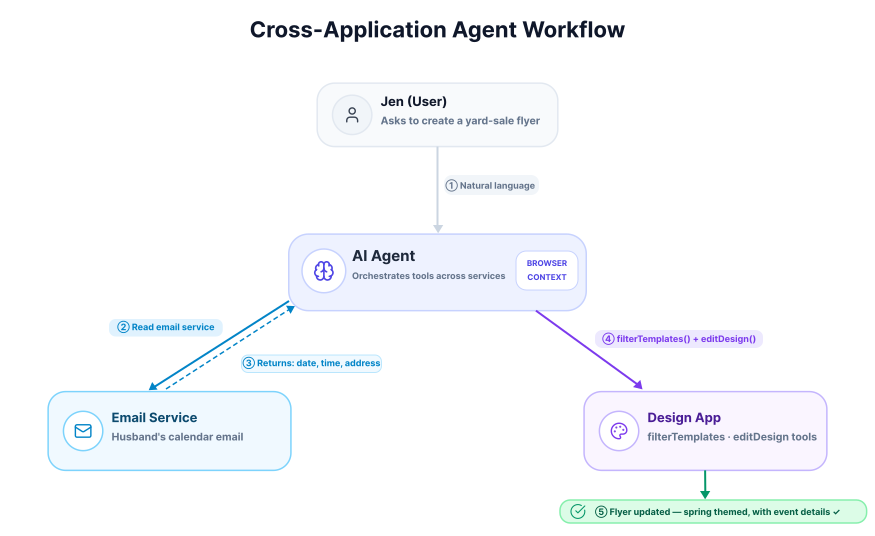
- Design and editing tools: expose actions such as filtering templates, applying edits, or inserting structured content while the user watches the page update.
- Commerce and search experiences: expose structured product retrieval or filtering tools so an agent can narrow results without scraping listings.
- Developer and power-user apps: expose page-local actions such as log inspection, search, or suggested edits in tools that are hard to discover from the UI alone.
The key pattern across all of these is the same: WebMCP is most useful when the website already has meaningful client-side actions and wants to make them easier for an agent to call safely and predictably.
WebMCP Tool Design Checklist
Once you know where WebMCP fits, the next practical question is how to design browser-exposed tools that an agent can use reliably.
The exact API surface may evolve while WebMCP remains experimental, but the design principles behind good browser-exposed tools are already clear. If you want an AI agent to use your website reliably, optimize for clarity, predictable state changes, and easy recovery when something goes wrong.
What good WebMCP tools should do
| Area | What to do | Why it matters |
|---|---|---|
| Name clearly | Describe the real outcome - searchFlights, addSuggestedEdit | Agent picks the right tool first try |
| Describe when to use it | Explain purpose in plain language | Reduces wrong tool selection |
| Accept natural inputs | Use dates, times, and labels as users would enter them | Less reasoning overhead for the model |
| Validate in code | Validate arguments even with a schema defined | Prevents silent failures from bad inputs |
| Return useful errors | State what was invalid and how to fix it | Makes retries more likely to succeed |
| Update the UI before resolving | Only resolve after visible state matches the result | Keeps agent and user in sync |
| Keep tools atomic | One clear action per tool, no overlapping variants | Easier to compose |
Three practical rules for developers
- Separate page logic from presentation. WebMCP works best when your core business logic already exists outside click handlers and UI-only code.
- Expose only the actions that make sense in the current page state. Tools should match what the user can actually do on the page right now.
- Design for user-visible collaboration, not hidden automation. WebMCP is strongest when the agent helps inside a live webpage that the user can still inspect and control.
In other words, the best WebMCP implementations do not just expose functionality. They expose it in a way that is understandable to both the model and the human watching the interaction.
Current Status and Limitations
Yes, but only in a limited experimental form. The most accurate framing today is that WebMCP is an early-preview browser capability rather than a mature cross-browser standard.
Current browser support
As of 2026, public WebMCP experimentation is mainly tied to Chrome early preview materials, demo environments, and tooling. That means you should not assume broad support across major browsers or stable long-term API behavior.
For the latest public implementation status, check the Chrome Platform Status entry.
Is WebMCP production-ready?
Not as a general web platform baseline. Teams can explore it, prototype around it, and use it to understand what browser-native agent tooling might look like, but they should be careful about relying on it as a durable production dependency.
The main reasons are straightforward:
- browser support is still narrow
- parts of the API surface are still evolving
- developer tooling is still preview-oriented
- product teams may need fallback paths for users on unsupported browsers
What this means for developers
If you are building today, WebMCP is best treated as:
- a technology to monitor closely
- an experimental feature to prototype with
- a useful model for designing cleaner browser-side tools
If you need broad compatibility right now, conventional web APIs, server-side MCP integrations, and standard automation approaches remain more dependable choices.
That early status also explains the current limitations. WebMCP is still a proposal, so developers should expect open questions and rough edges.
- Browsing Context is Required: WebMCP tools are executed in JavaScript within a webpage. This means a browser tab or webview must generally be open for an agent to interact with the site. It is not positioned today as a pure headless replacement for backend integrations.
- Developer Responsibility for UI Synchronization: The protocol facilitates the execution of actions, but it is up to the web developer to ensure the user interface accurately reflects any state changes made by an agent. For example, if an agent adds an item to a shopping cart via a tool, the site's JavaScript must update the cart icon and item list accordingly.
- Potential for Refactoring: On websites with highly complex or tightly-coupled user interfaces, simply adding tool definitions may not be enough. Developers may need to refactor existing JavaScript to separate business logic from its presentation, making it easier to expose clean, reusable functions as tools.
- Tool Discoverability: There is no built-in, centralized mechanism for an AI agent to discover which websites support WebMCP without first navigating to them. Search engines or dedicated directories may eventually fill this gap, but for now, tool discovery is limited to the context of a visited page.
As of 2026, WebMCP should be treated as an experimental Chrome early-preview capability rather than a broadly supported browser standard. The longer-term goal is wider standardization, but cross-browser support is still part of the future roadmap.
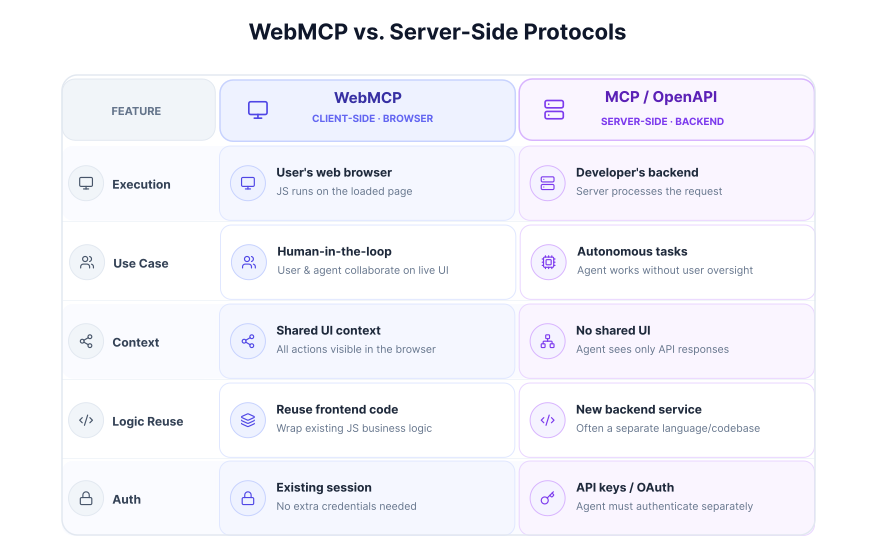
WebMCP is not intended to replace backend integrations. Instead, it complements them by providing a solution specifically designed for the interactive, UI-driven nature of the web. A business might offer a server-side MCP API for autonomous booking while also implementing a client-side WebMCP layer to assist users who are actively browsing and refining their travel plans on the website.
WebMCP needs the site owner to ship it, and a flagged browser.
Webfuse works today, on any live session.
Getting Started: Trying WebMCP Today
If you want to experiment with WebMCP now, approach it as an early preview workflow rather than a stable production feature. At the time of writing, testing centers on compatible Chrome early-preview builds, the relevant flag, and Chrome's demo/debugging tooling.
The best public starting points are Chrome's early preview announcement and the Google Chrome Labs WebMCP tools repository.
To begin, you will need two prerequisites:
- Chrome Version: Use a recent compatible Chrome early-preview build that supports WebMCP testing.
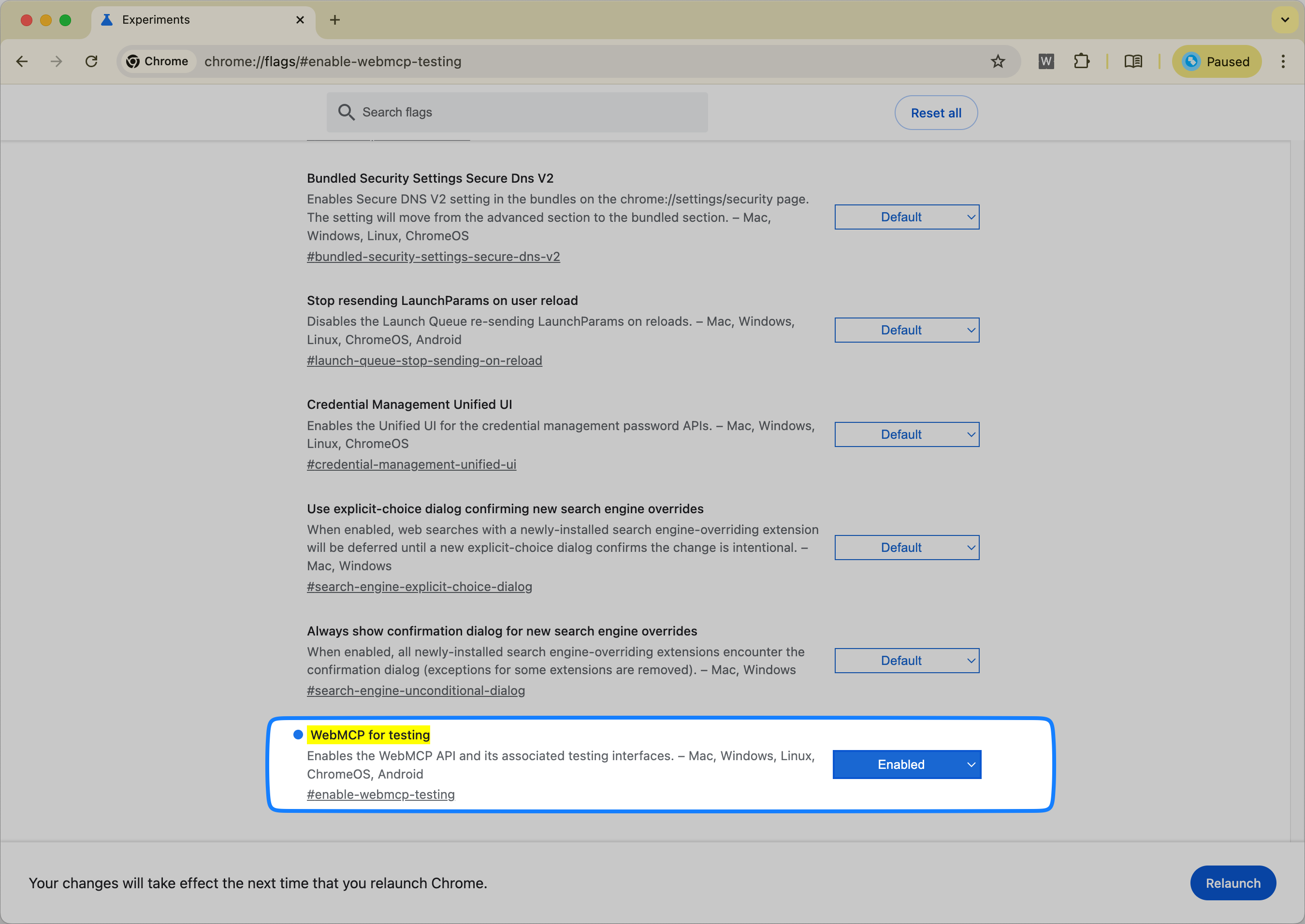
- Feature Flag: The "WebMCP for testing" flag must be enabled.
Enabling the WebMCP Flag
First, you need to activate the feature within Chrome. This process exposes the WebMCP APIs to websites.
- Open a new tab in Chrome and navigate to the flags page by typing
chrome://flags/#enable-webmcp-testinginto the address bar. - Locate the "WebMCP for testing" flag and change its setting from "Default" to Enabled.
- A prompt will appear at the bottom of the screen to relaunch the browser. Click Relaunch to apply the changes.
Using the Model Context Tool Inspector Extension
To help developers debug and test their WebMCP implementations, the Chrome team has released a browser extension. The Model Context Tool Inspector lets you inspect registered tools, execute them manually, and test them with an AI agent.
Its three most useful capabilities are:
- List Registered Tools: The extension automatically detects and lists all tools registered on the active tab, whether through the Imperative API (
registerTool) or the Declarative API (HTML form annotations). For each tool, it displays its name, description, and the complete JSON input schema, which is useful for debugging. - Call Tools Manually: This feature allows you to bypass the non-deterministic nature of an AI model for initial testing. You can select a tool from the list, fill in its parameters using a JSON editor directly in the extension's UI, and execute it. The extension shows the returned result or any error messages, helping to quickly identify schema mismatches or runtime bugs in your
executefunction. - Test with an Agent: The extension includes support for the Gemini API. By providing your own API key, you can enter natural language prompts and observe if the agent correctly identifies and calls the appropriate tool with the right parameters. This is a major help for optimizing tool descriptions and schemas for better model comprehension.
Hands-On with the Live Demo
The best way to see WebMCP in action is with a hosted travel demo that exposes a searchFlights tool triggerable through the inspector extension.
Manually Executing the searchFlights Tool
This exercise demonstrates how to call a tool directly with structured data, without needing an AI model.
- With the extension installed and the flag enabled, navigate to the React Flight Search demo.
- Click the Model Context Tool Inspector extension icon in your toolbar to open its panel. You should see the
searchFlightstool listed. - In the panel, ensure the "Tool" dropdown is set to "searchFlights".
- In the "Input Arguments" field, paste the following JSON object:
{
  "origin": "LON",
  "destination": "NYC",
  "tripType": "round-trip",
  "outboundDate": "2026-06-10",
  "inboundDate": "2026-06-17",
  "passengers": 2
}
- Click the Execute Tool button. The page will update to show the flight search results.
Invoking the Tool with Natural Language
This next step simulates a real user interaction by translating a natural language request into a tool call. Note that this requires a Gemini API key.
- Open the extension on the same demo page.
- Click Set a Gemini API key and enter your key.
- In the "User Prompt" field, type:
Search flights from LON to NYC leaving next Monday and returning after a week for 2 passengers. - Click Send. The extension will send your prompt and the tool's definition to the Gemini model. The model will determine that the
searchFlightstool should be called and generate the necessary JSON arguments. The extension will then execute the tool with these arguments, and the page will update with the results.
The demos and source code are open source and available for review on the Google Chrome Labs GitHub repository. If you want more context on server-side alternatives, see Best MCP Servers for AI Agent Browser Automation. If you are comparing browser-native structured tooling with existing automation approaches, see Agent Browser vs. Puppeteer & Playwright.
Conclusion
WebMCP matters because it gives websites a cleaner way to expose structured actions to AI agents without forcing those agents to guess from the DOM alone. For live, user-visible workflows, that can make browser interaction faster, more reliable, and easier to maintain than brittle screen-scraping.
At the same time, WebMCP is not a finished cross-browser standard and it does not replace MCP or OpenAPI. Today, the most accurate way to think about it is as an experimental browser-side approach for human-in-the-loop interactions on a live webpage, while MCP and conventional APIs remain stronger choices for many backend and automation scenarios.
If you are evaluating WebMCP now, the right mindset is to treat it as an early but important direction: worth testing, worth understanding, and worth tracking closely as browser tooling for AI agents continues to evolve.
Official Sources and Further Reading
Frequently Asked Questions

Next Steps
Connect an agent to any web app
No signup, runs in your browser
Ready to let your AI agent act on the live web?
Headless browsers give your agent a copy of the web. Webfuse gives it the session your user is actually in — over MCP, with no install.
- No credit card
- Free forever plan
- Quick setup
Related Articles