To connect an AI agent to the live web, you need an execution layer that lets it observe page state and trigger real actions. That layer might be a browser automation framework, a remote browser, a proxy-based system, or a structured protocol exposed by the site itself.
The right choice depends on where the agent runs, how quickly it needs to respond, and whether it acts inside the user's active session or in a separate environment.
TL;DR
AI web agents need an execution layer, not just a model. The main options are live-session actuation, headless browsers, browser-use frameworks, cloud browsers, and WebMCP.
Live-session actuation fits real-time, user-visible tasks best. The agent acts inside the user's browser, so the feedback loop is fast and the user can watch what it is doing.
Headless browsers, browser-use frameworks, and cloud browsers fit background automation best. They are better suited to scraping, testing, and other isolated jobs where infrastructure and scale matter more than immediate feedback.
WebMCP is the cleanest option when a site exposes structured tools. It lets the agent call defined capabilities directly instead of working through the UI.
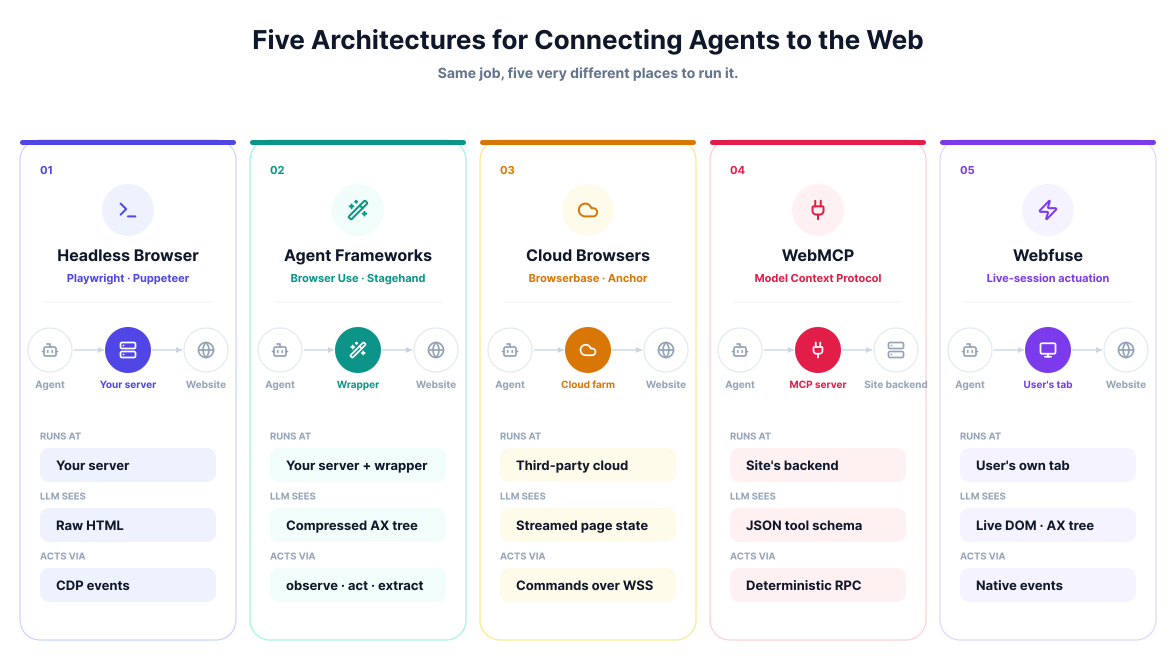
These five approaches solve the same basic problem in different ways. They differ in where execution happens, how the model reads page state, and how much latency, control, and infrastructure each setup involves.
This article compares the five common architectures so it is easier to match the connection method to the job, whether that means a voice-driven assistant, a background scraper, or an agent working alongside a user in a live session.
1. Live-Session Actuation (Webfuse)

Live-session actuation runs the agent inside the user's active browser session. Systems like Webfuse, which is our own product, do this with an augmentation proxy between the user and the origin server. The proxy rewrites traffic and injects a virtualization layer into the page, and the agent communicates with that layer over an RPC bridge.
Because execution stays in the user's browser, the agent triggers the same JavaScript events and framework state changes as a human user. The user can watch the agent move through the site in real time, while cookies, local storage, and other session data remain in the local browser. This setup avoids browser extensions and separate remote browser infrastructure.
The setup has a few practical advantages:
- In-session visibility: The agent reads a compressed markup view and the accessibility tree from the live page state.
- Readiness handling: The layer buffers perception calls while the page is undergoing a significant UI shift, and an action can keep retrying its target for up to five seconds before giving up.
- Human handoff: A person can step in and take control if the agent reaches an edge case.
The proxy handles routing, while the virtualization layer handles browser-side control. The agent sends commands through the proxy, which forwards them into the live page. To avoid acting too early, the layer holds perception calls back while the page is still shifting, rather than leaving the caller to guess at timing.
This execution model also handles page structures that are awkward in external automation setups. Because the control layer runs from inside the session, it can work across shadow DOM boundaries and cross-origin iframes while presenting the agent with one usable view of the page. Rendering stays on the user's device, so there is no pixel-streaming round trip and visual feedback is immediate.
The same setup also gives teams more control over governance. Every action is visible in the user's session, policies can restrict which elements the agent may interact with, and sensitive fields can be masked before page state is sent to the model.
That is the augmentation proxy and the virtualization layer, working together.
Point your own agent at a live session.
2. Headless Browser Automation (Playwright / Puppeteer)

Headless browser automation gives an agent programmatic control over a browser running without a visible UI. Tools like Playwright and Puppeteer expose APIs for browsers such as Chromium, Firefox, and WebKit, usually through debugging protocols like the Chrome DevTools Protocol. The agent produces commands, and those commands run in a browser process on a server or local machine.
To understand the page, the agent can request HTML snapshots or screenshots. To act on it, the automation layer sends low-level browser events such as clicks, typing, and navigation. In practice, this means running the browser alongside the agent logic and using selectors or other DOM queries to locate the right elements before dispatching actions.
This setup has a few practical strengths:
- Direct DOM access: Automation scripts can read and modify the page directly, including running JavaScript in the page context.
- Network inspection: Frameworks can intercept, mock, or block requests, which is useful when the agent needs visibility into API calls and background traffic.
- Session isolation: Separate browser contexts help keep different agent runs isolated from one another.
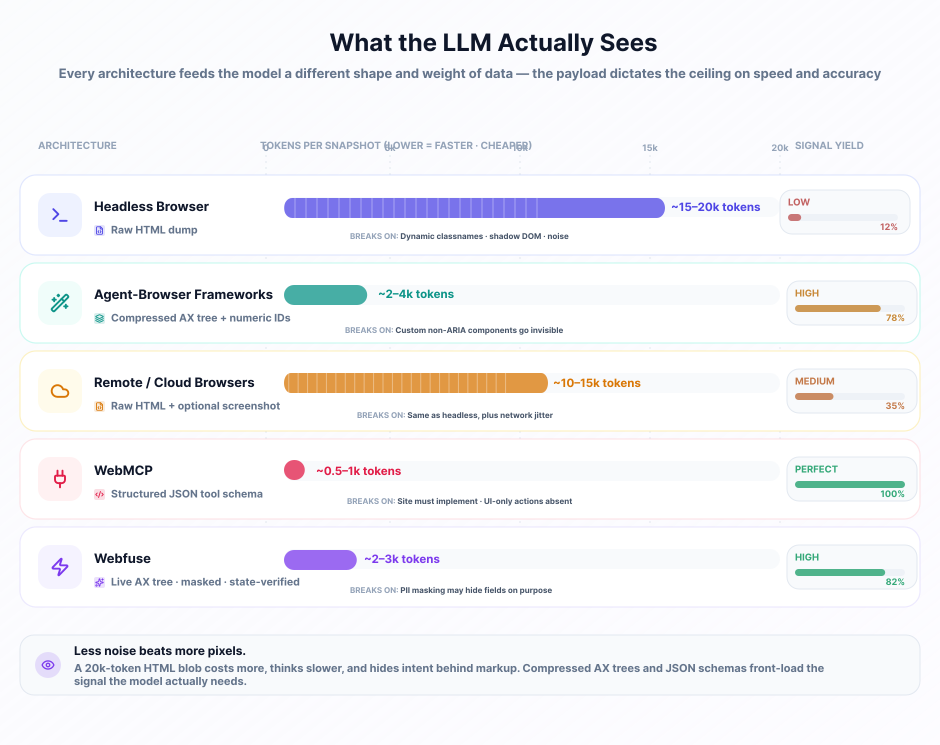
The tradeoff is that the agent often has to work through large, messy page representations. Modern web apps may use generated class names, shadow DOM, or heavily dynamic rendering, which makes reliable element targeting harder. If the model is reading raw HTML to decide what to do next, token use climbs quickly.
This model also runs outside the user's active session. The agent works in its own browser environment, so private workflows usually require sending cookies or tokens to the machine running the browser. That machine also needs standard browser sandboxing and infrastructure isolation, because it is executing untrusted web content at scale. As concurrency grows, the cost and operational overhead grow with it.
3. Browser-Use and Agent-Browser Frameworks

Frameworks like Browser Use and Stagehand sit on top of browser automation tools and give the model a simpler interface to work with. Instead of asking the model to produce raw Playwright or Puppeteer steps, they translate higher-level instructions into browser actions. That reduces the amount of low-level DOM and timing logic the model has to manage itself.
A common pattern is to compress the page before sending it to the model. These frameworks may extract the accessibility tree or strip out non-interactive markup so the model sees a cleaner text representation. Interactive elements are then mapped to identifiers, and the framework translates the model's chosen identifier back to the real DOM node before executing the action.
Common features in these frameworks include:
- Markup compression: They filter the page down to the text and controls most relevant to the task.
- Visual annotations: Some frameworks draw numbered boxes over screenshots so multimodal models can target elements visually.
- Readiness checks: They can wait for loading, animation, or element readiness before carrying out the next step.
The benefit is a simpler reasoning loop for the model. Frameworks like Stagehand structure that loop around patterns such as observe, act, and extract. Browser Use similarly gives the model a constrained set of actions and targets, then handles the lower-level execution underneath.
The tradeoff is that these tools still depend on headless browser infrastructure, and the extra parsing or screenshot annotation adds overhead. They also rely on heuristics to decide what counts as interactive. Highly custom UI components that do not expose standard HTML or ARIA patterns may be missed, which can make the agent less reliable.
4. Remote and Cloud Browsers
Remote browser platforms run the browser session on cloud infrastructure instead of on the local machine or inside the user's active browser. The agent connects to that remote browser over the network, typically through a WebSocket session, and sends automation commands from a separate runtime.
This setup is mainly about outsourcing browser operations. Running large numbers of browser instances is expensive and operationally heavy, so cloud browser providers handle provisioning, scaling, and lifecycle management. The agent just connects to a remote instance and drives it through the usual automation tooling.
These platforms often add features that are useful in large-scale automation:
- Fingerprint control: They can adjust browser characteristics such as user agent, screen resolution, and hardware signals.
- Persistent profiles: They can keep cookies, local storage, and cache across runs.
- Built-in anti-bot support: Some platforms bundle CAPTCHA solving or other evasion tooling into the environment.
They also usually manage network routing for you. Sessions can be distributed across proxy networks and different IP addresses, which helps when high request volume would otherwise get blocked. The downside is latency: every command has to cross the network to the remote browser, and the resulting page state has to come back. For interactive or voice-driven tasks, that extra round trip is a real constraint.
The other major tradeoff is trust and access. Credentials and session data live on third-party infrastructure, which may be unacceptable for sensitive workflows. Remote browsers are also harder to use against internal tools unless you add private network access. In regulated environments, teams may also need to care about where the provider runs its infrastructure and where that session data is stored.
5. WebMCP (Model Context Protocol for Web)
WebMCP applies the Model Context Protocol to web interactions by letting a site expose structured capabilities directly to an agent. Instead of working through the page like a user would, the agent connects to an MCP server and receives a defined set of tools, resources, and prompts for that site.
That changes the interaction model completely. Rather than parsing HTML, locating buttons, and simulating clicks, the agent can call a structured tool with the right parameters. If a site wants to support account creation, for example, it can expose a registration tool that accepts fields like name and email and handles the action directly.
This approach has a few clear advantages:
- Deterministic execution: The agent calls defined functions instead of relying on fragile UI automation.
- Lower context load: The model works with structured schemas rather than large DOM snapshots.
- Explicit permissions: The site owner controls exactly which actions and data the agent can access.
In practice, the MCP interface can expose read-only resources, reusable prompts, and executable tools. The agent connects over HTTP or WebSockets, inspects what the server makes available, and decides which tool to call based on the task.
The tradeoff is that WebMCP only works when the site owner builds and maintains that interface. If a site does not expose MCP capabilities, the agent cannot use this route. It also removes the visible, human-like interaction you get from browser automation, so teams may need additional client-side updates if users are meant to see the result reflected in the live UI.
Four of these five reach the web through a browser you spin up.
Webfuse acts in the live session.
Summary
The right way to connect an AI agent to the web depends on where the agent runs, how quickly it needs to respond, and whether the interaction needs to stay visible inside a live user session.
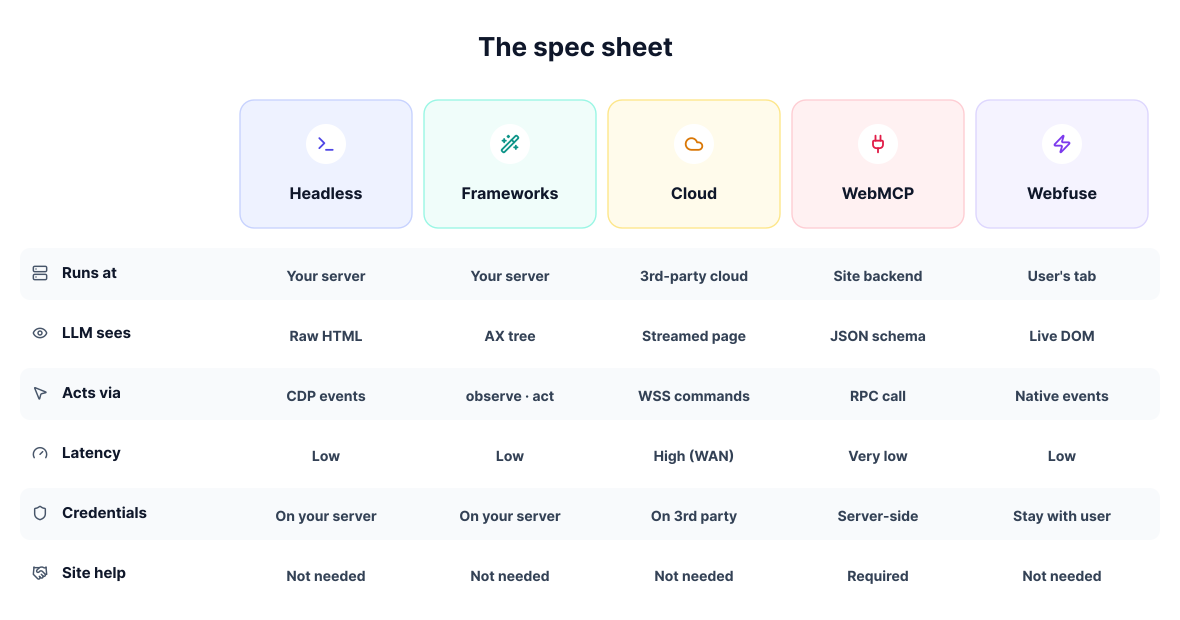
Live-session actuation is the best fit when the agent needs to work inside the user's browser with immediate visual feedback. Headless and cloud browser setups make more sense for isolated automation, large-scale extraction, and test-like workloads. Browser-use frameworks sit in the middle by making headless automation easier for models to operate. WebMCP is the cleanest option when the site exposes structured tools directly.
In practice, the decision comes down to latency, control, infrastructure, and trust boundaries. Those factors determine how the model sees the page, where session data lives, and how reliable the interaction will be.
Frequently Asked Questions

Next Steps
Connect an agent to any web app
No signup, runs in your browser
Ready to let your AI agent act on the live web?
Headless browsers give your agent a copy of the web. Webfuse gives it the session your user is actually in — over MCP, with no install.
- No credit card
- Free forever plan
- Quick setup
Related Articles