If you've been building AI-powered features lately, you've probably already wired up an MCP server or two. Now there's WebMCP, and the name alone creates confusion. Are they competing standards? Is one replacing the other? The short answer: no. They solve different problems at different layers of the stack. Understanding where each fits saves you from over-engineering one side or missing obvious wins on the other.
TL;DR
MCP is server-side. It connects agents to databases, APIs, and external services via a JSON-RPC protocol. Mature, production-ready, Linux Foundation-governed.
WebMCP is browser-side. It lets web pages expose structured tools to agents through navigator.modelContext - no DOM scraping, no screenshots, no guessing.
They're complementary, not competing. The best architectures use both: WebMCP for in-page interactions, MCP for backend data and services.
WebMCP is still experimental - testable in Chrome 146+ Canary behind flags, but not yet a cross-browser standard.
How MCP Works
MCP (Model Context Protocol) was announced by Anthropic in November 2024 and open-sourced immediately. It was built by David Soria Parra and Justin Spahr-Summers, with a design deliberately inspired by the Language Server Protocol: the same idea that standardized editor-to-language-server communication. In December 2025, Anthropic donated it to the Agentic AI Foundation under the Linux Foundation, making it vendor-neutral and community-governed.
At its core, MCP is a client-server protocol built on JSON-RPC 2.0. An MCP host (Claude Desktop, Cursor, your custom agent app) contains an MCP client that connects to one or more MCP servers. Those servers expose three types of capabilities:
- Tools: callable functions the model can invoke (run a query, call an API, write a file)
- Resources: read-only context the model can access (documents, database snapshots, API responses)
- Prompts: reusable templates and workflows
Transport is either STDIO for local servers (fast, low overhead) or Streamable HTTP for remote servers (supports OAuth and bearer tokens). The spec is versioned; the current stable release is 2025-11-25, with a 2026-07-28 release candidate adding stateless operation, Tasks for long-running jobs, and better auth patterns.
As of Anthropic's December 2025 ecosystem update, the Python and TypeScript SDKs were pulling roughly 97 million monthly downloads combined, with more than 10,000 public servers; the official MCP registry listed around 9,650 by May 2026. On the enterprise side, Stacklok's 2026 survey of software organizations found roughly 41% running MCP servers in limited or broad production.
WebMCP: The Browser-Native Complement
WebMCP is a W3C Draft Community Group spec, co-authored by engineers from Google Chrome and Microsoft, with an early preview landing in February 2026. It's not a competitor to MCP. It's a browser-native complement that lets web pages act as lightweight MCP-like servers using JavaScript and the DOM.
The API surface is straightforward. Instead of running a backend server, you call navigator.modelContext.registerTool() from within a web page:
navigator.modelContext.registerTool({
  name: "submit_support_ticket",
  description: "Creates a support ticket with the provided details",
  inputSchema: {
    type: "object",
    properties: {
      title: { type: "string" },
      priority: { type: "string", enum: ["low", "medium", "high"] },
      description: { type: "string" }
    },
    required: ["title", "description"]
  },
  execute: async (params, client) => {
    const result = await createTicket(params);
    return { ticketId: result.id, status: "created" };
  }
});
An in-browser AI agent running in a sidebar, extension, or embedded widget can discover and call that tool without scraping the DOM, guessing at selectors, or issuing vision-model calls to interpret a screenshot. The web app's existing JavaScript logic runs directly.

WebMCP Inspector - browse, test, and execute WebMCP tools registered on any page, directly in your browser.
A declarative HTML API is also in development, letting you annotate forms and actions so browsers can synthesize tool schemas automatically. That part is still marked TODO in the spec, but the imperative API is already testable in Chrome 146+ Canary behind flags, with polyfills available for broader support.
The Core Architectural Difference
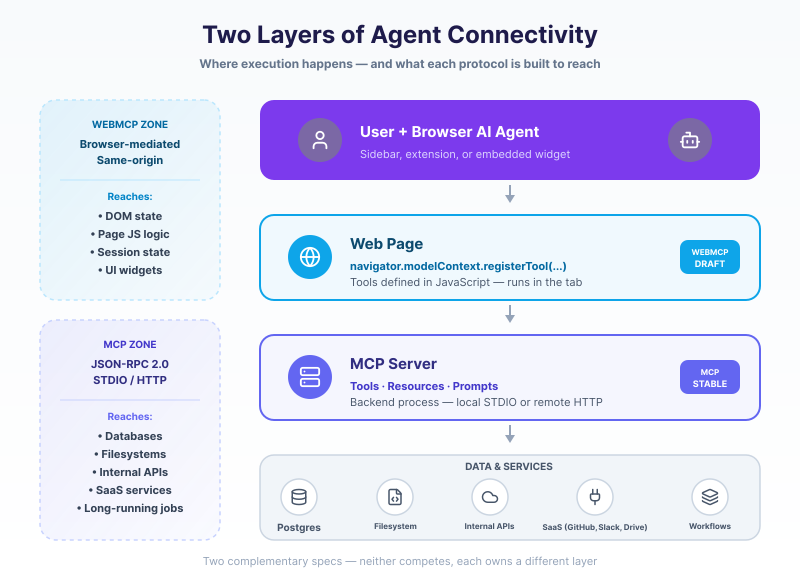
The practical gap between the two comes down to where execution happens and what you're connecting to.
| MCP | WebMCP | |
|---|---|---|
| Execution | Backend server process | JavaScript running in the page |
| Transport | STDIO or Streamable HTTP | Browser-mediated (same-origin) |
| Data access | Databases, filesystems, external APIs | DOM state, in-page business logic |
| Connection model | Persistent, stateful sessions | Per-page, event-driven |
| Auth | OAuth, bearer tokens, headers | Browser permissions policy, HTTPS |
| Status | Production, LF-governed | Experimental, CG draft |
MCP is built for connecting agents to data and services that live outside the browser: your Postgres instance, internal APIs, file systems, third-party SaaS. WebMCP is built for connecting agents to what's already rendered in a browser tab: a form the user has partially filled out, live product inventory fetched by the page, a booking widget with its own state machine.
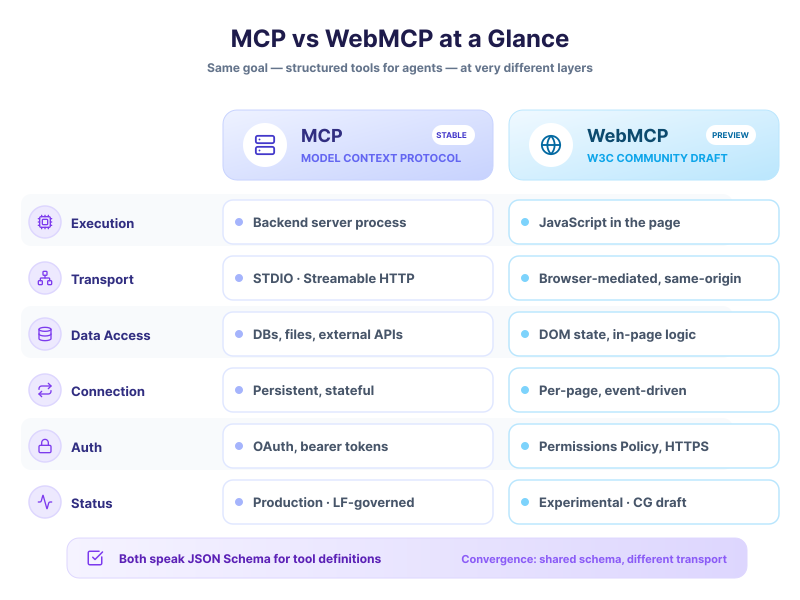
MCP reaches your backend. WebMCP needs the site to adopt it.
Webfuse reaches the live page now.
When to Use Each
MCP is the right tool when:
Your agent needs to read from or write to persistent data stores. This is the bulk of enterprise agentic work: querying a CRM, writing records to a database, pulling context from internal docs, running code execution environments. The ecosystem already has reference servers for GitHub, Google Drive, Postgres, Slack, Salesforce, and dozens more. If it lives on a server, MCP is the right abstraction.
It's also the right choice for multi-step, long-running workflows. The Tasks primitive in the 2026 RC spec handles jobs that span minutes or hours, with progress notifications and cancellation support. Those are things you simply can't manage from a browser page's lifecycle.
WebMCP is the right tool when:
You're building a website and want AI agents to interact with it reliably. Think e-commerce checkouts, support ticket flows, travel booking, multi-step onboarding forms. Today, browser agents either manipulate the DOM directly (fragile, breaks on layout changes) or use vision models to interpret screenshots (slow, expensive, imprecise). WebMCP gives your app a clean API surface that agents can call with confidence, using the same business logic that powers your regular UI.
It's also useful for collaborative user+agent workflows where both are active in the same interface at the same time. The agent can call a registered tool to pre-fill a form or fetch account details, while the user reviews and confirms before submission.
Using Them Together
The strongest setups use both. A browser agent session can call WebMCP tools exposed by the page, and those tools can in turn call your MCP backend for data that the page alone can't provide.
A realistic example: a travel booking site registers a WebMCP tool called search_available_flights. When an agent calls it, the tool's execute callback fires server-side logic (via your normal API), which may itself connect through an MCP server to an inventory database or a GDS like Amadeus. The agent gets clean structured results. The user sees the same results rendered in the UI they're already looking at. No scraping, no fragile coordinate-based clicking.
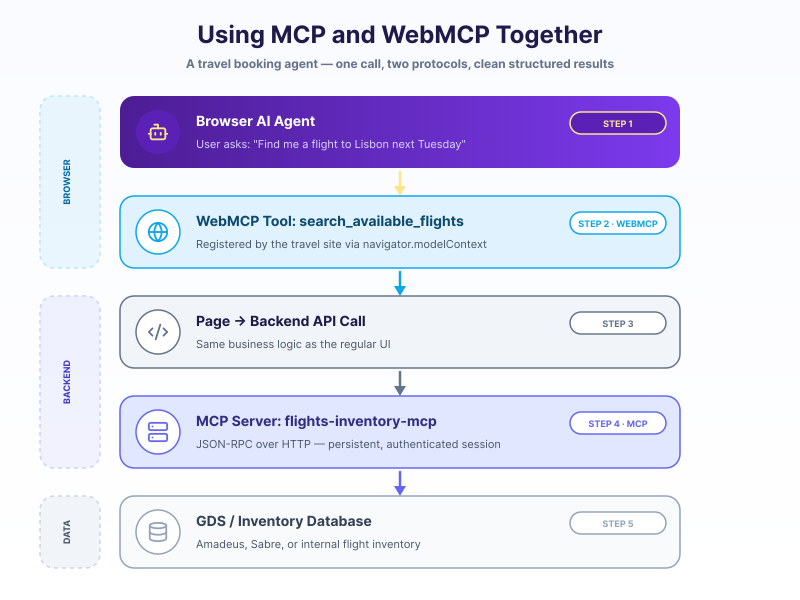
This pattern keeps the browser concerns (UI state, user session, page logic) firmly in WebMCP territory, and the data/service concerns in MCP territory. Neither bleeds into the other.
Security Considerations Worth Knowing
Both specs put user consent front and center, but the threat models differ.
MCP's main risks are at the server layer: tool poisoning (a malicious server returns instructions that hijack the agent), unauthorized data access if OAuth scopes are too broad, and the general problem of agents acting on ambiguous instructions in ways users didn't intend. The spec doesn't enforce consent at the protocol level, so implementers must build those approval flows themselves; this is why early production guidance consistently stresses the same safeguards: explicit tool allowlists, scoped OAuth permissions, and audit logging.
WebMCP's main risks are at the browser layer: prompt injection through page content (a malicious site injects text that manipulates the agent's next action), same-origin isolation (tools can only call code within the page's own origin), and the challenge of scoping agent permissions without making consent flows so disruptive that users dismiss them automatically. The spec uses the browser's existing permissions policy mechanism (Permissions-Policy: tools=(self)), which is a reasonable foundation, but the ecosystem hasn't had time to stress-test it in production.
One thing both share: the consent UX is hard. An agent that asks for permission on every tool call is annoying. One that never asks is risky. Neither spec fully solves this; it's an open design problem for both browser vendors and MCP server authors.
The Practical Decision
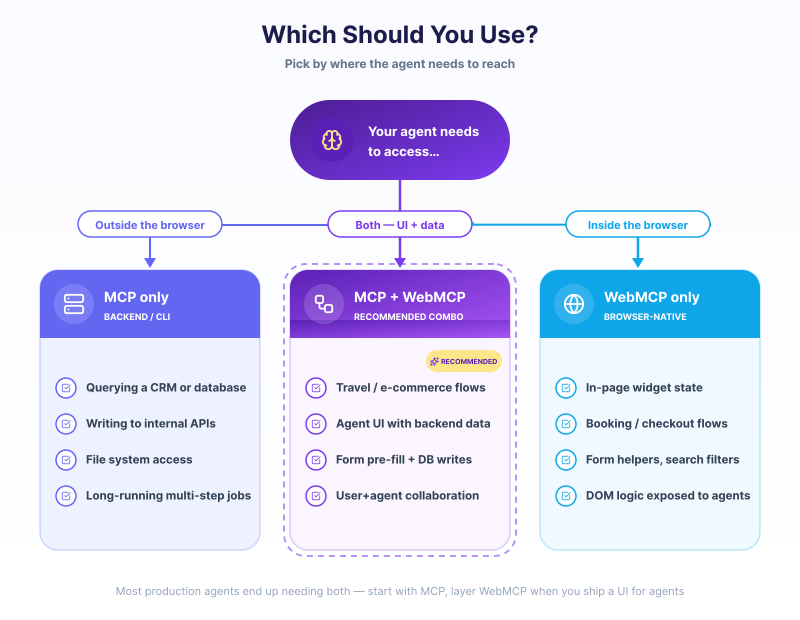
Start with MCP if your agent needs to read or write anything that isn't rendered in a browser: data sources, APIs, file systems, third-party services. The tooling is mature, the SDKs are solid, and the ecosystem has enough reference implementations that you rarely have to start from scratch.
Add WebMCP if you're also building or maintaining a web application that agents will interact with. Registering tools in your web app now, even behind a flag, gets you ahead of the shift toward agents expecting reliable, structured web interfaces rather than DOM scraping.
Skip WebMCP for now if your use case is entirely backend or CLI-based, or if your browser agent needs are already covered by existing MCP tooling. The spec is still experimental, Chrome is the only engine running it (behind flags), and production deployments aren't common yet.
These two standards are converging toward a world where agents have consistent interfaces at every layer: backend services through MCP, web applications through WebMCP, with JSON Schema as the shared language for tool definitions across both. Getting familiar with both now means you won't be caught retrofitting when adoption catches up.
Frequently Asked Questions

Next Steps
Connect an agent to any web app
No signup, runs in your browser
Ready to let your AI agent act on the live web?
Headless browsers give your agent a copy of the web. Webfuse gives it the session your user is actually in — over MCP, with no install.
- No credit card
- Free forever plan
- Quick setup
Related Articles