Customer-facing AI agents need more than text generation. They need to act in a browser, respond quickly enough for live conversation, and work inside the user's authenticated session.
That usually leads to two implementation models: run a headless browser on remote infrastructure, or run inside the user's live browser session. Both can work, but they solve different problems. Headless browsers are a good fit for background automation. Live sessions are often a better fit for customer-facing voice and support workflows, where latency, authentication, and visibility matter.
Quick Summary
- Headless browsers are a strong fit for scraping, testing, and batch automation.
- Live sessions are a better fit when a user is already on the page and needs to see the agent act in real time.
- For voice agents, latency often decides the architecture.
The main challenge is not deciding what action to take. It is executing that action reliably in a modern web app. A model may produce the right form values, but the action can still fail if the target sits inside an unhydrated React Suspense boundary, an Angular component is still updating, a Salesforce Lightning element is hidden behind Shadow DOM, or a cookie banner blocks the click target.
Resolving the execution bottleneck forces engineering teams to choose an architecture. The choice dictates the latency profile, the security perimeter, and the integration complexity.
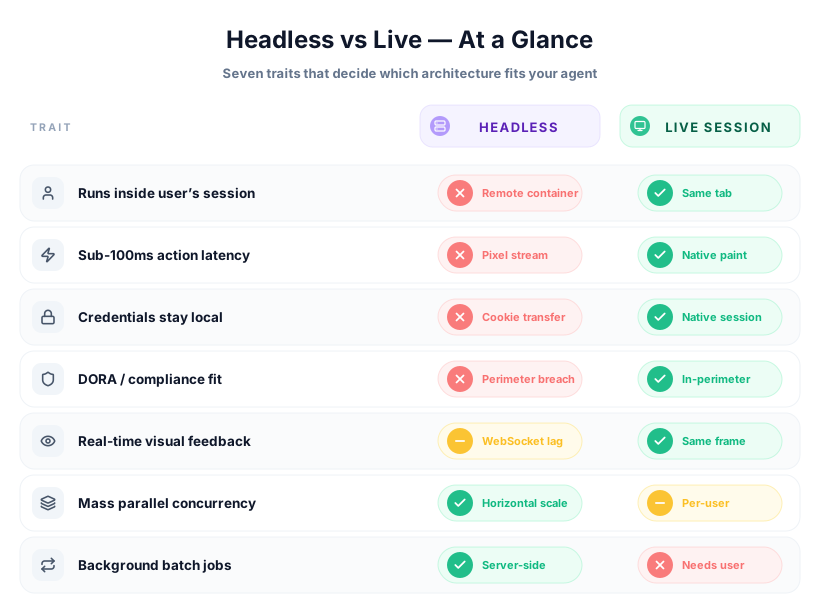
Evaluating the Latency Budget
Voice-driven interactions leave little room for delay. Natural conversation starts to feel broken once response times drift too high, and web automation has to fit inside that budget rather than sit on top of it.
Speech recognition, end-of-speech detection, LLM response time, and text-to-speech synthesis already consume most of the available time. In many systems, the full pipeline lands around 1,200 milliseconds before the browser action is even considered.
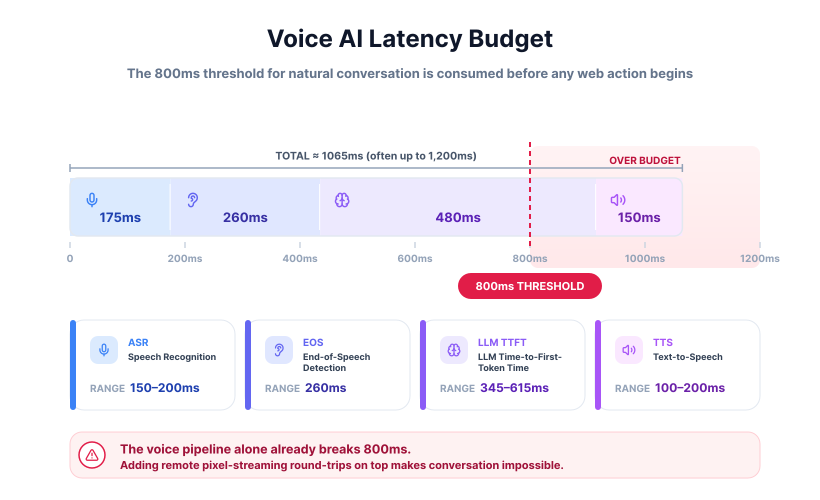
Web automation approaches that add hundreds of milliseconds on top of this pipeline produce broken experiences. The execution layer cannot afford to add network round-trips for pixel streaming. The system must operate within the existing browser session to meet the strict timing constraints.
Headless Browsers
Headless browsers provide a clean, isolated environment for task execution. A server starts a fresh Chromium instance, runs the task, and tears the environment down afterward. That model works well for testing, data extraction, and background automation, where isolation and repeatability matter more than immediacy.
The tradeoff is that the browser runs outside the user's active session. If the user is authenticated locally, the remote instance does not automatically share that state. To act on the user's behalf, the system usually has to copy session material such as cookies into the remote environment. In regulated settings, that can create governance and compliance concerns.
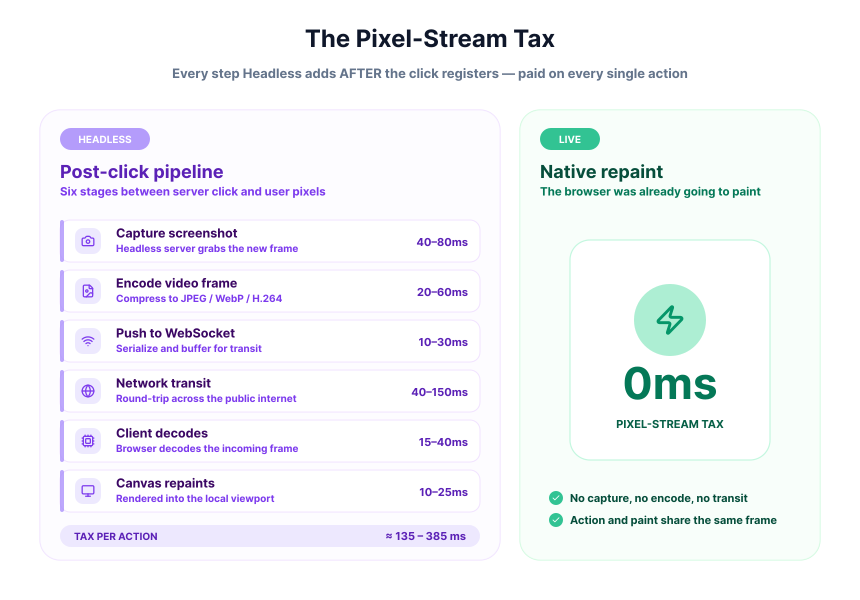
It also separates the action from what the user sees. If the remote browser clicks a button and opens a modal, the user does not see that directly unless the system streams screenshots or video back to the client. That extra transport layer adds latency and makes the experience feel slower.
Playwright

Playwright is a browser automation framework that drives cross-browser execution for developers. Microsoft maintains this open-source project, which interacts with browsers through a bidirectional WebSocket connection. AI agents use Playwright to load pages, evaluate JavaScript, and extract content for LLM processing. The framework provides rich selectors and auto-waiting mechanisms out of the box.
- Multi-page support: The API manages multiple browser contexts simultaneously, isolating cookies and local storage between individual execution runs.
- Network interception: Developers mock network requests or modify HTTP headers during execution to test edge cases and agent error handling.
- DOM traversal: Agents extract the accessibility tree using built-in methods to feed concise representations to LLMs, reducing overall token consumption.
- Trace viewer: The system captures execution logs, network payloads, and DOM snapshots to debug failed agent actions post-execution.
Browserbase

Browserbase is a serverless platform that hosts headless browsers for AI agents. The infrastructure manages the complexity of scaling browser instances, handling session timeouts, and dealing with bot mitigation systems. Agents connect to the service via standard automation protocols and receive a dedicated, clean execution environment. The platform abstracts away the DevOps burden of maintaining a fleet of Chrome containers.
- Session persistence: The service keeps browser contexts alive across multiple LLM reasoning cycles to maintain active login states and shopping cart data.
- Proxy rotation: The infrastructure automatically routes traffic through different IP addresses to avoid rate limits on heavily guarded target domains.
- Stealth mode: The environment includes built-in configurations to bypass common anti-bot protections and advanced canvas fingerprinting checks.
- Debug viewing: Developers access a live video stream of the remote browser to monitor agent behavior during complex, multi-step execution workflows.
Browserless

Browserless is a cloud infrastructure that provisions headless browser APIs for data scrapers. It operates as a managed service offering high-concurrency browser execution environments accessed via REST APIs or WebSocket connections. The platform focuses heavily on raw execution speed and throughput for background tasks. Teams use it to run thousands of parallel agent extraction jobs without managing server clusters.
- GraphQL endpoints: The API supports structured queries for specific DOM elements, returning clean JSON payloads instead of raw, unparsed HTML.
- Concurrent execution: The infrastructure scales horizontally to handle massive parallel scraping jobs across geographically distributed worker nodes.
- Custom docker images: Engineers deploy customized browser binaries with specific Chrome extensions pre-loaded for highly specialized scraping tasks.
- Webhook integration: The system pushes extracted data back to the originating server once the autonomous agent completes the defined web task.
Headless browsers give your agent a copy of the web.
Webfuse gives it the live session.
Live Sessions
Live sessions run the execution layer inside the browser the customer is already using. The agent works in the same tab and uses the state that already exists there, including authentication, cookies, and local storage.
That changes a few practical things right away:
- The agent does not have to recreate the user's session on a remote server.
- Actions appear directly in the page the user is already viewing.
- Existing security controls and analytics stay in the same environment.
This is why live sessions fit real-time support and voice workflows well. When the agent fills a form or clicks a button, the result shows up immediately instead of being relayed back from a separate browser.
They can also be more reliable in complex JavaScript applications, where timing and page readiness often break browser automation.
Webfuse

Webfuse is a proxy-based execution layer that augments live sessions for enterprise AI platforms. The service acts as an on-demand reverse proxy that injects a virtualization layer into any target website without requiring infrastructure changes from the website owner. Voice agents and LLM orchestrators connect to the session via an MCP server or direct RPC WebSocket, receiving compressed DOM snapshots and issuing actuation commands. The execution happens inside the user's active browser, making it highly suitable for real-time customer support workflows where visual audit trails matter.
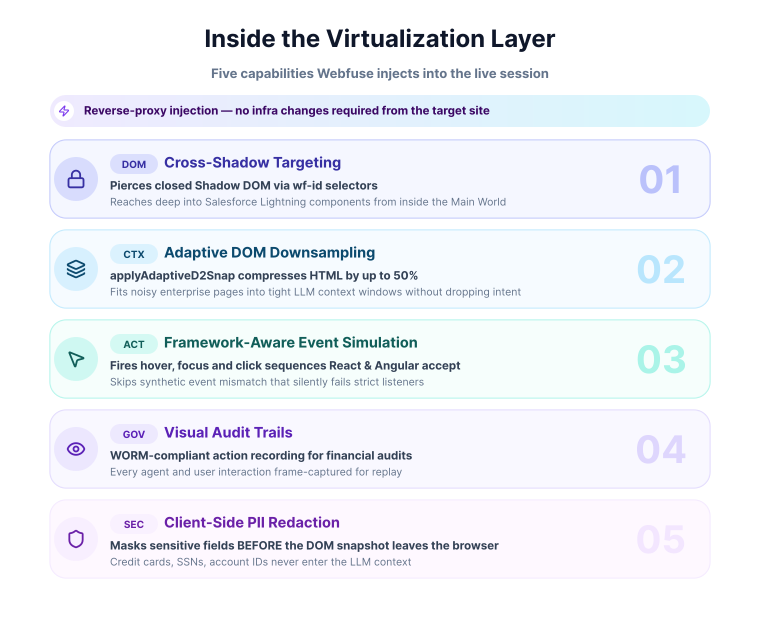
- Cross-shadow targeting: The API penetrates Shadow DOM and iframe boundaries to interact with encapsulated components, allowing agents to click elements deep inside Salesforce Lightning interfaces using the
wf-idattribute. - DOM downsampling: The
applyAdaptiveD2Snapalgorithm compresses a DOM snapshot to fit a target LLM token budget (around 32K tokens by default), retaining structure and the interactive elements agents target viawf-id. - Visual audit trails: The platform records every agent action and user interaction for strict compliance reporting, storing the output in WORM-compliant storage for financial services audits.
- Event simulation: Actuation commands fire the complete sequence of framework-level events, including hover and focus states, to satisfy strict React and Angular event listeners.
- PII redaction: The virtualization layer masks sensitive fields like credit card numbers on the client side before the DOM snapshot ever reaches the external LLM provider.
Chrome CDP
Chrome CDP is a protocol layer that exposes internal browser APIs for automation engineers. Connecting an agent to a local debugging port allows the system to drive an already active browser rather than booting a new, isolated container. This attachment method means the AI operates within the authenticated environment the user is actively viewing. Developers utilize this approach when they need granular control over a visible session without injecting external JavaScript libraries.
- Active attachment: Agents connect directly to a running browser tab, sharing the live session, existing cookies, and local state without transferring credentials to a remote server.
- Raw input emulation: The protocol bypasses high-level JavaScript events by dispatching low-level input commands, simulating exact mouse coordinates and key presses within the user's window.
- Live DOM inspection: Engineers query the rendered document object model in real-time, giving agents immediate access to newly painted elements on the user's screen.
- Network monitoring: The system intercepts live HTTP requests, allowing the automation logic to pause execution until specific backend data finishes loading visually.
Browser Use

Browser Use is an open-source library that connects language models to local browsers for agent builders. The framework takes a goal-oriented approach, allowing the developer to pass a prompt and an LLM client, after which the library autonomously determines the required browser actions. It manages the translation between the model's text outputs and the Playwright Python commands required to drive the local Chrome instance. The project emphasizes simplicity, letting developers spin up an agent with minimal initial configuration.
- Self-correcting execution: The agent evaluates the page state after each action, reading the new DOM to retry the command if the expected outcome fails.
- Multi-tab orchestration: The library manages workflows that span across several open browser tabs simultaneously, switching contexts to gather scattered data points.
- Vision capabilities: The system captures screenshots and annotates interactive elements with numeric bounding boxes to feed context to multimodal visual models.
- Extensible action space: Developers register custom Python functions as tools that the agent calls during its autonomous execution loop to interact with local databases.
Choosing Between the Two
Headless browsers are a strong fit for background automation: scraping, testing, scheduled tasks, and other workloads where no user is waiting on the screen. They are easy to isolate, easy to scale, and well suited to parallel execution.
Live sessions are a better fit when the agent needs to work inside a real user's active session. They keep authentication local, provide immediate visual feedback, and avoid the extra round-trips that make real-time interactions feel slow.
| Factor | Headless (remote) | Live session (in-browser) |
|---|---|---|
| Where it runs | Remote server | The user's own browser |
| Authentication | Cookies copied to a remote instance | Inherited from the active session |
| Visual feedback | Screenshot streaming | Native and immediate |
| Latency | Adds network round-trips | Local execution |
| Best fit | Scraping, testing, background jobs | Real-time customer support and voice |
For voice agents, that last point matters most. The speech pipeline already consumes much of the response budget, so adding remote browser streaming usually pushes the interaction further out of range for natural conversation.
Frequently Asked Questions

Next Steps
Connect an agent to any web app
No signup, runs in your browser
Ready to let your AI agent act on the live web?
Headless browsers give your agent a copy of the web. Webfuse gives it the session your user is actually in — over MCP, with no install.
- No credit card
- Free forever plan
- Quick setup
Related Articles