AI agents now run multi-step work across enterprise web apps, which gives software write access to production systems. One unverified action can send a wire transfer, change a live configuration, or edit a customer record. A checkpoint sits in front of those actions: the agent's proposed change waits until a person approves it.
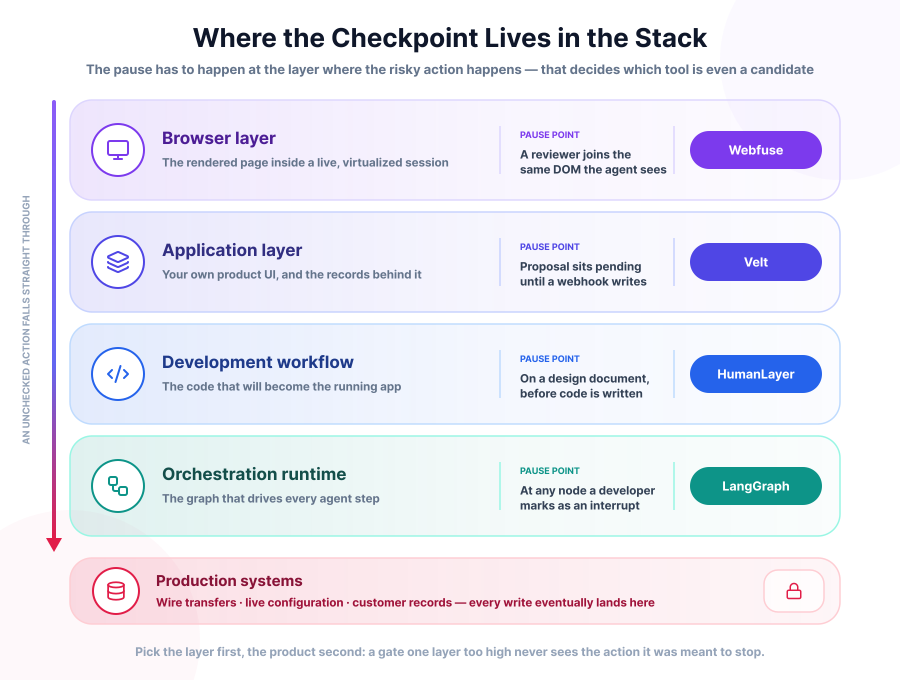
Building that checkpoint means pausing agent execution, showing the proposed action to a reviewer, and resuming once the reviewer approves. Webfuse, HumanLayer, LangGraph and Velt each do this at a different layer of the stack - a browser proxy, a coding IDE, an orchestration framework, and a UI SDK.
TL;DR
Pick the tool by where the risky action happens.
Webfuse (our own product) pauses inside the user's live browser session. Built for web apps with no API.
HumanLayer puts the review on the design document, before any code is written.
LangGraph pauses at a node you mark in the graph. You build the reviewer experience yourself.
Velt puts approval inside your app's own UI. Proposals sit apart from live data until someone signs off.
Webfuse: pausing live browser sessions for a human to join
Webfuse runs as a proxy between the browser and the origin server. When a session starts, it intercepts the site's HTTP responses and renders the page inside a virtualized container, without touching the target app's source code. The agent reads and acts on the same DOM the person sees, in the same browser tab, in real time.

When an agent hits a high-stakes step, Webfuse pulls a reviewer into that live session. The session becomes shared, and the reviewer sees the page itself rather than a summary of it. The pieces that make this work:
- Co-browsing escalation - a reviewer joins the live session to approve or correct what the agent is doing, in the same DOM state.
- Session recordings and audit logs - every agent action gets logged with a video replay, tying the model's reasoning to what happened on screen.
- Element-level rules - admins set allow and deny lists for specific URLs or DOM elements, so an agent can read a support ticket but not touch the billing field on the same page.
- Data masking - the proxy strips personal information, a card number or a password, before it reaches the model.
A bank employee approving a wire transfer an agent has drafted: the agent fills in the form fields, an admin rule marks the step as one that needs sign-off, and the employee gets pulled into the same session to check the numbers before clicking confirm. Both sides see the identical page state, and the video log captures the whole exchange for compliance review later.
Webfuse fits customer-facing workflows running on legacy web apps with no API, where the graphical interface is the only way in. It connects over MCP, so agent frameworks such as LangChain or AutoGen can drive a live session, and it supports a direct WebSocket bridge for voice agents.
Webfuse works at the browser layer, so a third-party proxy sits inline with production traffic. It also can't gate work that happens outside a browser: a background job, a database trigger, an internal API call.
Put a human in the loop of a live browser session
Webfuse runs any web app through a proxy, so an agent and a person can work in the same page at the same time. Pull a reviewer into the session before the agent submits a form, with element-level rules and a video log of every action.
HumanLayer: stopping the agent before it writes code
HumanLayer is an IDE and cloud platform built for teams running AI coding agents against large codebases. The checkpoint comes before any code gets written.

The workflow is called QRSPI: Questions, Research, Design, Structure, Plan, Implement. Questions come first, before anything is written. During Research, the agent maps the codebase, its dependencies and the patterns around it. Design produces a document the team comments on, Structure breaks that into phased, verifiable steps, and Plan adds file paths, test cases and acceptance criteria. Only then does the agent move into Implement.
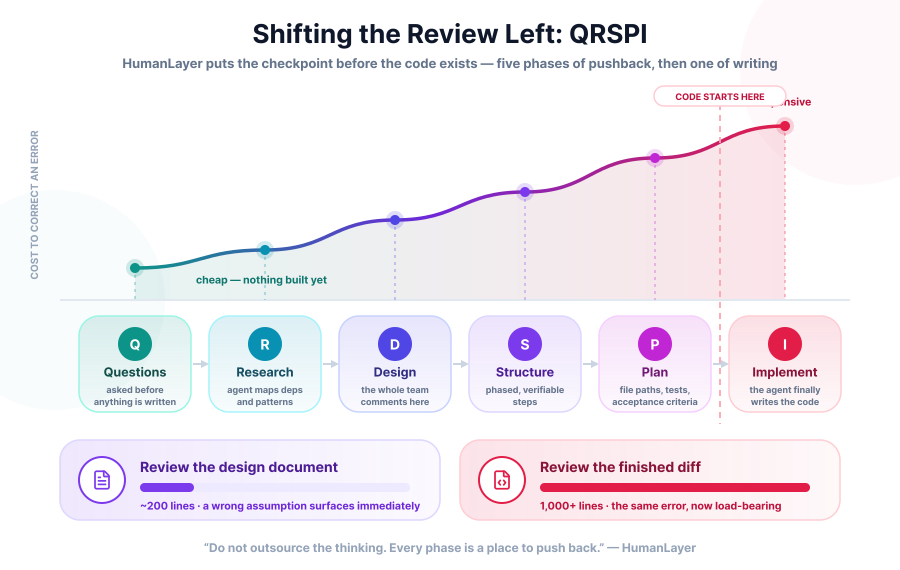
HumanLayer's stated principle: "Do not outsource the thinking. Every phase is a place to push back." The design phase is where that pushback happens as a group, and the aim, in their words, is "your whole team - humans and Agents - commenting on the design before a single line is written."
Beyond the workflow itself:
- Task workspaces group agent sessions, files, and worktrees under one shared environment, so a team can see which agent is touching which part of the codebase.
- Bring-your-own-model support means teams plug in their own Claude, Codex, or Copilot subscription instead of paying a separate token bill.
- A local daemon runs parallel agent sessions on a developer's machine, and the cloud side handles longer background tasks and syncs sessions across a team, so a reviewer working from a different device still sees the current state of a session.
HumanLayer hasn't open-sourced the QRSPI implementation, so the mechanics above come from how the team describes it publicly rather than from a spec. The scope is narrow: this is for software teams working in a codebase, not for approving agent actions in a business app.
LangGraph: pausing a program at a set point in its logic
LangGraph is a low-level framework from LangChain for building agent workflows as graphs, where nodes are functions or model calls and edges control the flow between them. It ships no review interface, only the primitives to build one.

A single call to a language model is stateless and forgets everything the moment it returns a response. Wrapping those calls in a graph with a persisted state object gives the agent memory across a long workflow, and it gives a pause something concrete to save and restore. That state object is typed, a dictionary or a Pydantic model in most setups, and each node records how it changed the state as the run continues.
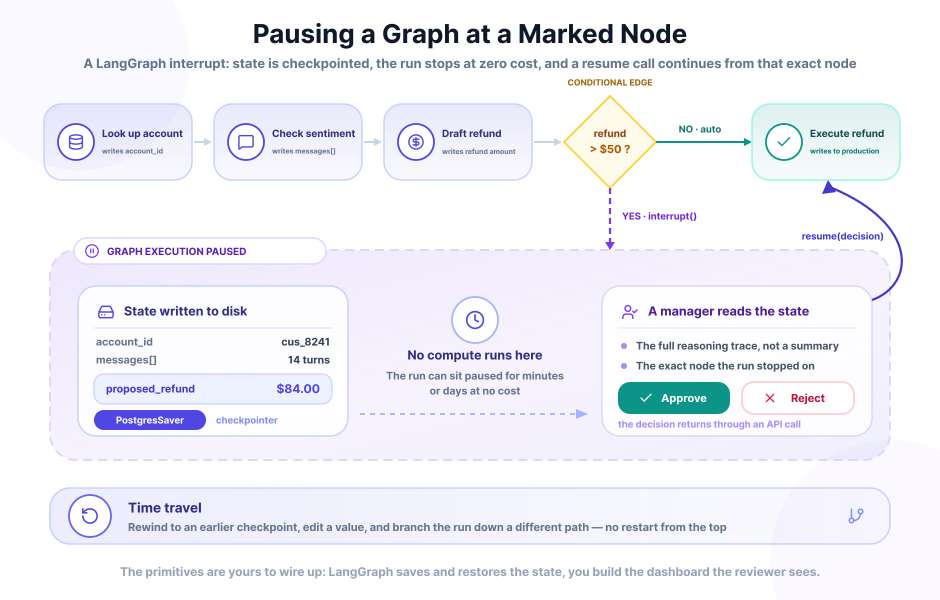
The relevant primitive is the interrupt. A developer marks a node in the graph, a payment step for example, as one that should pause and wait. What that gets you:
- The run stops and hands back a value. Per the documentation, the interrupt function pauses graph execution and returns a value to the caller, then waits for you to resume with input.
- The state goes to a database. A checkpointer writes it,
SqliteSaverfor local work andPostgresSaverin production. - Nothing runs while it waits. No compute is consumed, so a graph can sit paused for minutes or days.
- Time travel rewinds a run. A reviewer returns to an earlier checkpoint, edits a value, and branches down a different path instead of restarting from the beginning.
A support workflow shows the shape of it: a graph holds a customer's account ID, conversation history, and a proposed refund amount as it moves through nodes for data lookup, sentiment check, and refund calculation. A conditional edge routes any refund over fifty dollars to an interrupt node before the final execution step. The graph stops there, and a manager reviewing the state sees the agent's full reasoning trace before approving the refund through an API call that resumes the graph from that exact point.
LangGraph suits teams building custom, often cyclical workflows who want full control over where the pause happens and what the reviewer sees. You build the review dashboard, the notification system and the resume logic yourself.
Velt: routing AI proposals through an approval interface inside the app
Velt is an SDK for embedding review and approval into a web product's own UI, so the reviewer stays in the app instead of moving to Slack or email. It targets apps where an agent proposes a change and a person signs off on it before the change reaches production.

An agent's suggestion - a document change, a report figure, a database row - sits in a pending state, separate from live app data, until someone reviews it. The pieces developers wire up:
- Approval flows with routing rules: a single sign-off for one type of content, a multi-step chain for another, based on role or document type.
- Contextual suggestions shown as inline diffs or comment threads attached to the exact UI element they affect.
- Immutable audit logs recording every proposal, edit, and approval with a timestamp and the approver's identity.
- Memory ingestion, where the system indexes past approvals so future agent proposals line up with what reviewers have accepted before.
A financial analyst reviewing an AI-generated report sees the agent's proposed numbers highlighted in the dashboard, the analyst opens a side panel to see the agent's reasoning, edits a figure directly in the suggestion view, and clicks approve. Only then does Velt fire a webhook to the backend, which writes the change to the production database. If the change needs sign-off from more than one person, Velt routes it to the next approver in the chain automatically, and the underlying record stays untouched until every required approval comes in.
Velt also ships a review agent, where a model checks AI-generated content against a set of stored rules - a brand guideline, a compliance policy - and drops a comment flagging an issue before a person even opens the document. It's a first-pass check rather than a final decision, and it cuts what the human reviewer has to catch manually.
Velt bills on activity rather than seats, so a large but mostly passive user base does not drive the cost. Their materials describe the billing unit in two ways, as monthly active collaborators in one place and as monthly active documents - "a unique document that has CRUD operations performed on it by any Velt feature during the month" - in another. Velt states that its products are "SOC 2 Type II and HIPAA compliant", with multi-region hosting and a self-hosting option for sensitive data. It fits fintech dashboards, creative review tools, and any app where a person needs to see and edit an AI proposal in the interface they already use. Like Webfuse, it works at the app layer, so the agent logic still lives somewhere else.
What these four have in common
All four separate the proposal from the live data it would change, and all four keep a record of who saw what and when. The reviewer gets something concrete to act on: a page, a design document, a state payload, a diff. The record carries as much weight as the pause. A wire transfer approved with no trace of who clicked confirm, and on what basis, is still an audit gap.
Which one fits your setup
| Tool | Best for | Where it pauses |
|---|---|---|
| Webfuse | Legacy web apps with no API, customer-facing sessions | Inside a live browser session |
| HumanLayer | AI coding agents working in large codebases | Before code gets written |
| LangGraph | Custom, often cyclical agent workflows needing full control | At a developer-defined graph node |
| Velt | In-app review of AI-generated content, with a UI already built | Before a webhook writes to your database |
The four are not mutually exclusive. A team can run LangGraph as the orchestration layer and use Webfuse for the steps that happen in a browser, or pair HumanLayer's design review with Velt's in-app sign-off on the shipped feature. The build effort differs more than the outcome: Velt and Webfuse ship a reviewer experience, LangGraph ships primitives, and HumanLayer ships a workflow you follow.
Frequently Asked Questions

Next Steps
Connect an agent to any web app
No signup, runs in your browser
Ready to let your AI agent act on the live web?
Headless browsers give your agent a copy of the web. Webfuse gives it the session your user is actually in — over MCP, with no install.
- No credit card
- Free forever plan
- Quick setup
Related Articles