LLMs have become a core component of AI web browsing agents. Previously, automating a web journey required formal models of both web browsing and web-based user interfaces (UIs). An LLM can serve as a plug-in reasoning backend: given serialised web UI state, it is expected to suggest input actions that progress a specified web browsing task. Serialised UI state is, more ergonomically, referred to as a snapshot.
Snapshots and action suggestions are the two key artefacts along the agent loop. Action suggestions are elicited from the web agent LLM backend. Suggestions can be acted out via automated web browser environments, such as Playwright or Webfuse, for example, clicking or typing. The snapshot, on the other hand, is an artefact created by the agent harness, that is, the individual application component between the LLM and the web browser.
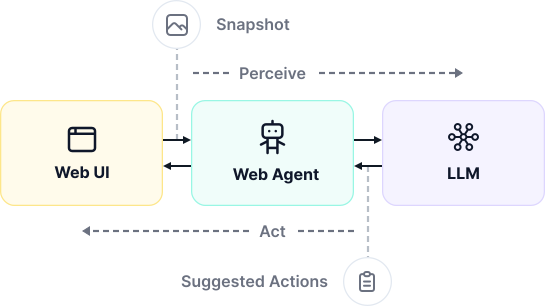
Creating snapshots for LLMs is a central challenge of developing efficient web agents. It is a trade-off between representation utility – how well models can interpret the such encoded UI – and LLM token costs. Snapshots are the major cost factor of an agentic web journey, accumulated over multiple rounds of the loop.
GUI Snapshots
Screenshots, i.e., GUI snapshots, resemble what humans see when viewing a web page at a given point in time. Early LLM-based web agents were primarily premised on GUI snapshots because of this evident equivalence. By design, the GUI surfaces only the UI context designated to be visible to the user.
The document object model (DOM) is a web browser's model of a web application UI's runtime state. With few exceptions, the DOM is the single source of truth regarding the UI. Most snapshot representations are thus, technically speaking, derivatives of a raw DOM snapshot. For the cases not reflected in the DOM, GUI snapshots are a first-class base representation.
Rendering a GUI snapshot from the DOM is, moreover, non-trivial; no client-side library manages to create GUI snapshots in reasonable quality or time – HTML2Canvas demonstrates the limits.

Vision-Based Targeting
The snapshot representation dictates how elements can be targeted in the live UI. Unambiguous targeting based on a visual representation must be either geometric (absolute), e.g., via point coordinates, or semantic (relative), e.g., via cues, such as "Button with Text 'Shop'". On its own, semantic targeting introduces a circular problem: which element has this text?
Consider the web browsing task: "Navigate to the Apple online shop". In combination with an action, in this case click, the agent could target the Shop button via a point coordinate, e.g., (725, 750).

When the UI shifts between snapshot and action time, geometric targeting suggestions might have become obsolete.
Depending on the web browser environment, screenshots might be constrained to the GUI viewport. Scrolling is a secondary task that is imperative with viewport-contrained GUI snapshots.
The Problem with GUI Snapshots
Image data is downsampled to make it economically viable as input to LLMs. It reduces LLM input tokens to a few thousand for real-world-representative full-page screenshots. A common downsampling approach is averaging n×n-tiles of pixels, as known from image downscaling. Side effects are: pixel-precise targeting does not map back to the live UI, and small geometric features are not preserved (e.g., small labels). Downsampling effects can be accounted for under certain circumstances, e.g., by providing a snapshot format that downsamples to its identity. However, GUI aspect ratio and detail might be beyond the agent's control.

Grounded GUI Snapshots
Geometric targeting remains unreliable with certain models and responsive UIs. To rely on semantic targeting instead, the agent must link relevant elements in the live UI to semantics in the screenshot. Relevance usually equates with actionability, but ultimately depends on the snapshot's purpose.
Set-of-Mark prompting is the go-to technique to create grounded GUI snapshots1. In this context, relevant elements are parsed from the live DOM and indexed with a unique numeric identifier. Each indexed element in the live UI is then enhanced with a coloured bounding box associated with the respective identifier.

Browser Use agents implement Set-of-Mark-grounded GUI snapshots2.
DOM Snapshots
The DOM is parsed from HTML. In its latest state it can be serialised back to HTML – including all runtime mutations. Research has supported LLMs' capabilities to interpret HTML, and even to navigate such encoded UIs3. For that reason, DOM snapshots are a compelling alternative to GUI snapshots. LLMs excel at code generation and review, so these capabilities are no surprise.
Cross-origin iframe elements and canvas elements are exceptions to the DOM-is-source-of-truth assumption: canvas-drawn GUI is not reflected in the DOM, nor are external, self-contained DOM subtrees if no explicit policy allows it. Structurally, both are leaves in the serialisable DOM tree.
DOM-Based Targeting
Programmatically, DOM elements can be targeted by different relative means. CSS selectors abstract targeting with a standalone language. Whilst CSS selectors can resolve to more than one element in the DOM – compare semantics of the HTML class and id attributes – every element has at least one unique CSS selector, constructed from nth-child node paths, e.g., main .section:nth-child(2) > .row:nth-of-type(5) > form button.

A raw DOM snapshot is complete, beyond the GUI that renders in the spatially limited browser viewport. For a human-like visual browsing experience, scrolling can be abstracted by an indirect scroll-target-into-view mechanism.
The Problem with DOM Snapshots
DOM snapshots of real-world web pages may come at a size of several megabytes, which converts to millions of LLM input tokens – we estimate a raw snapshot of cnn.com at around 1.5M tokens. At this size, DOM snapshots over-utilise the context window of many LLMs, or even exceed it (such as of GPT-4o (OpenAI)). Ultimately, raw DOM snapshots out-cost GUI snapshots.
Using DOM snapshots with LLM-based web agents requires size-reducing transformations, similar to image downsampling implemented behind LLM APIs.
Extracted DOM Snapshots
The naïve approach to use information from the DOM as a snapshot is element extraction: relevant elements are copied from the live DOM to an initially empty virtual DOM. For small top-k extractions – the k highest-scoring elements – a snapshot of the virtual DOM comes at a fraction of the original DOM's size.
Top-3 DOM Snapshot:
<button type="submit">Submit</button>
<button>More</button>
<a href="/more">Find out more</a>
If done manually, element extraction presupposes correct assumptions about which elements and element properties count as relevant. Alternatively, element relevance scoring can be outsourced to an LLM, at the cost of another inference step.
Extraction disposes of deep DOM hierarchy, which might be salient to the web agent LLM backend. From the below extracted DOM snapshot alone, the original content relationship is lost:
Extracted DOM Snapshot:
<strong>MacBook Air</strong>
<button>Add to cart</button>
<p>Out of stock</p>
<h2>MacBook Pro</h2>
<button>Add to cart</button>
Original DOM Snapshot – Candidate A:
<section class="product">
  <strong>MacBook Air</strong>
  <button>Add to cart</button>
  <p>Out of stock</p>  👈
</section>
<section class="product">
  <strong>MacBook Pro</strong>
  <button>Add to cart</button>
</section>
Original DOM Snapshot – Candidate B:
<section class="product">
  <strong>MacBook Air</strong>
  <button>Add to cart</button>
</section>
<section class="product">
  <p>Out of stock</p>  👈
  <strong>MacBook Pro</strong>
  <button>Add to cart</button>
</section>
Downsampled DOM Snapshots
Downsampling means reducing data point count whilst preserving the overall data shape and most of the relevant features. Picture an image being downsized: the depicted object remains recognisable to a large degree. The concept of image downsampling can be transferred to the DOM by locally 'averaging' DOM subtrees – trading fidelity for size4.
Original DOM Snapshot:
<section class="container" tabindex="3" required="true" type="example">
  <div class="mx-auto" data-topic="products" required="false">
    <h1>Our Pizza</h1>
    <div>
      <div class="shadow-lg">
        <h2>Margherita</h2>
        <p>
         A simple classic: mozzarella, tomatoes and basil.
         An everyday choice!
        </p>
        <button type="button">Add</button>
      </div>
      <div class="shadow-lg">
        <h2>Capricciosa</h2>
        <p>
          A rich taste: mozzarella, ham, mushrooms, artichokes and olives.
          A true favourite!
        </p>
        <button type="button">Add</button>
      </div>
    </div>
  </div>
</section>
Downsampled DOM Snapshot:
<section class="container" required="true" type="example">
  <div class="mx-auto" required="false">
    Our Pizza
    <div>
      Margherita
      A simple classic: mozzarella, tomatoes and basil.
      An everyday choice!
      <button type="button">Add</button>
      Capricciosa
      A rich taste: mozzarella, ham, mushrooms, artichokes and olives.
      A true favourite!
      <button type="button">Add</button>
    </div>
  </div>
</section>
When downsampling is defined over different types of nodes – for instance, elements, attributes, and text – it becomes a powerful technique to control DOM size in a snapshot pipeline. Adaptive implementations can moreover produce snapshots that fall below a hard token limit. Our evaluation revealed that moderate downsampling ratios comfortably fit the mean DOM snapshot of real-world-representative web pages within GPT-4o's context window – leaving headroom for an agent system prompt and a trace of reasoning and action history4.
The Problem with DOM-Based Targeting
When DOM snapshots are transformation artefacts, relative CSS selectors like nth-child paths might not map back to the live DOM. There are two straightforward ways to account for breaking CSS selectors: (1) assigning unique IDs to relevant elements in the live UI that persist transformations (e.g., via a unique attribute UNIQUE-ID="27", which can be selected via [UNIQUE-ID="27"]), and (2) maintaining a source map between elements in the live DOM and the transformed DOM. The latter approach does favourably not affect the snapshot directly.
DOM Snapshot with Inlined IDs:

The DOM-Based Snapshot Pipeline
LLMs are able to reason over HTML. Yet, HTML carries noise, such as obfuscated scripts or hidden subtrees. DOM snapshots should for that reason be seen as a base representation, rather than a target representation.
The concept of DOM downsampling can be utilised as a universal size control in a snapshot pipeline – ideally exposed as quality, the inverse property of downsampling. Moreover, the DOM can be pre-transformed by deterministic techniques, such as pruning hidden subtrees to surface only the tangible UI – a characteristic that is natural with GUI snapshots.
The pipeline approach traceably goes from the raw DOM to an abstract snapshot representation. For example:
- Scope Subtree. Scope in to a task-relevant subtree. An information retrieval task on wikipedia.org can scope into the
mainelement –headerandfooterare irrelevant. - Clone. Clone the live DOM.
- Filter. Apply arbitrary filters to the cloned DOM (in memory). For example:
- Prune Subtrees E.g.:
- Non-interactive Nodes, e.g., hidden elements.
- Irrelevant Nodes, e.g., comment nodes.
- Redundant Nodes, e.g.,
ain thefooterthat has a same-hrefequivalent in theheader.
- Sanitise. E.g., sensitive information from content-editables.
- Clean. E.g., remove stop words from text nodes.
- Prune Subtrees E.g.:
- Serialise. Serialise the cloned DOM to HTML.
- Downsample. Downsample the HTML to control size.
- Translate. Translate the downsampled HTML to any DOM-based representation, e.g., the accessibility tree.
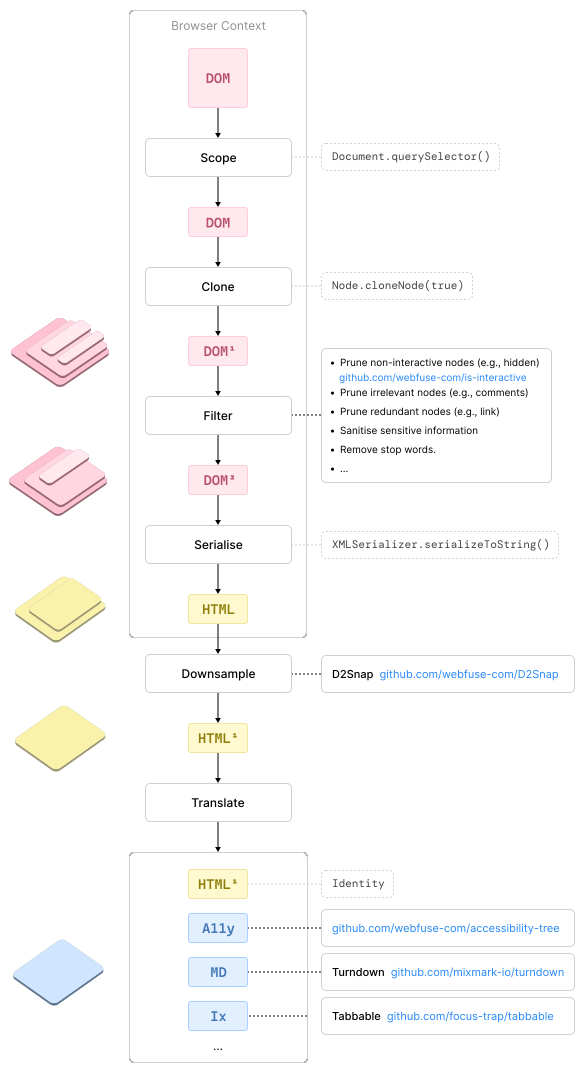
A filtered DOM drastically increases stability of repeatedly run web journeys: if only a single button routes to a target page, the agent perceives an unambiguous action target element. The rule of thumb is: the less actionable options a snapshot transcribes, the better – given all relevant options are covered.
Arbitrary Snapshot Representations
Any text-based snapshot representation can be derived from the single-source-of-truth DOM. Which representation is best highly depends on the given web browsing task. A high-level distinction is between (A) navigation and (B) information retrieval tasks. Navigation tasks do not require extensive text, but actionable elements – if a snapshot omits a relevant button, the LLM is not able to use the encoded UI. Information retrieval tasks, on the other hand, require text, as the text contains topical information, whilst actionable elements do not matter.
Compare the following snapshots representations for the same UI:
DOM Snapshot:
<section class="container" required="true" type="example">
  <div class="mx-auto" required="false">
    <h1>Our Pizza</h1>
    <div>
      <h2>Margherita</h2>
      <p>
        A simple classic: mozzarella, tomatoes and basil.
        An everyday choice!
      </p>
      <a href="add?p=margherita" data-uid="1">Add</a>
      <h2>Capricciosa</h2>
      <p>
        A rich taste: mozzarella, ham, mushrooms, artichokes and olives.
        A true favourite!
      </p>
      <a href="add?p=capricciosa" data-uid="2">Add</a>
    </div>
  </div>
</section>
Accessibility Tree Snapshot:
- document:
  children:
    - section:
      children:
        - heading:
          name: "Our Pizza"
          level: 1
        - heading:
          name: "Margherita"
          level: 2
        - paragraph:
          children:
            - text: "A simple classic: mozzarella, tomatoes and basil. An everyday choice!"
        - link:
          name: "Add"
          url: "add?p=margherita"
          data-uid: 1
        - heading:
          name: "Capricciosa"
          level: 2
        - paragraph:
          children:
            - text: "A rich taste: mozzarella, ham, mushrooms, artichokes and olives. A true favourite!"
        - link:
          name: "Add"
          url: "add?p=capricciosa"
          data-uid: 2
Markdown Snapshot:
# Our Pizza

## Margherita

A simple classic: mozzarella, tomatoes and basil.
An everyday choice!

[Add](add?p=margherita)

## Capricciosa

A rich taste: mozzarella, ham, mushrooms, artichokes and olives.
A true favourite!

[Add](add?p=capricciosa)
Custom Format Snapshot:
[0] H1 "Our Pizza"
[1] H2 "Margherita"
[2] P "A simple classic: mozzarella, tomatoes and basil.\nAn everyday choice!"
[3] A "Add" "add?p=margherita"
[4] H2 "Capricciosa"
[5] P "A rich taste: mozzarella, ham, mushrooms, artichokes and olives.\nA true..."
[6] A "Add" "add?p=capricciosa"
Browser Use agents implement hybrid snapshots: the grounded GUI snapshot is a supplement to a custom-format indexed-list DOM snapshot, similar to the above example. Evaluations show that the indexed-list snapshot representation generally conveys most of the salient UI features for the web agent LLM backend4.
Non-Idiomatic Application Designs
An actionable element might lack affordance – not communicating its actionability through its bare appearance. That is bad UI/UX design practice. The concept extends to the DOM through HTML semantics, which communicate the general purpose of an element to web browsers and developers rather than users. Generalising to web agent LLM backends, the concept of affordance aligns between the GUI and the DOM – the model is a UI representation-agnostic user.
Missing affordances should be rectified in a snapshot wherever they can be discovered. Discoverability is another circular problem: what is an indirect affordance for actionability? Ideally, the underlying actionability is tracked, such as by checking for attached action event listeners. However, there is no browser API for this practice.
As an example for bad affordance in the GUI, imagine an overly subtle 'Shop' button. Bounding boxes in grounded GUI snapshots are a workaround – provided the element is discoverable as actionable in the DOM in the first place.

As an example for bad affordance in the DOM, look at this datepicker from webmd.com:

<div>
  <span class="cell day-header">Sun</span>
  <span class="cell day-header">Mon</span>
  <span class="cell day-header">Tue</span>
  <span class="cell day-header">Wed</span>
  <span class="cell day-header">Thu</span>
  <span class="cell day-header">Fri</span>
  <span class="cell day-header">Sat</span>
  <!-- [...] -->
  <span class="cell day blank"></span>
  <span class="cell day blank"></span>
  <span class="cell day"><span>1</span></span>
  <span class="cell day"><span>2</span></span>
  <span class="cell day"><span>3</span></span>
  <!-- [...] -->
  <span class="cell day"><span>29</span></span>
  <span class="cell day"><span>30</span></span>
</div>
The days wrapped in span (e.g., 16) are clickable, but the HTML communicates no such actionability. The idiomatic DOM equivalent would instead use button elements throughout, or at least assign suitable role attributes like button. A DOM snapshot pipeline leaves space for solving this problem: rewrite the virtual DOM with idiomatic elements.
  <button class="cell day">29</button>
  <!-- OR -->
  <span role="button" class="cell day">30</button>
Choosing Between Snapshot Representations
No snapshot representation fits all purposes; the two base representations alone – GUI and DOM (HTML) – come with markedly different advantages and limitations. A proper snapshot tool should therefore route and cascade:
- Route Modality. Fall back to GUI snapshots if the UI is based on
canvasor cross-originiframeelements; use DOM snapshots by default. - Route Representation. Categorise task and translate DOM snapshot to the most suitable representation. Categorising the task can be done with increasing levels of machine learning – simple keyword matching, or deploying a language model.
- Scope Escalation. If elicited action suggestions are unusable, widen the snapshot scope and representation richness.
- Cascade to Hybrid. If elicited action suggestions are still unusable, augment the rich DOM snapshot with a GUI snapshot for maximum grounding.
| GUI | grounded | DOM | transformed | |
|---|---|---|---|---|
| LLM Input Tokens | Low | Low | High | Low to Moderate |
| Element Targeting | Absolute | Relative | Relative | Relative |
| Snapshot Scope | Free/Viewport | Free/Viewport | Free | Free |
| Snapshot Context | UI | UI | Full | Full |
iframe Context | Viewport | Viewport | Same-origin only | Same-origin only |
canvas Context | Yes | Yes | No | No |
Using Snapshots in the Model Context
Creating a snapshot is one thing. Using it as context to a model prompt is the other. Usually, conversational AI maintains a full trace of history as model context. Since a snapshot is time-sensitive, however, only the latest snapshot can be targeted with actions by an LLM.
Whether to keep a trace of previous actions and model reasoning is a question in its own right. If web browsing is modelled as a history-independent task, the snapshot-to-actions agent loop could even be separated from the persistent conversational loop as transient, one-shot model prompts.
Timing Snapshots in the Web Client
LLM-based web agents are much slower than humans in taking and processing snapshots. Not least for that reason, snapshot rounds should be kept to a minimum and timed so that a snapshot is taken as soon as the UI has reached a stable state. That implies a non-trivial challenge: defining what qualifies as a UI change, and at what intensity such a change counts as a state shift – beyond hard page transitions, e.g., in a single-page application5.
The snapshot is the central artefact in a web agent harness. Its representation is among the most significant factors for agent success6.
At Webfuse, we develop a platform for agentic browsing. A focus of our research is on efficient snapshot representations. The Automation API can be used to create next-level snapshots: timed, rectified, across iframe boundaries, etc.
Footnotes
- https://arxiv.org/abs/2310.11441 ↩
- Our reimplementation of Browser Use's grounded GUI snapshots: https://github.com/webfuse-com/D2Snap/blob/main/snapshots/_bu.js ↩
- https://arxiv.org/abs/2210.03945 ↩
- https://arxiv.org/abs/2508.04412 ↩ ↩2 ↩3
- https://github.com/webfuse-com/DOMQuake ↩
- https://arxiv.org/abs/2504.01382 ↩

Connect an agent to any web app
No signup, runs in your browser
Related Articles