Actuation, a term borrowed from robotics, describes an artificial entity’s active manipulation of a problem-specific world. For example: robotic sorting of objects in a warehouse, where the robot is the entity and the warehouse and its items constitute the world. In the context of web agents, where an AI agent is the entity and the web application is the world, actuation comprises synthetic input to the application’s user interface (UI). When web agents are deployed directly on human-facing UIs, synthetic input – programmatically dispatched in the client – emulates human user input.
Events – Atomic Signals
Events represent the atomic signal of an application state change, such as an aspect of a user action. In the DOM API, an event is an Event instance dispatched on a specific EventTarget instance, such as an HTMLElement. Events can invoke any number of application-defined event listeners and browser-native behaviour.
document.querySelector("button#submit-button")
  ?.addEventListener("click", (event: MouseEvent) => {
    console.debug("Submit button clicked:", event.target);
  });
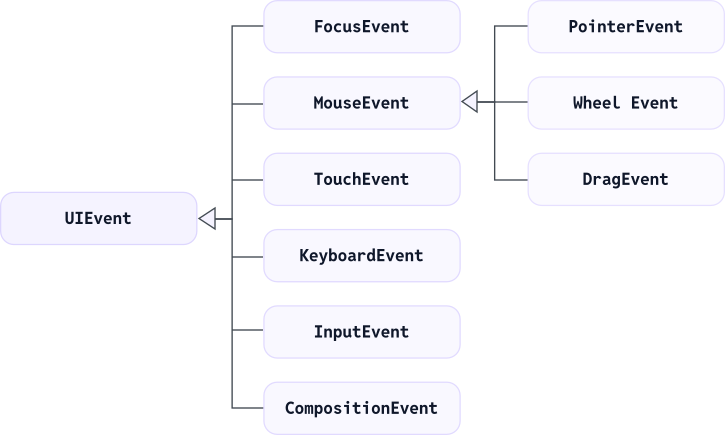
Input devices trigger events inheriting from UIEvent, such as MouseEvent or KeyboardEvent. Each such event is targeted at a specific element in the DOM and at the view (i.e., the Window) that the element belongs to.
Event Class Inconsistencies
Strictly speaking, not every event that can be triggered by input devices is classified as UIEvent, despite being practically related to a specific view. For example, ClipboardEvent does not inherit from UIEvent. With regard to actuation, the browser-native event classification is not ideal. The sub-classification as a UIEvent is historical rather than conceptual.
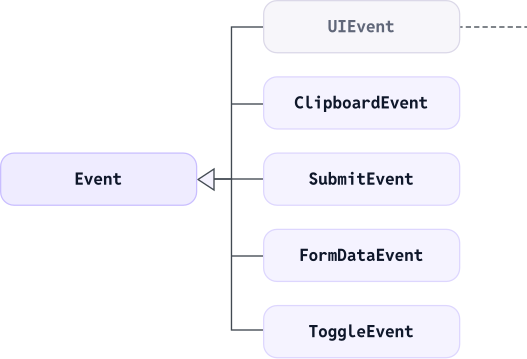
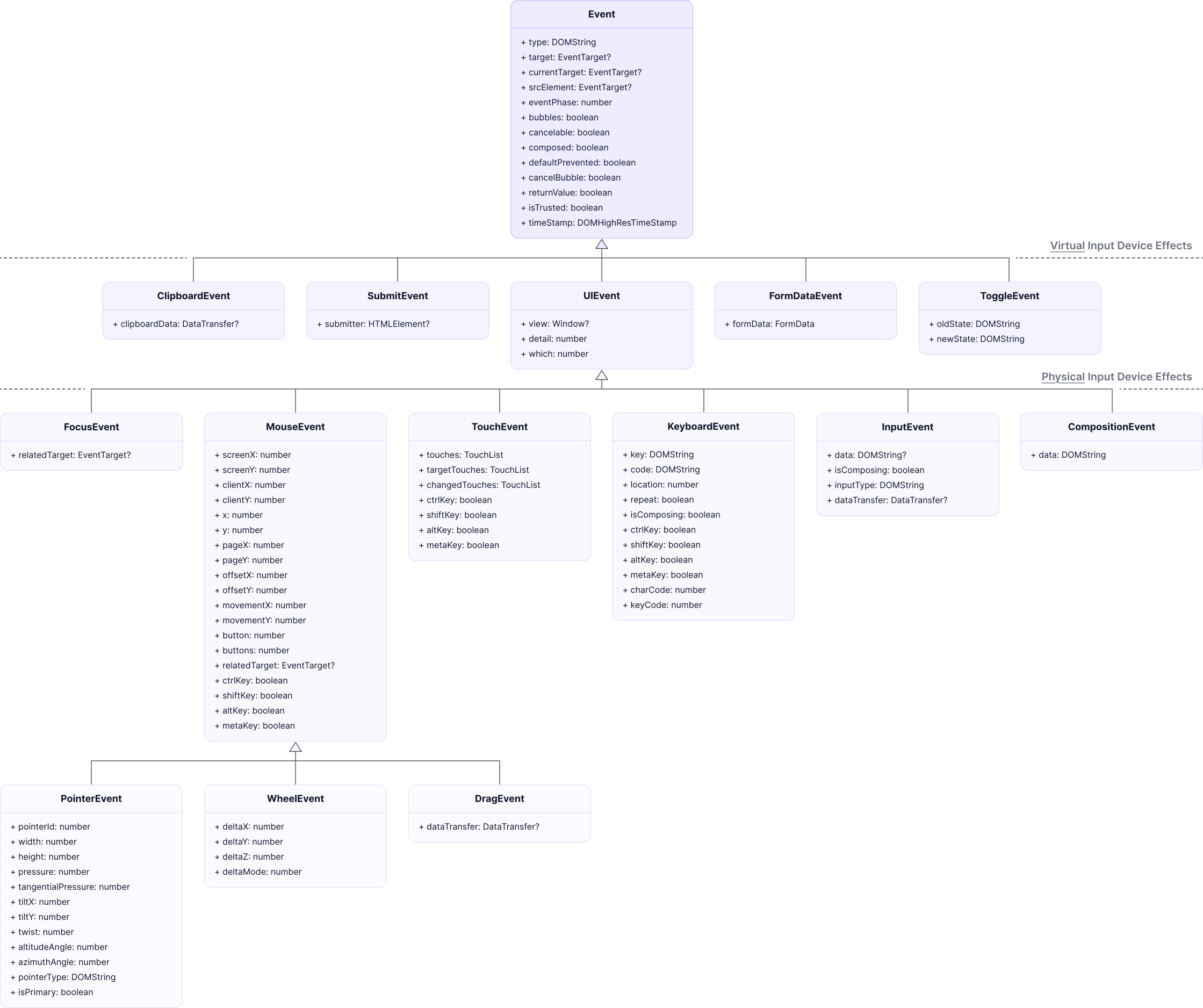
To fit an architectural model to the DOM standard, it is best to distinguish between physical and virtual input device effects. Whilst the keyboard is a physical input device and thus KeyboardEvent is a UIEvent class, the clipboard is not such an input device and hence ClipboardEvent is not a UIEvent class. Input itself is not a device either, but InputEvent is, in most cases, indirectly caused by a KeyboardEvent targeted at an editable element.
The 'isTrusted' Roadblock
Specific event options depend on the input action:
const options: PointerEventInit = {
  clientX,
  clientY,
  screenX: clientX + window.screenX,
  screenY: clientY + window.screenY,
  detail: 1,
  pointerId: 1,
  pointerType: "mouse",
  bubbles: true,
  cancelable: true,
  composed: true,
  isPrimary: true,
  view: window
};
These options are reflected by the event instance identically, as read by listeners. However, the isTrusted read-only property is set by the browser. It is not overridable. The browser strictly sets it to false for synthetic events not coming directly from a physical input device.
Input Actions – Event Sequences
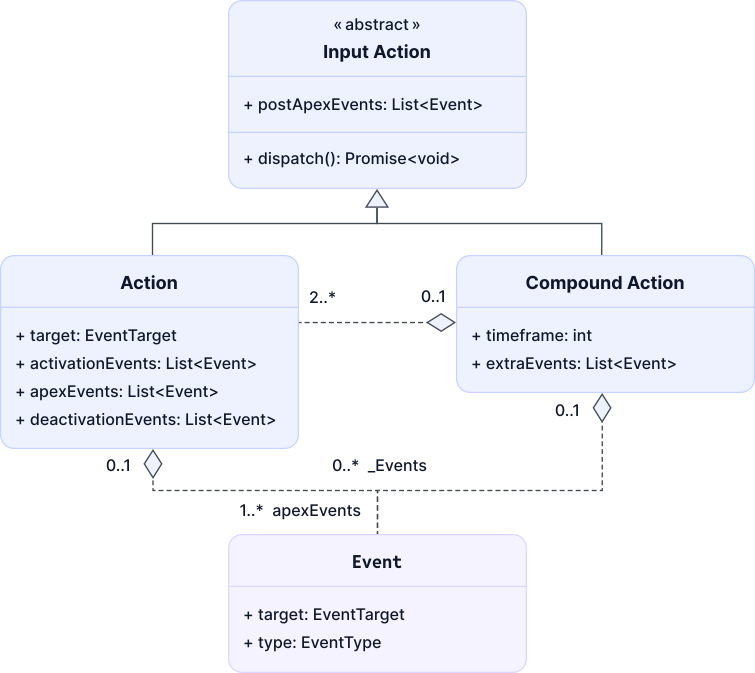
Input actions are user actions, composed of atomic events. For instance, a mousedown event is necessary for a click action, but only a subsequent mouseup event on the same target element renders it complete through a click event. Atomic events in an action sequence allow for fine-grained application control.

There is no DOM API for synthetic input on the action level, only for creating and dispatching atomic events: e = new MouseEvent("click") and EventTarget.dispatchEvent(e). HTMLElement.click() is but a shorthand for an atomic click event dispatch, not for the fully qualified input action.
Symmetry in Event Sequences
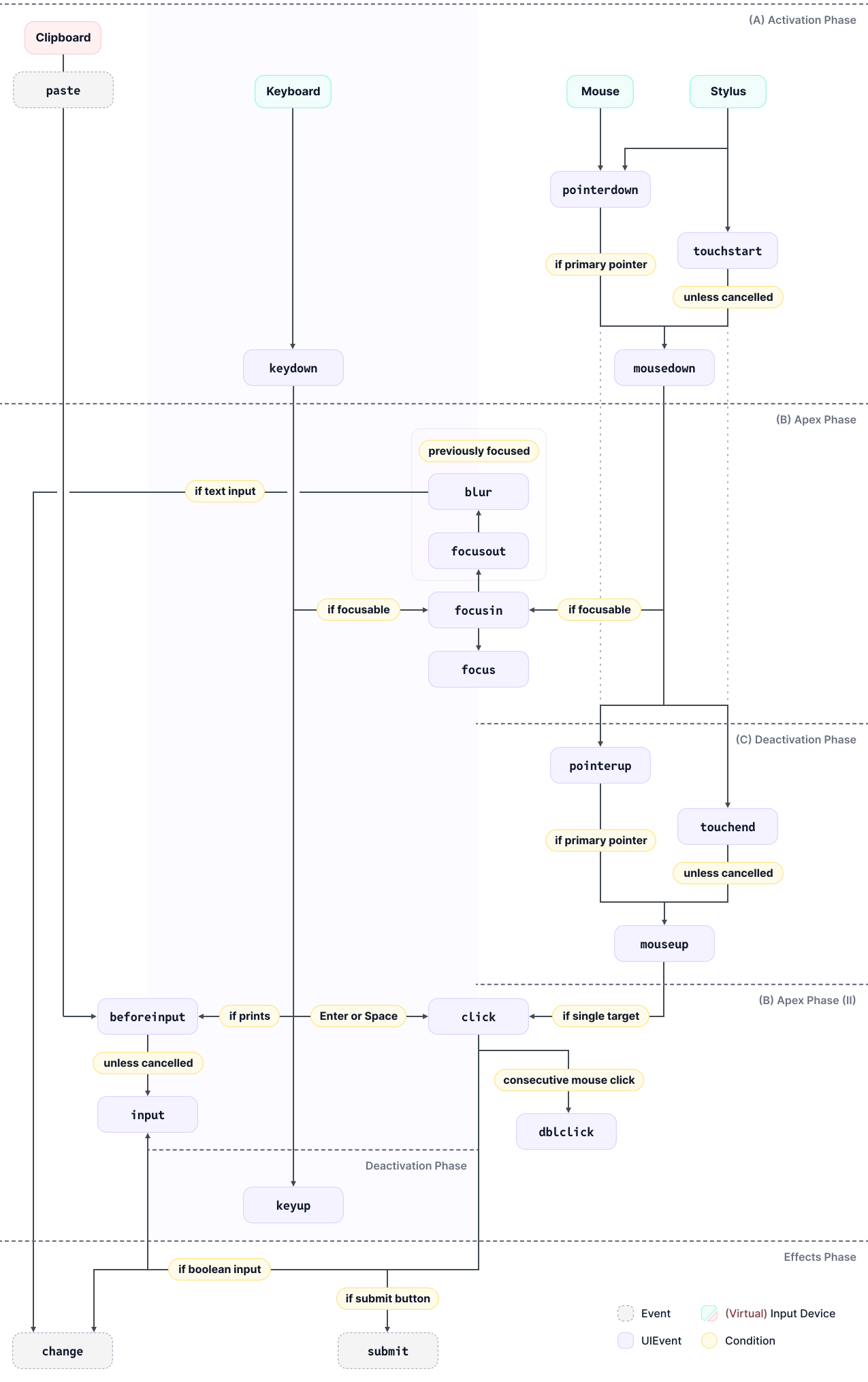
By design of button-based input devices, which are almost imperative for human motor skills, actions are generally based on symmetric event sequences – symmetry between button activation and deactivation. Symmetry thereby holds over abstract event classes: (A) activation events, (B) apex events, and (C) deactivation events.
Here is the event sequence for typing a single symbol:
keydown(A, activation)beforeinput(B, apex)input(B)keyup(C, deactivation)
Some actions like click have apex events at the end, because the symmetry of events is necessary to qualify the action as such. Here is the event sequence for clicking, i.e., mouse-down and -up on the same target:
mousedown(A; targetT)focus(B; ifTis focusable)mouseup(C;T)click(B)
Moving the mouse to a different target in between activation (1) and deactivation (3) events would not render a click action on T1 or T2:
mousedown(A; targetT1)focus(B)mouseup(C;T2)click(B; nearest common ancestor ofT1andT2)
An action itself can also be a composition of actions: a double-click, for instance, is two consecutive clicks in a short timeframe:
mousedown(A)focus(B)mouseup(C)click(B)mousedown(A)mouseup(C)click(B)dblclick(B)
Event and Action Equivalency
Web standards primarily consider two high-level devices: the keyboard and the mouse – with the stylus (or finger) as a substitute for the mouse on touchscreen devices.
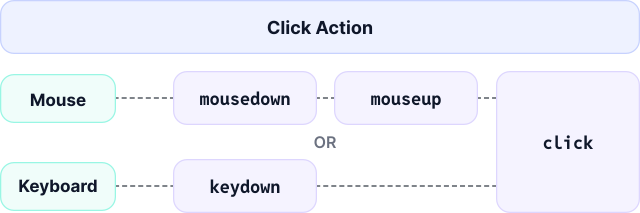
Action anatomy across input devices considerably overlaps: not least for accessibility reasons, a click can also be triggered through the keyboard – an Enter- or Space-bound key press action that commonly mirrors a click. Whilst the click action is generally associated with the mouse device, it is technically a generic fire action to trigger natively or programmatically attached effects.
Touchscreen devices exchange the mouse for the screen itself. Via stylus (or finger), the TouchEvent and MouseEvent classes are mostly equivalent: a touchstart corresponds to a mousedown, and a tap corresponds to a click. The PointerEvent class, which inherits from MouseEvent, unifies both kinds of input, covering their intersecting properties.
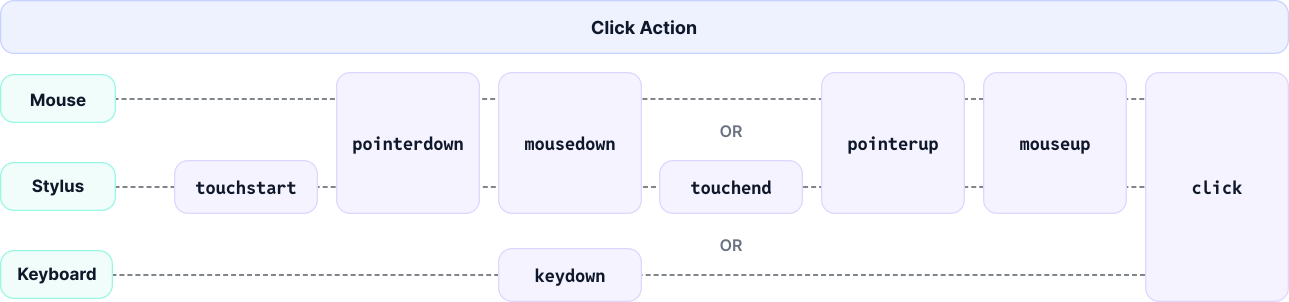
Aligned with the two significant input devices, click and type represent the central input actions for navigating a web-based UI: click as a universal trigger action, and type for providing individual data – symbol by symbol.
The click and type actions get a web agent far, with certain caveats. The dropdown of a <select> element, for instance, is by default OS-native. Dropdown interaction is hidden from the DOM. A synthetic select is hence just the resulting event sequence: setting the value, followed by input and change events.
Browser-Native Side Effects
On specific target elements, generic input actions can trigger specific events. Clicking a form submit button issues a submit event on the form at the end of the input action event sequence.
Calling HTMLElement.click() does not render a full click input action. By contrast, HTMLElement.focus() runs a focus shift event sequence across related elements: the previously focused element is blurred, then the focus target is focused. Focus events never fire if the page's window has no focus, e.g., if the browser is running in the background, which is why a synthetic focus-shift routine is often favourable.
If the targeted element is focusable and another element has focus at the moment:
blur(B, targetT1)focusout(B, targetT1)
Subsequently:
focus(B, targetT2)focusin(B, targetT2)
Primary and Secondary Actions
Click, type, and select are primary input actions – they are functionally required to solve a specified web browsing task. Secondary browser actions exist for ergonomic reasons, but are generally not functionally required. The two prevalent secondary input actions in a browser arose with the graphical UI: scrolling and mouse pointer movement.
Scrolling: Scoping the GUI in the Viewport
In order to point at a target element with the physical mouse device pointer, a human user must scroll it into the viewport, as the pointer's location is constrained by the browser's viewport. Synthetic actions are independent of the physical mouse. Event properties, such as the mouse position, can be set programmatically. However, scrolling the target element into view is a desirable side effect to cause synthetically, so a human supervisor can trace AI agent actions.
Mouse Pointer: Scoping Targets in the GUI
The physical mouse pointer cannot be moved programmatically. A virtual mouse pointer is the answer; it moreover visualises the agent as a co-browsing agent that can ideally be cut off by the human.
The degree to which to maintain a virtual mouse pointer depends on the agent design objective. A full-fledged virtual mouse pointer emits mouse events over all elements along its movement trajectory. The trajectory can follow any continuous and differentiable function, and the same holds for the timing. A human mouse movement generally consists of a fast initial sweep toward the target, then slower corrective adjustments – Fitts's Law describes a natural mouse movement duration based on spatial target element properties. Synthetic mouse events do not apply CSS pseudo-classes, such as :hover.
No strict model fits the problem of web actuation: event classes are historical rather than conceptual, events sequences are only roughly symmetric, and browser-native side effects vary by target element. Visualising the key concepts – atomic events, abstract sequence symmetry, and primary versus secondary actions – nonetheless helps when designing a web actuation API.
Webfuse provides automated agents with human-like input capabilities on any web-based UI – including trusted events and a seamless virtual mouse pointer.

Next Steps
Connect an agent to any web app
No signup, runs in your browser
Related Articles