Microsoft maintains two ways for an AI agent to drive a browser with Playwright. One is an MCP server with 37,000 stars and 4.6 million weekly downloads. The other is a command-line binary. Read the MCP server's own README and you find Microsoft pointing coding agents at the second one.
That is an unusual thing for a vendor to publish about its own integration, and it is worth taking seriously rather than reading as a retreat. The reason is narrow and measurable: tokens.
Which Should You Choose?
The short version, before the detail:
- Choose the CLI for short scripted tasks, CI steps, and any agent loop where you pay for every token twice over by resending history.
- Choose MCP for long-running sessions that need browser state to survive across many turns, and for test authoring that uses the assertion tools.
- Choose neither when the page you need sits behind a login you cannot script, which is a different problem with a different answer.
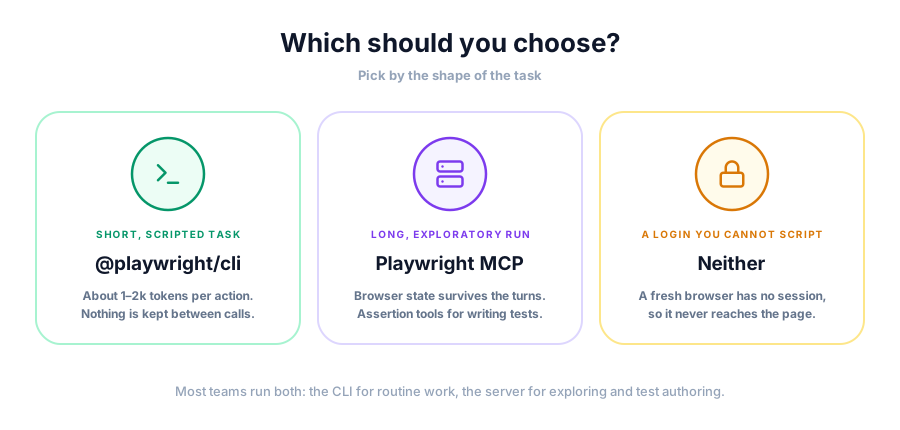
Most teams end up with both. The CLI handles the routine work, and the server comes out for exploratory runs where the agent needs to keep looking at the same page.
What Microsoft Actually Says
The second section of the Playwright MCP README compares the two directly. The wording matters, so here it is:
"Modern coding agents increasingly favor CLI-based workflows exposed as SKILLS over MCP because CLI invocations are more token-efficient: they avoid loading large tool schemas and verbose accessibility trees into the model context, allowing agents to act through concise, purpose-built commands."
The same paragraph keeps a place for the server:
"MCP remains relevant for specialized agentic loops that benefit from persistent state, rich introspection, and iterative reasoning over page structure, such as exploratory automation, self-healing tests, or long-running autonomous workflows where maintaining continuous browser context outweighs token cost concerns."
Two claims sit inside that. The first is that per-call cost favors the CLI. The second is that persistent state favors MCP. Both are true, and which one dominates depends entirely on the shape of your task.
The adoption numbers show teams acting on it. @playwright/cli moved from roughly 912,000 monthly downloads in March 2026 to 3.35 million in August. The MCP server is still far larger in absolute terms, at 4.6 million weekly, so this is not a migration so much as a second lane opening up.
Where the Tokens Go
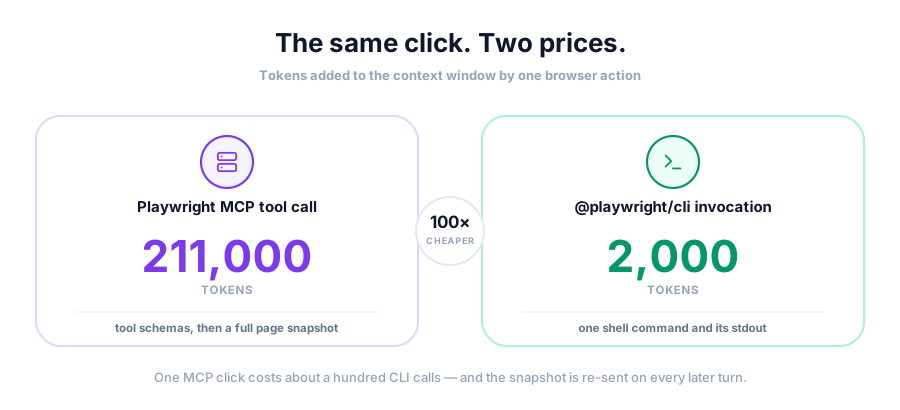
An MCP tool call is not one message. It is a tool schema loaded at session start, a request, a result, and then that result carried forward in history on every subsequent turn. The schema cost is fixed and the result cost compounds.
Start with the fixed part. One analysis measured the sibling Chrome DevTools MCP server at roughly 17,000 tokens for tool definitions alone, before the agent does anything. A Claude Code user filing an unrelated issue showed /context reporting 28.1k tokens, 14.1 percent of the window, consumed by MCP tool definitions across their installed servers. You pay that on turn one and every turn after.
The compounding part is worse, and it comes from snapshots. Playwright MCP returns an accessibility snapshot of the page so the agent can see what it is working with, which is the thing that makes the server useful. On a small page that is cheap. On a real application it is not.
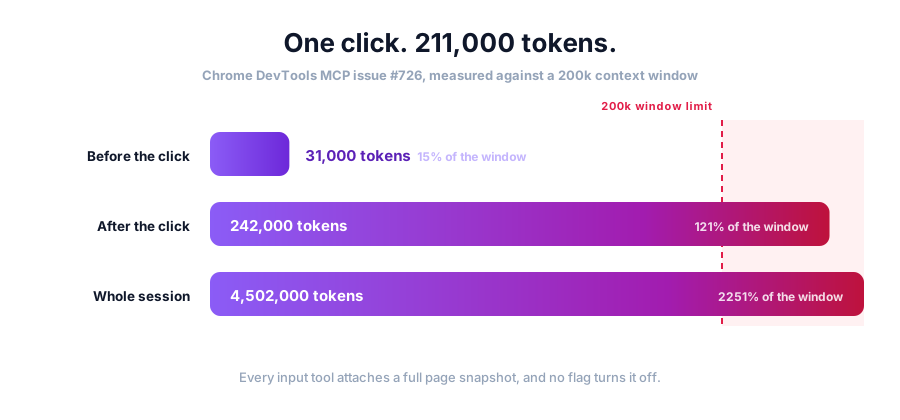
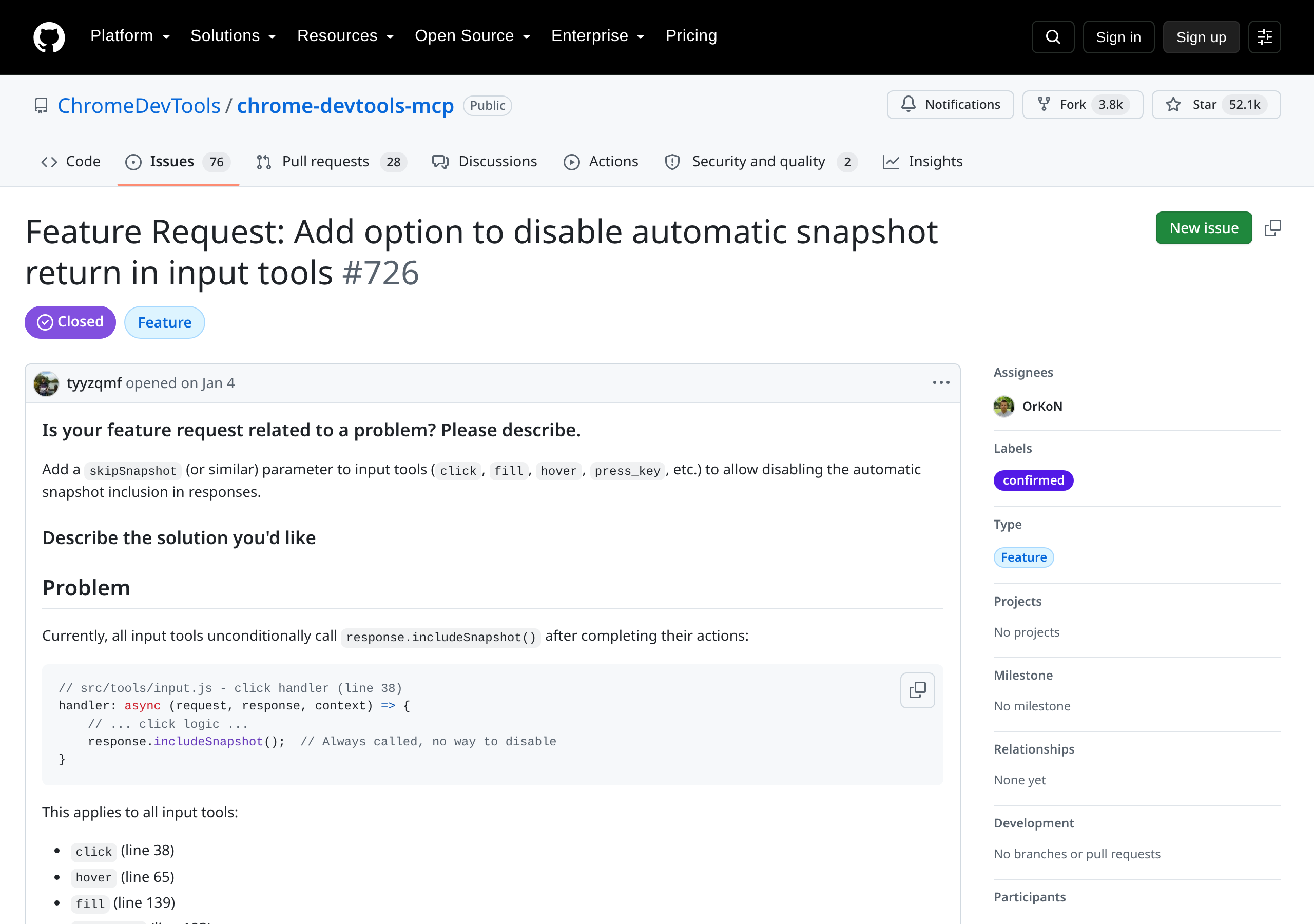
The sharpest measurement comes from Chrome DevTools MCP, which behaves the same way. Issue #726, labelled confirmed by maintainers, records a single click:
- Context before the call: roughly 31,000 tokens.
- Context after: roughly 242,000 tokens.
- Session total at the end: 4,502,000 tokens against a 200,000 window, or 2251 percent.
The issue names the cause precisely. Every input tool in that server calls response.includeSnapshot() with no way to switch it off, so click, hover, fill, press_key, drag and upload_file all attach a full page snapshot to their result. One report in the same tracker counted 1,668 tokens per response wasted on lines that only say an element was ignored. It was closed as not planned.
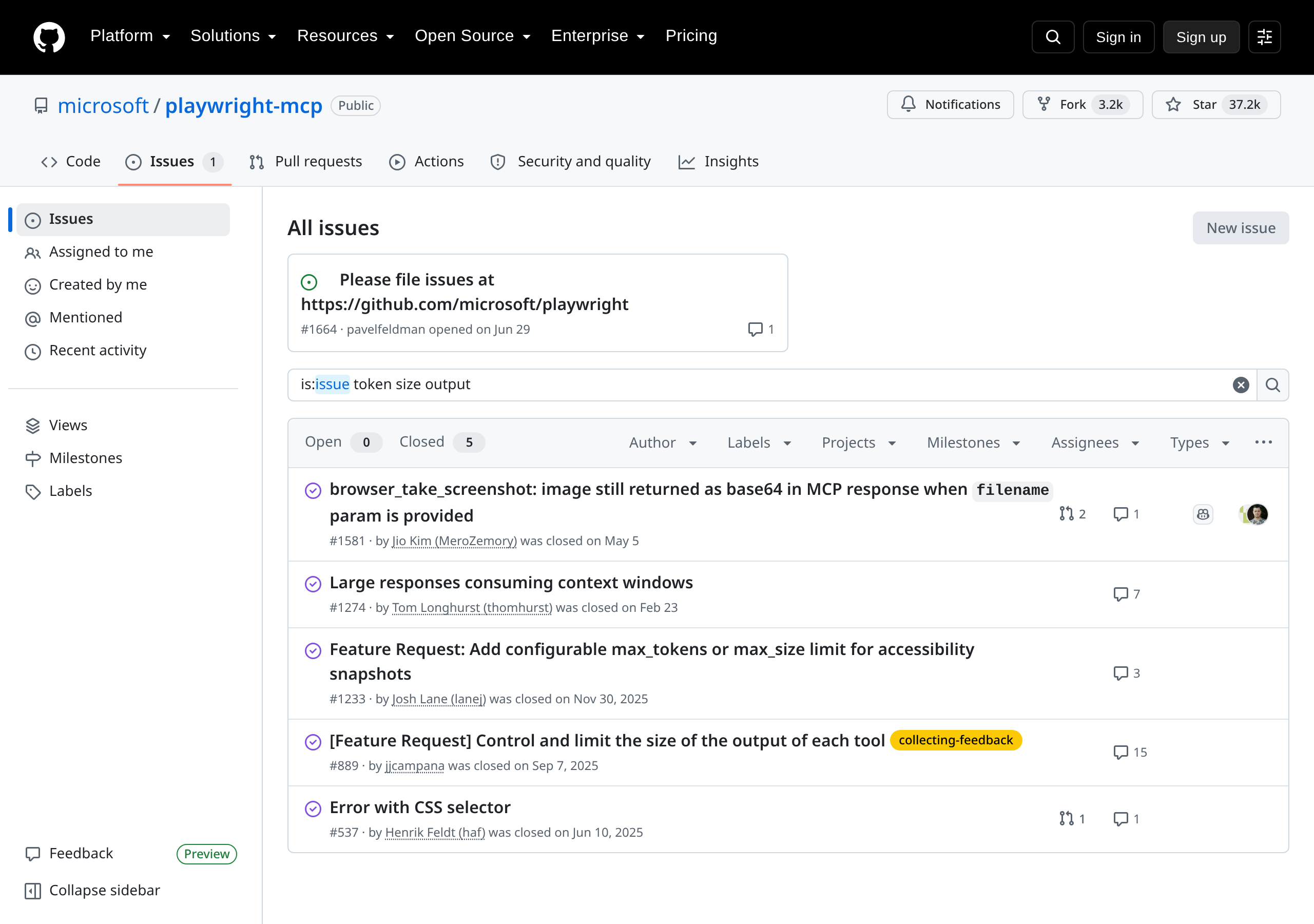
Playwright MCP's own tracker shows the same pressure. "Control and limit the size of the output of each tool" drew 13 reactions across 15 comments. "Easy to reach token limit" drew 9. "Excessive tool response size" drew 7. All three sit closed, and the repository now redirects new reports to the main Playwright tracker, so the demand is on record without a size limit shipping next to it.
A Chrome DevTools engineer acknowledged the general point in public, calling better token behavior good news for anyone keenly aware of MCP's token costs. The people building these servers are not disputing the arithmetic.
What the CLI Trades Away
Running Playwright through the CLI turns each browser action into a shell command. The agent writes the command, reads the output, and moves on. Nothing persists between calls except what the agent chose to keep.
Practitioners running this way report roughly 1,000 to 2,000 tokens per interaction after some tuning, against snapshot payloads that can run into six figures. The gap is not marginal.
What you give up is real:
- No live session. Each command starts and ends. State lives in your script or in a storage state file, not in the tool.
- No structured page view by default. The agent sees stdout. Reading the page means asking for it explicitly, which is both the cost saving and the limitation.
- No assertion tools. The verification helpers that ship behind
--caps=testinghave no direct CLI equivalent.
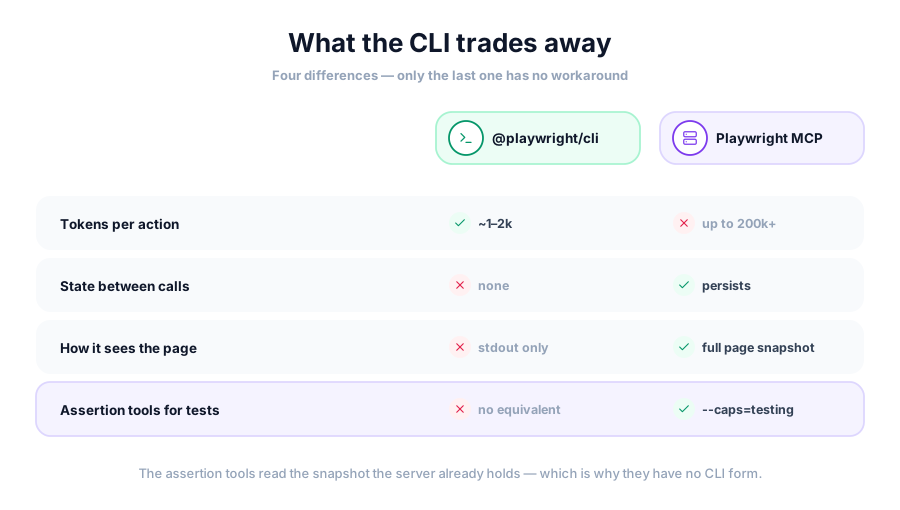
That last point deserves attention, since it is the one most likely to catch a team out mid-migration.
# CLI: one command, one result, no session held open
npx playwright screenshot --viewport-size=1280,720 https://example.com out.png
// MCP: a session the agent keeps open across many turns
{
  "mcpServers": {
    "playwright": {
      "command": "npx",
      "args": ["-y", "@playwright/mcp@latest", "--caps=testing"]
    }
  }
}
The Testing Tools Are the Real Dividing Line
Playwright MCP ships 73 tools, and the ones that matter for QA work are opt-in. Pass --caps=testing and you get a small set that turns browsing into verification:
browser_generate_locatorreturns a locator for an element, ready to paste into a test.browser_verify_element_visibleasserts on role and accessible name rather than on a selector.browser_verify_text_visiblechecks for text the user can actually read.browser_verify_valuechecks an input value, taking the stringstrueandfalsefor checkboxes.
Leave the flag off and the server can drive a browser competently and verify nothing. Teams who install it expecting test support and find none have usually missed this.
These tools depend on the snapshot the agent is already holding, since they address elements by their snapshot reference. That coupling is why they have no clean CLI form, and it is the strongest argument for keeping the server in an authoring workflow even after you move routine automation to commands.
Both approaches drive a browser you launched.
Webfuse drives the live one.
If You Stay on MCP
Several flags reduce the bill without changing tools. --image-responses omit drops screenshots from results. --mobile loads the mobile version of pages, which are usually lighter. --storage-state lets a session start already authenticated rather than spending turns on a login flow.
None of these touch the accessibility snapshot, which is the largest line item on a complex page. Treat them as trimming rather than as a fix.
Two operational limits show up often enough to plan around. A persistent browser profile can only be used by one instance at a time, so two clients sharing a workspace will collide until one passes --isolated. Tool count also matters in some hosts: Cursor caps the tool list at 40, and combined server and tool names have a 60-character ceiling there.
There is a counterweight worth stating. Not everyone hits these walls. One well-documented account of adding the server to Claude Code reports a clean experience with no token complaints, having sidestepped authentication entirely by logging in by hand in the visible browser window. Page complexity and session length drive the cost more than the tool choice does.
Where This Leaves Agents on Sites You Do Not Own
Both options assume the agent launches its own browser. That assumption holds for testing your own application and breaks the moment the target is a site you do not control.
A launched browser arrives with no cookies, no session, and no history. It hits bot challenges that a real user never sees, and it cannot reach anything behind a login until you script the credentials into the run. Token cost stops being the interesting problem at that point, since the agent cannot load the page at all.
That is the case where a live session changes the shape of the work. The page is already open, already authenticated, and already past whatever checks stand between an automated browser and the content. The agent acts inside a session a person is in, rather than trying to recreate it from a clean profile.
Closing Takeaway
Microsoft's advice is narrower than it first reads. The CLI wins on cost per interaction, and for short scripted work that is the only number that matters. The MCP server wins where the session has to live across many steps, and its assertion tools have no replacement.
Run the CLI for routine automation, keep the server for exploratory runs and test authoring, and measure your own snapshot sizes before assuming either answer applies to your pages.
Frequently Asked Questions

Connect an agent to any web app
No signup, runs in your browser
Ready to let your AI agent act on the live web?
Headless browsers give your agent a copy of the web. Webfuse gives it the session your user is actually in — over MCP, with no install.
- No credit card
- Free forever plan
- Quick setup
Related Articles