ElevenLabs has emerged as a major name in AI-driven voice synthesis, offering highly realistic and emotionally expressive audio that is often difficult to tell apart from human speech. While known for its powerful text-to-speech capabilities, the platform is a complete audio creation toolkit for developers and creators. This guide provides a comprehensive look at the ElevenLabs API, how to get started with code, and what you can build with it in 2025.
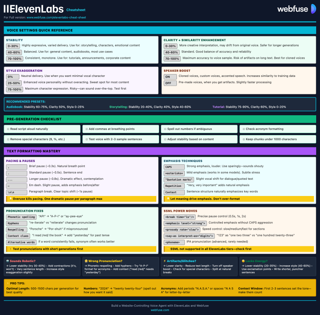
ElevenLabs Cheat Sheet
Quick reference for ElevenLabs models, voices, streaming, cloning, and API usage.
View cheat sheetGetting Started: Your API Key
To begin using the ElevenLabs API, you will need an API key, which authenticates all your requests.
- Create an Account: First, sign up on the ElevenLabs website. Even the free plan includes API access.
- Navigate to API Keys: Once logged in, click on "Developers" in the sidebar, then select the "API Keys" tab.

- Create Your API Key: Click the create button to generate a new API key. You'll be prompted to set permissions and limits for the key.

- Configure Permissions: Select the appropriate permissions for your use case and set a monthly credit limit (recommended to prevent unexpected usage).
- Copy Your Key: Copy your unique API key. It is important to keep this key secure, as it is linked to your account and usage quota.
It's useful to know that the website and the API draw from the same monthly quota, but they have different per-generation limits. The API supports much larger inputs depending on the model you choose (up to 40,000 characters for newer models like Flash v2.5 and Turbo v2.5).
Core API Capabilities
The ElevenLabs API provides a range of powerful features for developers. The key capabilities include:
- Text-to-Speech (TTS): The primary function of converting written text into spoken audio with fine-grained control over voice characteristics like stability and clarity.
- Speech-to-Speech (STS): Allows for the transformation of one voice into another, preserving the original speech's intonation and pacing.
- Voice Cloning: The ability to create a digital copy of a voice from a small audio sample.
- AI Dubbing & Translation: Enables you to dub audio and video into a wide array of different languages.
- Multiple Voice Models: Different models are available that offer trade-offs between quality, latency, and cost to suit various applications, from real-time streaming to high-fidelity narration.
The API gives your agent a voice, not a browser.
Webfuse gives it the live session.
Handling Your API Key Securely
A common mistake is to place your API key directly in your source code. This is a security risk because anyone who sees your code gains access to your key and can use your character quota.
A much safer method is to use environment variables. An environment variable is a value that lives outside your code, making it invisible in your script. Here’s how to set it up.
First, create a file named .env in your project's main directory. Add your API key to this file like so:
ELEVENLABS_API_KEY="your_api_key_goes_here"
Next, make sure you have the python-dotenv library installed to help your Python script read this file. You can install it using pip:
pip install python-dotenv elevenlabs
Now, you can access your key securely in your Python code. This approach keeps your key safe and makes your code more portable, as you can use different keys in different environments without changing the code itself.
# Import the necessary libraries
import os
from dotenv import load_dotenv
from elevenlabs.client import ElevenLabs

# Load environment variables from the .env file
load_dotenv()

# Initialize the ElevenLabs client
# The API key will be automatically read from the ELEVENLABS_API_KEY environment variable
elevenlabs = ElevenLabs(
    api_key=os.getenv("ELEVENLABS_API_KEY")
)

print("API Key loaded and client initialized.")
Core Functionality: Code Examples
With the API key correctly configured, let's look at how to use the main features of the ElevenLabs API. The examples below use the official elevenlabs-python library, which simplifies the process of making requests.
1. Text-to-Speech (TTS)
The most direct use of the API is converting text into speech. The process involves sending a piece of text along with a chosen voice ID to the API and receiving audio data back.
This code snippet generates speech and saves it as an MP3 file. You can find voice IDs for pre-made voices in the Voice Lab on the ElevenLabs website.
# Generate audio from text
audio = elevenlabs.text_to_speech.convert(
    text="Hello, this is a test of the ElevenLabs API.",
    voice_id="JBFqnCBsd6RMkjVDRZzb",  # Rachel's voice ID
    model_id="eleven_multilingual_v2",
    output_format="mp3_44100_128"
)

# Save the generated audio to a file
with open("output.mp3", "wb") as f:
    for chunk in audio:
        if chunk:
            f.write(chunk)

print("Audio file saved as output.mp3")
Customizing Your Audio Output
You can adjust the audio output using different settings. This is done through a VoiceSettings object, giving you fine-grained control over the final sound.
Let's look at some of these settings. They allow you to modify the voice's performance to better suit your needs.
- Stability: Controls the voice's consistency. Higher values make the voice more monotonic and stable, suitable for narration or news reading. Lower values introduce more expression and variability, which can be good for characters or emotional dialogue but may sometimes result in artifacts. A setting between
0.0(more expressive) and1.0(more stable) is the valid range. - Clarity + Similarity Boost: This setting makes the generated audio clearer and closer to the original voice clone. High values are recommended, but if you hear artifacts, try lowering it slightly. A value between
0.0and1.0is valid. - Style Exaggeration: This parameter controls how much the model leans into the selected voice's style. It works best on newer models and can add a more pronounced personality to the speech. A value of
0.0is off, while higher values (e.g.,0.5) increase the effect. Valid range is0.0to1.0. - Speed: Controls the speed of the generated audio. A value of
1.0is normal speed, while values less than1.0slow it down and values greater than1.0speed it up.
Here is how you would apply these settings in your code.
from elevenlabs import VoiceSettings

# Generate audio with custom voice settings
audio = elevenlabs.text_to_speech.convert(
    text="Customizing the voice makes the output more suitable for the context.",
    voice_id='JBFqnCBsd6RMkjVDRZzb',  # Rachel's voice ID
    model_id="eleven_multilingual_v2",
    output_format="mp3_44100_128",
    voice_settings=VoiceSettings(
        stability=0.7,
        similarity_boost=0.75,
        style=0.3,
        use_speaker_boost=True
    )
)

# Save the audio
with open("custom_output.mp3", "wb") as f:
    for chunk in audio:
        if chunk:
            f.write(chunk)

print("Customized audio file saved.")
2. Real-Time Streaming
For applications that require immediate audio feedback, such as conversational AI or live narration, the ElevenLabs API supports real-time streaming. This allows you to process and play audio in chunks as it's being generated, rather than waiting for the entire file to complete. This approach lowers perceived latency, creating a more fluid and natural user experience.
To work with streaming audio, you'll need a way to play the incoming audio chunks. The mpv media player is a good option for this. On macOS, you can install it with Homebrew (brew install mpv). For other operating systems, refer to the official mpv website.
The following code demonstrates how to stream audio. It sends text to the API and immediately begins playing the audio chunks as they are received.
from elevenlabs import play

# Request the audio stream
audio_stream = elevenlabs.text_to_speech.convert(
    text="This is a real-time streaming demonstration. You should hear this audio as it's generated.",
    voice_id="JBFqnCBsd6RMkjVDRZzb",
    model_id="eleven_multilingual_v2",
    output_format="mp3_44100_128"
)

# Play the audio stream
play(audio_stream)

print("Streaming complete.")
Streaming is particularly useful for applications where the text input is also being generated in real-time, such as from a large language model. The API can even start generating audio before the full text is available, further reducing delays.
3. Voice Cloning
One of the most powerful features of the ElevenLabs API is the ability to clone voices from audio samples. This opens up a wide range of possibilities for personalized applications, from custom voice assistants to dubbing content with a specific person's voice.
To clone a voice, you need one or more clean audio recordings of the target voice. For the best results, the audio should be free of background noise. While you can get started with a minute of audio, providing more data will generally result in a higher-quality clone.
Here’s how you can add a new voice from a set of audio files using the API. You provide the file paths to your audio samples and give the new voice a name.
from io import BytesIO

# Clone a voice from one or more audio files
voice = elevenlabs.voices.ivc.create(
    name="My Cloned Voice",
    description="A clone of my voice for personal projects.",
    files=[
        BytesIO(open("/path/to/sample1.mp3", "rb").read()),
        BytesIO(open("/path/to/sample2.mp3", "rb").read())
    ]
)

print(f"Voice 'My Cloned Voice' created with ID: {voice.voice_id}")

# Now you can use this voice for TTS
audio = elevenlabs.text_to_speech.convert(
    text="This audio was generated using a cloned voice.",
    voice_id=voice.voice_id,
    model_id="eleven_multilingual_v2",
    output_format="mp3_44100_128"
)

# Save or play the audio as before
with open("cloned_voice_output.mp3", "wb") as f:
    for chunk in audio:
        if chunk:
            f.write(chunk)

print("Audio generated with the cloned voice.")
Once a voice is cloned, it's added to your Voice Lab and can be used just like any of the pre-made voices by referencing its name or the newly generated voice ID. This makes it simple to integrate custom voices into any of the API's functions, including standard TTS and real-time streaming.
Practical Project Ideas: What Can You Build?
Knowing how to use the API is one thing; applying it to create something useful is the next step. The ElevenLabs API is versatile enough for a wide range of applications, from simple content creation tools to highly interactive AI systems.
Let's look at some of these possibilities. These projects show how the core features we've discussed TTS, streaming, and voice cloning can be combined to build real-world applications.
1. Automated Podcast Creation for Bloggers
A major opportunity for content creators is to repurpose written content into other formats. You can build a service that automatically converts blog posts or news articles into audio podcasts, making the content accessible to a wider audience.
- How it works: The application would scrape the text from a web page, clean it up by removing HTML and other non-essential elements, and then send it to the ElevenLabs Text-to-Speech endpoint. The resulting audio file could be embedded back into the article or published to a podcast feed.
- Key API Feature: Core TTS. You could offer different voices and use custom settings to match the tone of the content, from formal narration to a more casual, conversational style.
2. Lifelike AI Voice Agents
For customer service or virtual assistants, a natural-sounding voice can make the interaction feel more human and less robotic. By combining a large language model (LLM) with the ElevenLabs API, you can create a conversational agent that provides spoken responses in real time.
- How it works: The user's spoken query is first converted to text (using a speech-to-text service). This text is then sent to an LLM to generate a response. The LLM's text output is then immediately sent to the ElevenLabs API for voice synthesis.
- Key API Feature: Real-Time Streaming. Low latency is important here. Streaming the audio back to the user as it's generated creates a fluid conversation, avoiding awkward pauses while the full audio file is created.
3. Personalized In-Game Characters
Gaming is an area with a great deal of potential for personalized audio. You could create a system that allows players to use their own voice for their game character. This can lead to a more immersive experience where the character's voice is uniquely the player's.
- How it works: The player would provide a few audio samples. These samples are sent to the ElevenLabs API to create a new voice model. The game's dialogue lines can then be generated using this newly created voice.
- Key API Feature: Voice Cloning. This feature is central to creating personalized audio experiences. It could also be used to generate dynamic, non-repetitive dialogue for non-player characters (NPCs), making the game world feel more alive.
4. Rapid Dubbing for Video Creators
Content creators looking to reach a global audience often face the challenge of translating and dubbing their videos. An application built on the ElevenLabs API could automate a large part of this process.
- How it works: A user uploads a video file. The application extracts the audio and sends it to the AI Dubbing endpoint, specifying the original and target languages. The API returns a fully dubbed audio track that can be combined with the original video.
- Key API Feature: AI Dubbing & Translation. This powerful feature can preserve the original speaker's vocal characteristics in the translated version, resulting in a more authentic final product.
Best Practices & Troubleshooting
Building applications with an API involves more than just making successful requests. Efficiently managing costs, handling potential errors, and ensuring high-quality output are all important for creating a reliable and effective application.
Managing Costs and Character Usage
ElevenLabs' pricing is primarily based on the number of characters you generate. Every paid plan comes with a monthly character quota, and any usage beyond that is billed separately. This makes it important to use your quota efficiently.
Here are some practices to help manage your costs:
- Cache Your Audio: Avoid generating the same piece of audio multiple times. If your application frequently uses the same text phrases (e.g., standard greetings, button labels), generate the audio once and save the MP3 file. You can then play the local file for subsequent requests, which costs nothing.
- Choose the Right Model: Different models may have different character costs. For applications where ultra-low latency is the main goal, Flash models are optimized for speed and can be more cost-effective. For narration or content where quality is the top priority, a model like
eleven_multilingual_v2might be more suitable, even if it processes text more slowly. - Monitor Your Usage: Keep an eye on your character consumption through the ElevenLabs dashboard. This will help you anticipate costs and understand which parts of your application are using the most characters.
- Use Short Chunks for Streaming: When streaming, especially with real-time input, breaking the text into smaller, logical chunks can be more efficient than sending one very long, continuous stream.
Handling Common API Errors
Network requests can fail for many reasons, and the ElevenLabs API is no exception. Your application should be built to handle these errors gracefully instead of crashing. This is typically done using a try...except block in Python.
The elevenlabs-python library raises an APIError when it receives a non-successful response from the server. You can inspect this error to understand what went wrong.
Here is a list of common error codes and what they mean:
- 401 Unauthorized: This almost always means your API key is invalid or missing. Double-check that it's set correctly in your environment variables.
- 400 Bad Request: This can happen if the voice ID you provided doesn't exist.
- 403 Forbidden: You might see this if you're trying to use a feature that isn't available on your current subscription plan.
- 422 Unprocessable Entity: This often indicates a problem with the text you sent, such as being too long for a single request.
- 429 Too Many Requests: This means you've hit your rate limit or concurrency limit for your plan. You may need to slow down your requests or consider upgrading your plan if you consistently hit this limit.
This code snippet shows how to wrap an API call in a try...except block to catch and handle these potential errors.
from elevenlabs.client import APIError

try:
    # Attempt to generate audio with a potentially invalid voice ID
    audio = elevenlabs.text_to_speech.convert(
        text="Handling errors is a good practice.",
        voice_id="invalid_voice_id",
        model_id="eleven_multilingual_v2",
        output_format="mp3_44100_128"
    )
    with open("error_test.mp3", "wb") as f:
        for chunk in audio:
            if chunk:
                f.write(chunk)
    print("Audio generated successfully.")

except APIError as e:
    print(f"An API error occurred: {e}")
    # You could add logic here to retry the request or inform the user.
Optimizing Audio Quality
The final quality of your generated audio depends on several factors. Beyond just the voice and model you choose, how you prepare the text and configure the voice settings plays a major role.
To get the best results, consider the following:
- Provide Clean Input Text: The model uses punctuation to add natural pauses and intonation. Well-punctuated text with correct spelling will produce better-sounding audio. For numbers or symbols, spelling them out (e.g., "one hundred dollars" instead of "$100") can sometimes improve pronunciation.
- Use SSML for Advanced Control: For highly specific control over the speech output, you can use Speech Synthesis Markup Language (SSML). SSML is an XML-based language that lets you add pauses, control pronunciation with phonemes, and adjust pitch and rate directly within your text. The ElevenLabs API supports the
<break>tag for adding precise pauses and<phoneme>tags for custom pronunciations on certain models. - Experiment with Voice Settings: Don't stick with the default voice settings. Adjusting the stability and clarity sliders can have a sizeable impact on the final output. For expressive dialogue, try lowering the stability. For clear, consistent narration, a higher stability setting is usually better.
- For Cloning, Use High-Quality Samples: The quality of a cloned voice is directly tied to the quality of the input audio samples. Use clear, crisp recordings with no background noise, echo, or music for the best results. The more clean audio you provide, the more accurate the cloned voice will be.
Market Comparison: How ElevenLabs Stacks Up
The text-to-speech (TTS) market is crowded, with major technology companies and specialized startups all offering powerful solutions. Understanding where ElevenLabs fits in requires comparing it to other key players like OpenAI, Google Cloud, and Amazon Web Services. The choice between them often comes down to specific needs: voice quality, customization, cost, or integration with a broader ecosystem.
ElevenLabs vs. OpenAI TTS
This is a comparison between two of the leading names in AI-driven voice synthesis. Both are known for high-quality voices, but they focus on different areas.
- Voice Quality and Expressiveness: ElevenLabs is widely recognized for its highly natural and emotionally expressive voices. It excels at creating audio with nuanced intonation, making it a strong choice for content like audiobooks, podcasts, and character dialogue. OpenAI's TTS is also very high quality, but it prioritizes clarity and consistency over emotional range.
- Voice Customization and Cloning: This is a major differentiator. ElevenLabs offers extensive voice customization options, including a large library of pre-made voices and powerful voice cloning capabilities. You can create a digital replica of a voice from just a few seconds of audio. OpenAI, in contrast, offers a smaller, curated set of pre-made voices and does not currently offer public-facing voice cloning features.
- Latency: For real-time applications, latency is a key factor. ElevenLabs has models specifically optimized for low-latency streaming, achieving response times as low as 75 milliseconds. OpenAI's TTS generally has slightly higher latency, though it is still suitable for many real-time use cases.
- Pricing: The pricing models are quite different. ElevenLabs primarily uses a subscription model with different tiers based on character usage. OpenAI uses a pay-as-you-go model, charging per million characters generated. For high-volume users, Google Cloud and Amazon Polly can be more cost-effective.
ElevenLabs vs. Google Cloud Text-to-Speech
Google has been a major player in speech technology for years, and its TTS API is an enterprise-grade solution. It's known for its reliability and integration within the Google Cloud Platform.
- Voice Variety and Quality: Google offers a very large selection of voices across many languages and variants. Its top-tier voices, powered by technologies like WaveNet and Chirp, are highly realistic and can be difficult to distinguish from human speech. While ElevenLabs is often praised for superior emotional expressiveness, Google's top voices are very competitive in terms of overall quality.
- Customization: Both platforms offer SSML support for fine-grained control over pronunciation, pitch, and speed. Google also provides the ability to create custom voices, though this is an enterprise-focused feature that requires working with their sales team. ElevenLabs' voice cloning is more accessible for individual developers and smaller businesses.
- Cost: For large-scale applications, Google Cloud TTS is often more cost-effective than ElevenLabs. Its pay-as-you-go pricing model can be more predictable for businesses with fluctuating usage.
ElevenLabs vs. Amazon Polly
Amazon Polly is another established enterprise solution that is deeply integrated into the Amazon Web Services (AWS) ecosystem. It's known for its scalability and broad language support.
- Voice Quality: Amazon Polly provides a range of voices, including "Neural" voices that use advanced technology for more natural-sounding speech. However, many users find that ElevenLabs' voices are more expressive and less robotic in comparison.
- Features: Polly offers features that are useful for specific applications, such as a "newscaster" speaking style. It also supports SSML and custom lexicons for pronunciation control. However, a key feature missing from Polly is voice cloning, which is a major strength of ElevenLabs.
- Integration and Scalability: As an AWS service, Polly is a natural choice for developers already using the AWS ecosystem. It is built for scalability and reliability, making it suitable for large-scale enterprise applications.
- Cost: Amazon Polly's pricing is very competitive, with a generous free tier and a pay-as-you-go model that is often more affordable than ElevenLabs, especially at a large scale.
Here is a summary table to help visualize the key differences:
| Feature | ElevenLabs | OpenAI TTS | Google Cloud TTS | Amazon Polly |
|---|---|---|---|---|
| Primary Strength | Voice Quality & Cloning | Simplicity & Integration | Scalability & Voice Variety | AWS Integration & Cost |
| Voice Cloning | Yes, very accessible | No | Yes (Enterprise) | No |
| Emotional Range | Very High | Moderate | High (Tiered) | Moderate |
| Real-Time Streaming | Yes (Low Latency) | Yes | Yes | Yes |
| Pricing Model | Subscription Tiers | Pay-as-you-go | Pay-as-you-go | Pay-as-you-go |
Conclusion: Your Turn to Build
The ElevenLabs API provides a highly capable toolkit for anyone looking to integrate lifelike voice synthesis into their projects. We have moved from the initial setup of securing an API key to exploring the core functions of text-to-speech, real-time streaming, and voice cloning. Each feature opens up different possibilities, from creating accessible content to building the next generation of interactive AI.
The practical project ideas show how these tools can be applied to solve real-world problems and create engaging user experiences. By following best practices for cost management, error handling, and quality optimization, you can build reliable and polished applications.
As the comparison with other major providers shows, ElevenLabs holds a strong position, especially in voice quality, emotional expressiveness, and the accessibility of its voice cloning technology. The platform gives developers and creators the ability to produce highly realistic audio that was once only possible in professional recording studios. Now, you have the code and the concepts to start building your own audio applications.
Frequently Asked Questions

Next Steps
Connect an agent to any web app
No signup, runs in your browser
Ready to let your AI agent act on the live web?
Headless browsers give your agent a copy of the web. Webfuse gives it the session your user is actually in — over MCP, with no install.
- No credit card
- Free forever plan
- Quick setup
Related Articles