Agentforce is Salesforce's AI platform for automating sales and service workflows. Out of the box, it handles the basics - contact records, activity logging, case management.
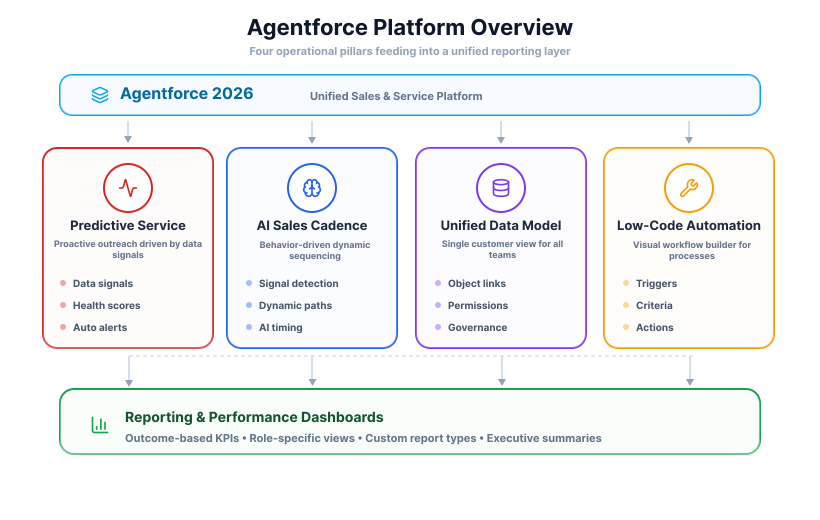
The more capable areas - predictive service, AI-driven cadences, unified data models - are where the platform earns its value. This guide covers what each one involves, what decisions matter, and what to keep in mind as the platform grows with your team.
Configuring Predictive Customer Service
A predictive service model monitors leading indicators of customer issues and automatically creates tasks for agents - before a problem is reported. It requires connecting varied data streams into Agentforce and mapping them to a unified customer profile.
Key data inputs for the system include:
- Product Usage Metrics: Stream data on feature adoption, session duration, and activity frequency. A sudden drop in usage is a primary trigger.
- Historical Support Data: Import past tickets to identify recurring problems for specific customer segments or lifecycle stages.
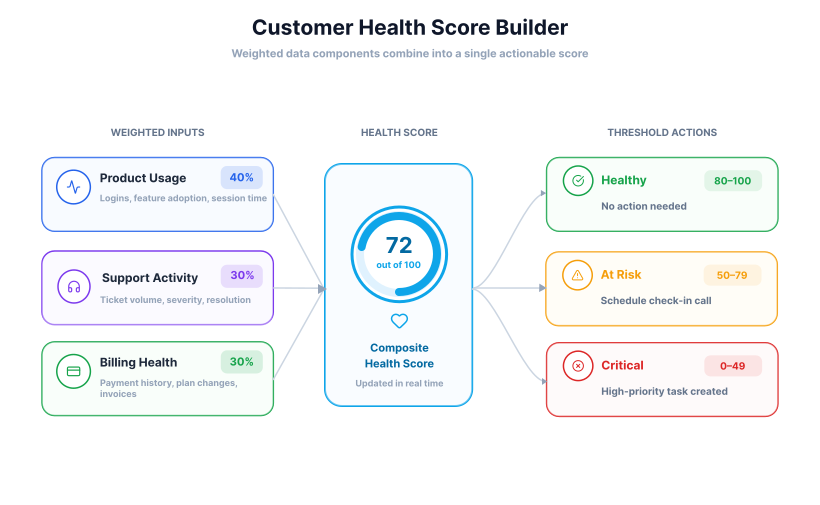
- Customer Health Scores: Integrate an existing tool or build a scoring model within Agentforce using a weighted mix of usage, support, and billing data.
- Third-Party Feedback: Pull reviews from G2 or Capterra via API - a negative review can trigger an agent alert automatically.
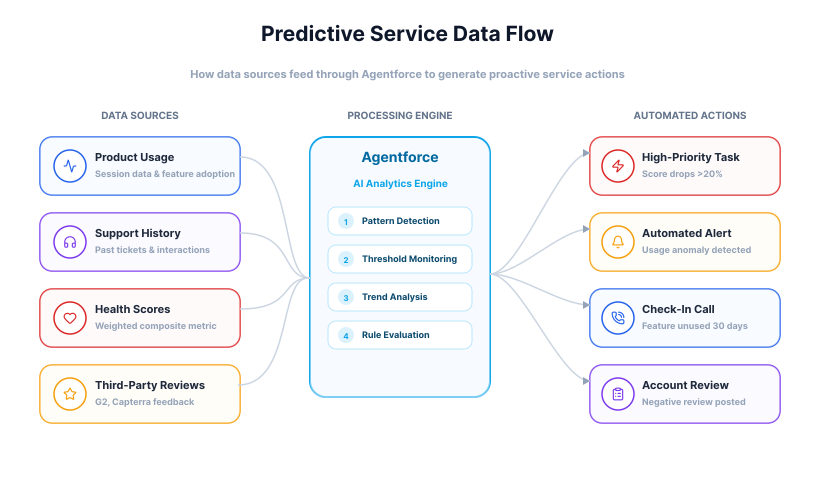
Once these data sources are connected, you can build automation rules. For example, a rule can be set to create a high-priority task for an account manager if a customer's health score drops by more than 20% in a week. Another rule might schedule a check-in call if a key feature remains unused 30 days post-onboarding. These rules are the mechanisms that turn raw data into actionable service tasks for your team.
Building AI-Powered Sales Cadences
Traditional sales cadences follow a rigid, time-based schedule. An AI-powered cadence adapts instead - responding to a prospect's real-time actions like visiting a pricing page, downloading a whitepaper, or repeatedly viewing a product feature. Instead of "wait 3 days," you set rules that read these signals and adjust the next step automatically.
Setting up a dynamic sales cadence involves configuring several key components within the platform.
- Signal Detection: Connect Agentforce to your website and map prospect activities - page views, content downloads - as signals the AI can recognize.
- Dynamic Pathing: Build branching logic so the cadence adapts. An opened-but-unclicked email triggers a follow-up with a different subject line; a fully ignored email switches the next step to a call.
- Content Personalization Engine: Use Agentforce's AI to suggest copy variations based on a prospect's industry and job title - less manual research, more relevant messaging.
- Optimal Timing Suggestions: The platform suggests the best send time per individual based on historical engagement. Requires enabling and a sizeable data set to work well.
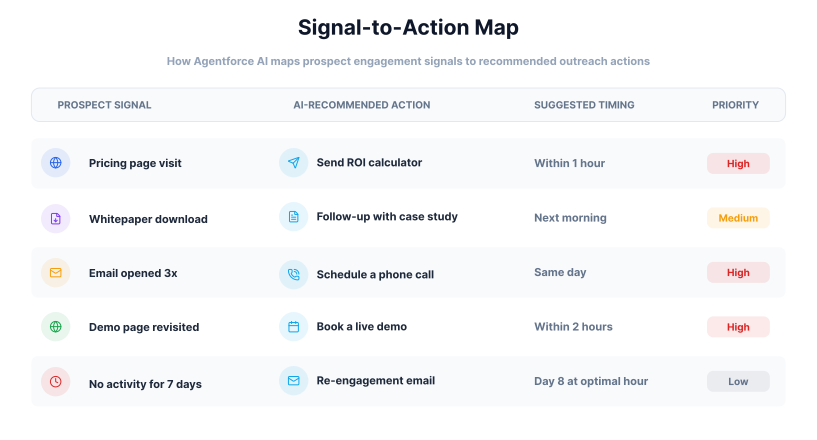
This approach results in a highly customized outreach sequence for each prospect without requiring manual oversight for every decision. The sales representative's role shifts to managing exceptions and handling the high-value conversations that the AI-driven cadence surfaces. What gets automated is the process. What stays human is the judgment.
Creating a Unified Data Model
When sales and service data is disconnected, reps miss open support issues and agents miss renewal signals. A unified data model creates a single authoritative record for every customer, accessible to both teams.
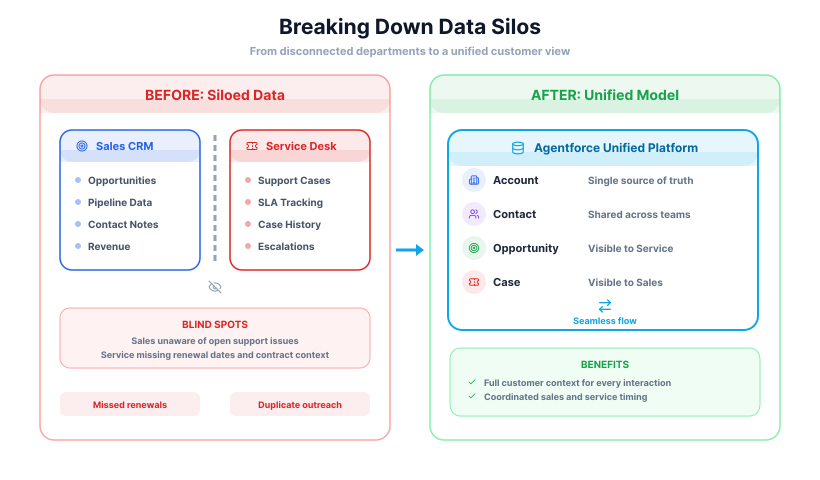
Building the model involves three configuration areas:
- Object Relationships: Link Account, Contact, Opportunity, and Case objects for a 360-degree view. A custom field on the Account can surface a live count of open high-priority cases, making service issues visible to sales at a glance.
- Data Governance Rules: Use validation rules to enforce consistent entry - standard phone formats, required industry fields - to prevent degradation when multiple teams write to the same system.
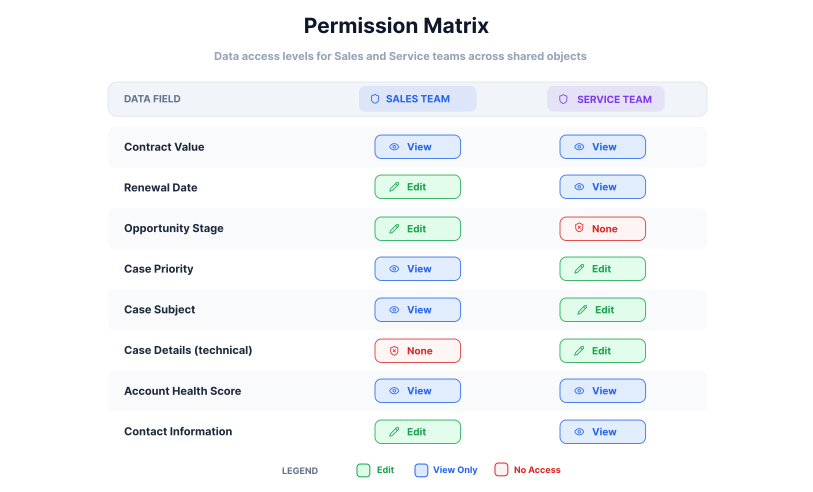
- Permission Sets and Sharing Rules: Service agents can view contract value and renewal dates without editing them; salespeople can see case subjects and priorities without accessing the full thread. Each team gets context, not access.
Implementing Low-Code Automation
Many sales and service processes are unique to a specific organization. Agentforce's low-code automation tools provide a way for teams to build custom workflows without needing development skills - translating operational logic directly into automated actions.
Common applications for low-code automation include:
- Complex Approval Routing: Route discount or contract approval requests to the right manager automatically based on value or percentage.
- New Customer Onboarding: Auto-generate tasks for each team member - account manager, technical support, training - when a new account is created.
- Data Hygiene and Enrichment: Flag incomplete records automatically and assign a task to the owner to fix them.
- Service Level Agreement (SLA) Management: Escalate or alert when a case approaches its deadline without resolution.
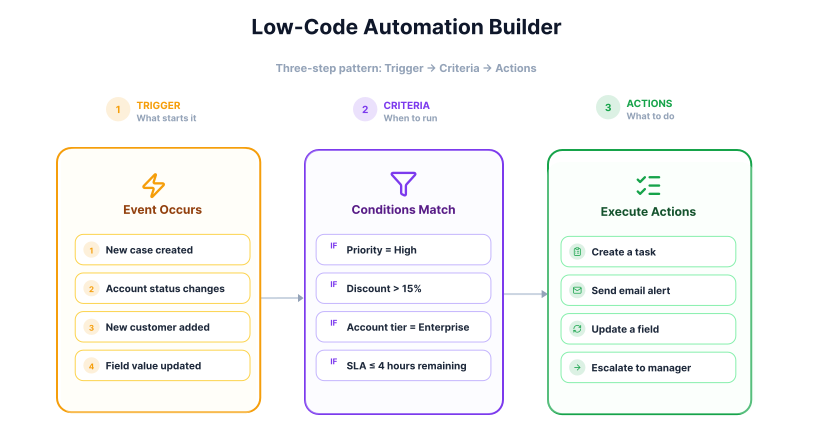
Each automation is built in a visual process builder using three components: a trigger (e.g. "a new case is created"), criteria that scope when it runs (e.g. "priority is high"), and actions - create a task, send an alert, update a field. No code required.
Configuring Advanced Reporting and Performance Dashboards
The automations and predictive models discussed above generate significant operational data. To extract value from it, reporting must shift from tracking activities to measuring outcomes - which means moving beyond default reports to custom dashboards built around your specific KPIs.
Consider adjusting your primary metrics to reflect these new processes:
- From 'Cases Closed' to 'Reduction in Repeat Customer Issues': This measures the success of your predictive service in resolving root causes rather than just symptoms.
- From 'Emails Sent' to 'Engagement Rate per Cadence Stage': This KPI tracks how effectively your AI-powered sales sequences are resonating with prospects at each step.
- From 'First Response Time' to 'Proactive Resolutions Initiated': This shifts the focus from how fast your team reacts to how often they solve a problem before the customer reports it.
- From 'Number of Demos Booked' to 'Pipeline Velocity': This metric measures the speed at which qualified leads move through the sales cycle, reflecting the efficiency gains from automation.
Agentforce allows the creation of role-specific dashboards tailored to each user type:
| Role | What they need to see |
|---|---|
| Executive | Customer health trends, pipeline growth |
| Service Manager | SLA compliance, rate of proactive interventions |
| Sales Manager | Cadence engagement rates, pipeline velocity |
Building these dashboards often requires custom report types that join standard objects with your unique data points - giving you the flexibility to report on your specific business processes.
Integrating Third-Party Tools
A standalone Agentforce instance has limited context. Its utility increases when connected to the other applications your teams use daily, creating a central command center for all customer interactions. This practice prevents data fragmentation and eliminates the need for manual data entry between systems.
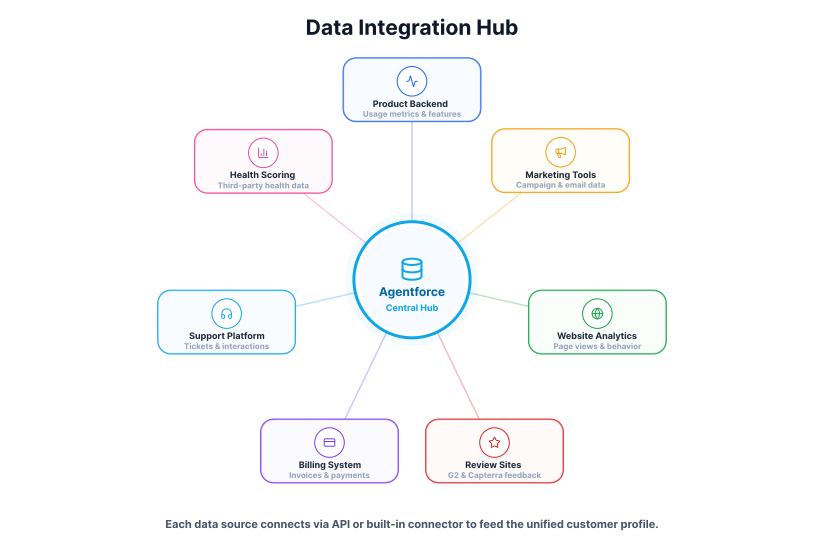
The platform provides several methods for connecting with other software. The most common integration categories offer direct benefits to sales and service operations.
- Marketing Automation Platforms: Connect to Marketo or HubSpot to pull email opens, website visits, and content downloads directly into the contact record.
- Communication Channels: Log emails, calls, and Slack or Teams messages automatically - no manual entry, complete interaction history.
- Billing and ERP Systems: Surface payment history, subscription status, and contract details inside Agentforce for renewal conversations and account reviews.
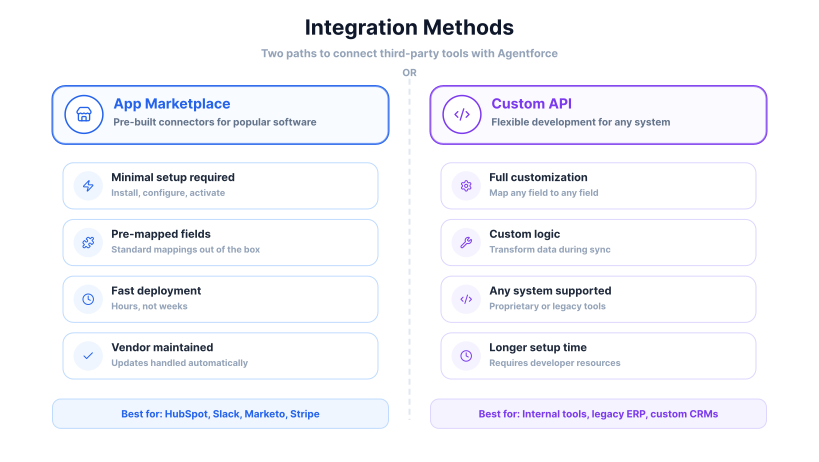
Connections are managed through the App Marketplace (pre-built connectors, minimal setup) or API access for proprietary systems. Either way, the two critical configuration steps are the same: field mapping to align external data with the correct Agentforce fields, and synchronization frequency to control how often data updates between systems.
Strategies for Team Adoption and Skill Development
A reconfigured platform only delivers value if people use it well. Here are several effective strategies for building user skill:
- Role-Specific Learning Paths: Train service agents on predictive service and data views; train salespeople on AI cadences. Targeted training respects time and improves relevance.
- Contextual In-App Guidance: Add pop-up tips, checklists, and walkthroughs inside the interface - help delivered at the exact moment it's needed.
- Develop Internal Champions: Pick highly engaged users from each team, give them extra training, and make them the first point of contact for peers.
- Establish a Feedback Mechanism: Create a simple channel - a dedicated queue works - for users to flag issues. Responding actively shows input is valued and surfaces refinement opportunities.
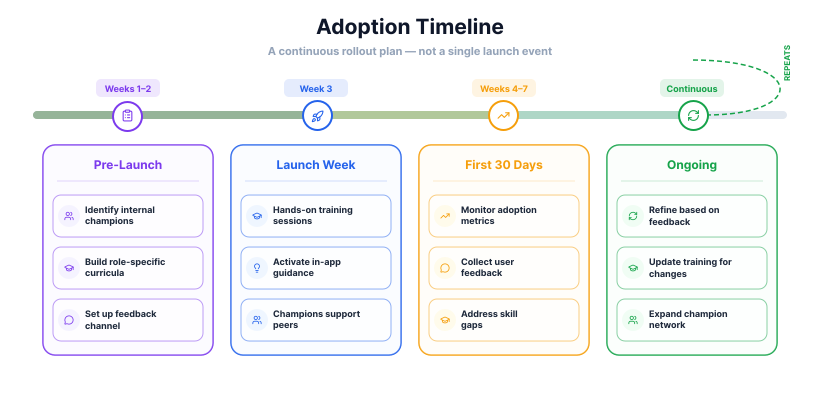
This continuous approach to training treats adoption as an ongoing process. It helps to sustain the value of the platform by making certain that team members remain skilled in its use as both the system and your business processes change over time.
Ongoing System Governance and Evolution
An Agentforce configuration is not a one-time project. A governance framework gives you the structure to manage changes, protect data integrity, and keep the platform aligned with your business - without it, complexity accumulates and the system decays.
A complete governance framework includes several core components:
- A Governance Committee: Stakeholders from sales, service, IT, and operations - meeting monthly to review metrics, prioritize changes, and set platform direction.
- A Formal Change Request Process: All modifications, big or small, go through a standardized process: document the business case, assess system impact, get committee approval.
- Dedicated Sandbox Testing: Every change gets built and tested in a sandbox before touching production - no exceptions.
- Regular System Audits: Periodic reviews of data quality, user permissions, and automation performance to catch what's inefficient or no longer needed.
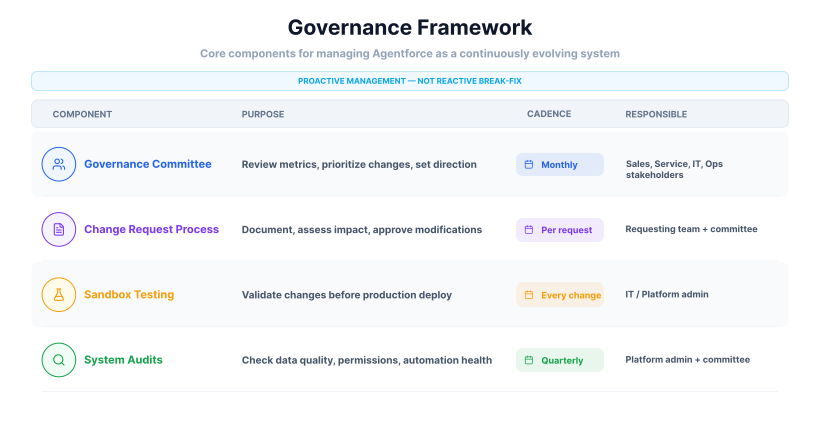
This framework moves system management from a reactive, break-fix model to a proactive, strategic one. It creates a predictable and controlled process for evolving Agentforce to meet the future needs of your sales and service organizations.
Managing Security and Compliance
Security is not one setting - it's a stack of layered controls that together enforce your data access policies. Here are the primary ones to configure:
- Role Hierarchy and Profiles: Profiles control what a user can do (create, read, edit, delete). Role Hierarchy controls what they can see - a sales manager sees their team's opportunities, not others'.
- Multi-Factor Authentication (MFA): A second verification step at login dramatically reduces unauthorized access risk. Enable it by default for all users.
- Transaction Security Policies: Monitor real-time events and trigger actions - block a user, send an alert - when specific conditions are met, like a bulk data export outside business hours.
- Data Encryption: Encrypt data in transit and at rest. Apply field-level encryption to the most sensitive information for an extra layer of protection.
These tools are also instrumental in meeting compliance requirements like GDPR:
- Audit trail logs every change made within your system, creating a verifiable record for accountability during audits.
- Field-level security restricts access to personal data, enforcing the principle of least privilege required by most privacy regulations.
- Regular settings reviews ensure your security configuration stays aligned with evolving compliance standards over time.
Extending Agentforce for Mobile and Field Operations
Sales and service work is not confined to a desk. Field reps and technicians need the same rich customer data as their office-based counterparts - delivered in a fast, mobile-first format.
The default mobile app is just the starting point. Its real value comes from custom configurations that prioritize speed and relevance for users who have only moments between appointments.
Key areas for mobile and field service configuration include:
- Custom Mobile Layouts: Build compact, role-specific layouts that surface priority info - next meeting address, open case subject, contact number - and hide non-essential fields with dynamic forms.
- Offline Data Access: Define each user's "briefcase" of essential objects so they can view and edit records without a connection; changes sync automatically when back online.
- Mobile-Specific Quick Actions: One-tap workflows for common field tasks - log a meeting, complete a work order, capture notes - pre-populate key fields to minimize manual entry.
- Geolocation and Mapping: Use map views for account planning and proximity-based technician dispatch to cut travel time and improve response times.
These configurations transform the mobile app from a simple data viewer into a practical tool for field productivity. It reduces the administrative burden on mobile workers and ensures that the information they gather in the field is captured accurately and in real time.
Maintaining a Forward-Looking Configuration
A well-configured Agentforce instance can decay into a record-keeping tool if it isn't actively maintained. These principles keep it useful long-term:
Core principles for long-term platform health:
- Establish a Regular Review Cadence: Periodically audit existing workflows, reports, and data models - not just approve new ones. Automations built years ago may no longer be the most efficient approach.
- Monitor Platform Releases: Assign someone to review each release cycle's notes and flag features that could replace a complex custom build or improve an existing process.
- Prioritize Data Integrity: Make data hygiene an ongoing, shared responsibility. Use automation to flag incomplete or inconsistent records - predictive models and AI cadences are only as good as the data underneath them.
- Focus on User Experience: Gather input before major changes and solicit feedback after. A configuration that reduces daily friction will always outperform a technically elegant one that nobody uses.
By adopting these principles, an organization can ensure its Agentforce instance remains a highly suitable and effective tool. The system becomes a direct reflection of the business's own evolution, equipped to support the sales and service functions as they meet future challenges.
Agentforce reasons over data you already exported.
Webfuse gives it the live web too.
Measuring Return on Investment (ROI)
To justify your investment, you need to connect specific Agentforce configurations to measurable business outcomes - efficiency gains, revenue impact, retention improvements, and cost avoidance.
You can measure the financial impact in several distinct categories:
- Efficiency Gains: Measure time saved per agent on tasks like case logging or activity entry before and after automation, then multiply by loaded cost to quantify direct savings.
- Direct Revenue Impact: A/B test AI-powered cadences against standard sequences and track the difference in conversion rates and deal size.
- Improved Customer Retention: Compare churn rates for customers who received proactive service interventions against a baseline - the value of retained accounts is your return on predictive service.
- Cost Avoidance: Estimate what a third-party developer would charge to build a specific workflow, then compare it to the internal cost of building it with low-code tools.
Managing Configuration Debt
Configuration debt is the accumulated cost of quick-fix decisions - redundant rules, outdated fields, overly complex workflows. Left unmanaged, it makes the system brittle and slows future changes. Treat platform health with the same discipline as a codebase:
- Document everything. Every automation, custom field, and workflow needs a description of its purpose and a consistent naming convention (e.g.,
[Department]_[Object]_[Action]) so components are identifiable without opening them. - Schedule quarterly refactoring. Dedicate time each quarter to simplifying complex processes, consolidating redundant rules, and rebuilding workflows with newer platform features - not to add, but to clean.
- Define a deprecation process. Before deleting a field or deactivating a workflow, run a dependency check to confirm nothing else references it. This single step prevents most accidental disruptions.
A Framework for Continuous Improvement
A successful Agentforce instance is not built once and left alone - it evolves in lockstep with the business. This requires a structured, cyclical approach to platform management.
The goal: turn system administration from a reactive task into a proactive, value-driven function.
The process consists of four repeating stages:
- Assess Business Needs. Identify a specific problem or opportunity through regular dialogue between platform admins and sales/service leaders - output should be a measurable goal, not a vague direction.
- Configure and Test. Design and build the solution using low-code tools, clean data, and the unified model. Validate everything in a sandbox before touching production.
- Deploy and Adopt. Roll out with targeted training, in-app guidance, and champion support to ensure the new configuration is actually used as intended.
- Measure and Analyze. Track performance against the ROI metrics set in stage one. Quantitative results and user feedback together determine what to improve in the next cycle.
Conclusion
The version of Agentforce most teams are running today is the starting point, not the destination. As AI capabilities expand and customer expectations keep rising, the platform will keep adding tools - but only teams with clean data, solid governance, and a culture of continuous improvement will be positioned to use them. The work described in this guide isn't a one-time project. It's the foundation that makes every future improvement possible.
Frequently Asked Questions

Connect an agent to any web app
No signup, runs in your browser
Ready to let your AI agent act on the live web?
Headless browsers give your agent a copy of the web. Webfuse gives it the session your user is actually in — over MCP, with no install.
- No credit card
- Free forever plan
- Quick setup
Related Articles