 Winner
 - Out-of-process control via a single WebSocket / CDP-style connection
- Native multi-tab, multi-window, popup, and iframe handling
- True cross-origin and multi-domain flows in one test
- Deep network interception, request mocking, and API testing
Browser Automation Comparison
Playwright runs out-of-process across Chromium, Firefox, and WebKit in four languages, while Cypress runs inside the browser with best-in-class interactive debugging and component testing. Across six dimensions, they score 51 and 44 out of 60 - the right pick comes down to one question: do you need cross-browser reach or the best developer experience.
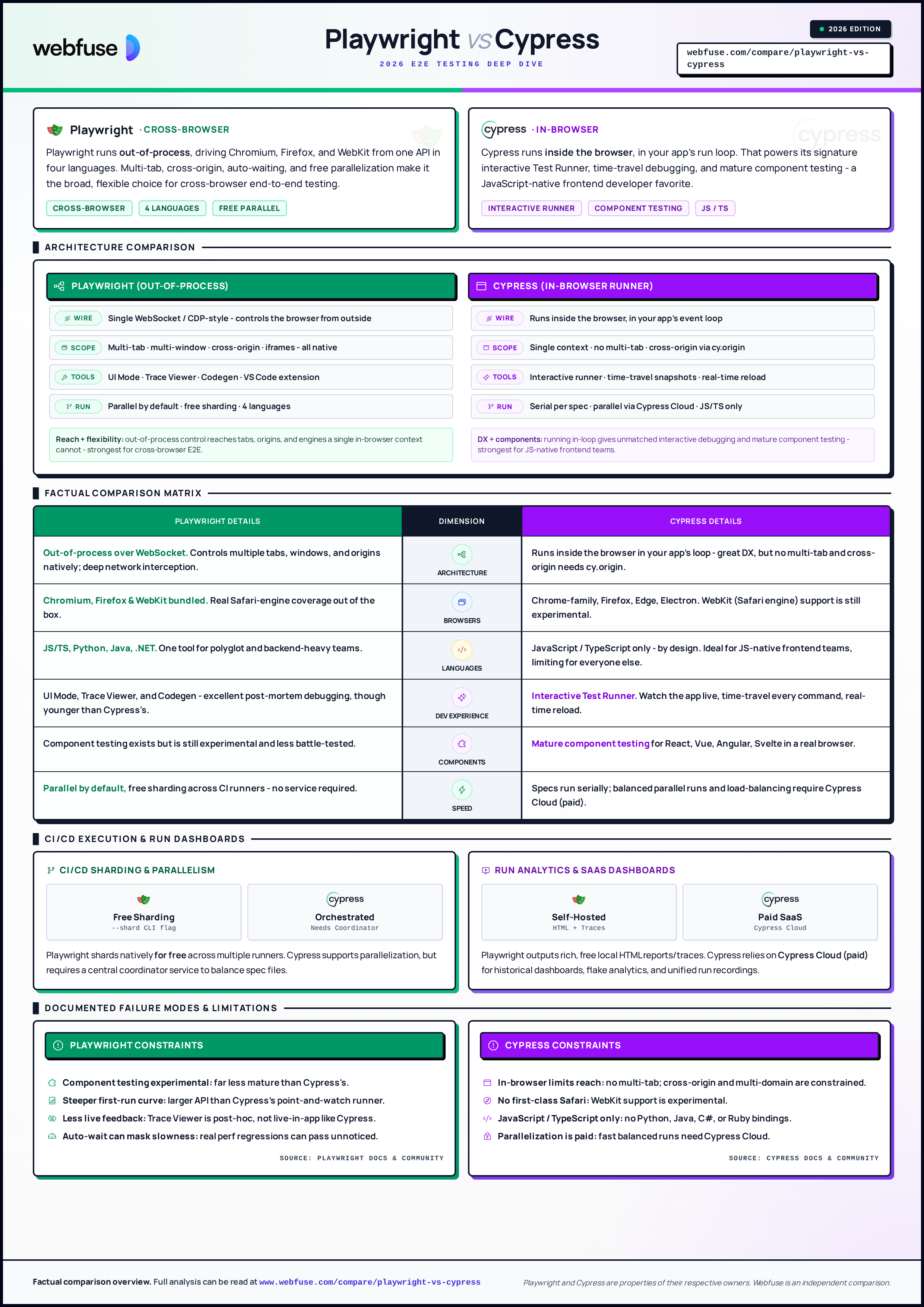
Comparison cheat sheet (click to open)
Quick Quiz
Answer five questions and we'll tell you which tool fits your project - Playwright or Cypress.
/
Your needs pull both ways - cross-browser reach versus interactive DX. The honest move is a quick proof-of-concept: build one real flow and one component test in each, run them in your CI, and let coverage, speed, and team comfort decide.
The TL;DR
Decide by what dominates your project - the score is close, the positioning isn't.
// Out-of-process, cross-browser // In-browser, frontend-firstHead-to-head
Six categories, scored head-to-head. Click any round to see how each platform performs and why.
This is the core divide. Playwright runs out-of-process over a WebSocket, so it controls multiple tabs, windows, origins, and iframes natively. Cypress runs inside the browser in your app’s run loop - which powers its great DX but caps what it can reach: multi-tab is unsupported and cross-origin needs cy.origin.
Winner This is the core divide. Playwright runs out-of-process over a WebSocket, so it controls multiple tabs, windows, origins, and iframes natively. Cypress runs inside the browser in your app’s run loop - which powers its great DX but caps what it can reach: multi-tab is unsupported and cross-origin needs cy.origin.
Winner Final Tally
Here's how the scores add up across all six categories.
// Out-of-process, cross-browser
// In-browser, frontend-first
Both drive a browser you start yourself.
Webfuse drives the live one.
Cost & licensing
Both tools are free and open source - Playwright is Apache-2.0, Cypress is MIT. The difference is at scale: Playwright's parallelization is built in and free, while Cypress's parallel orchestration, recordings, and analytics live in Cypress Cloud, a paid SaaS. Figures are illustrative as of mid-2026 - model with your own volume.
// How the bill is built
$0 license. Built-in sharding splits the suite across CI runners with no extra service or per-test fee.
≈ CI minutes only
no SaaS required
MIT-licensed runner is free to run serially in CI; you self-manage orchestration if you stay off Cloud.
$0 license
serial by default
Parallelization, load balancing, recordings, and flake analytics are billed per test result / seat.
$$ subscription
paid to scale out
Neither runner costs anything to adopt. The practical cost gap shows up when you parallelize: Playwright shards for free on your own CI, while Cypress's fast, balanced parallel runs and dashboards are a paid Cloud feature. For small suites it rarely matters; for large suites it can be the deciding line item.
Where each one breaks
Every comparison shows strengths. Few show where each tool actually breaks. Below are documented limitations from production users, GitHub issues, and community threads. Knowing these up front is worth more than another feature bullet.
Playwright can mount components, but the feature is experimental and far less battle-tested than Cypress component testing.
The larger API and out-of-process model are more to learn than Cypress’s point-and-watch runner, especially for pure-frontend teams.
UI Mode and Trace Viewer are excellent but post-hoc; you do not watch the app react in real time the way Cypress’s runner shows it.
Generous default waiting smooths over genuinely slow UI responses, so real performance regressions can pass unnoticed unless you assert on timing.
Running inside the browser means no multi-tab support and constrained cross-origin/multi-domain testing - some real user flows are hard or impossible.
WebKit support is experimental, so dependable Safari-engine coverage - a common requirement - is not there yet.
There are no Python, Java, C#, or Ruby bindings, so polyglot and backend-heavy teams cannot share the tool.
Fast, balanced parallel runs and analytics require Cypress Cloud; the free CLI runs specs serially, which slows large suites.
Both lists draw on documented user feedback, analyst notes, and review platforms as of mid-2026. Both vendors ship fast - any of these can move to the strengths column in a given quarter.
Use Case Picks
Six common scenarios with a defended pick.
Bundled Chromium, Firefox, and WebKit give real cross-browser coverage out of the box.
Mature, widely adopted component testing in a real browser with the interactive runner.
Time-travel snapshots and real-time reload make the debug loop delightful.
Out-of-process control handles tabs, popups, and cross-origin natively.
Four official language bindings let backend and frontend share one tool.
Built-in sharding parallelizes across runners with no paid service.
FAQ
The honest answers - drawn from real product positioning, not press releases.
Architecture. Playwright runs out-of-process and drives the browser over a WebSocket, so it controls multiple tabs, windows, and origins across Chromium, Firefox, and WebKit in several languages. Cypress runs inside the browser in your app’s run loop, which gives it superb interactive debugging and component testing but limits it to a single browser context, JavaScript/TypeScript, and (mostly) one origin per test.
For most new cross-browser E2E projects, Playwright is the broader choice - more browsers, more languages, multi-tab/cross-origin flows, and free parallelization. Cypress remains excellent where its strengths matter: interactive debugging, component testing, and a JavaScript-native frontend workflow. The right answer depends on what you are testing.
Playwright has overtaken Cypress as the default for many new test suites - its npm downloads, GitHub stars (around 91k vs ~50k), and State of JS satisfaction (around 91% vs ~72%) now lead Cypress. But Cypress is far from gone: it has a large install base and still leads on component testing and interactive DX. Both are actively developed.
Usually, yes. Playwright runs tests in parallel by default and communicates over a single WebSocket, while Cypress runs specs serially in-browser and relies on Cypress Cloud for parallel orchestration. On large suites the difference is significant.
Only experimentally. Cypress runs on Chrome-family browsers, Firefox, Edge, and Electron, with experimental WebKit support. Playwright bundles WebKit (Safari’s engine) as a first-class target, so if real Safari-engine coverage matters, Playwright has the edge.
The Cypress test runner is open source (MIT) and free to run. But parallelization, load balancing, run recordings, and flake analytics live in Cypress Cloud, a paid SaaS. Playwright is Apache-2.0 and its parallelization is built in and free.
Cypress is famous for its interactive Test Runner - you watch the app as tests run, with time-travel snapshots for every command. Playwright counters with UI Mode, Trace Viewer, and Codegen, which are excellent for post-mortem analysis. Many developers still find Cypress’s live, in-app feedback loop the most pleasant.
Cypress. Its component testing is mature and widely used across React, Vue, Angular, and Svelte, running components in a real browser with the same runner as E2E. Playwright has component testing too, but it is still experimental.
Multiple tabs are not supported, because Cypress runs inside a single browser context. Multiple domains are possible via cy.origin but with constraints. Playwright handles tabs, popups, and cross-origin flows natively, which is why complex user journeys often favor it.
Playwright has become the common substrate for AI-driven browser automation: it exposes accessibility-tree snapshots, ships an official MCP server, and its out-of-process model suits autonomous agent control. Cypress is adding AI to its authoring workflow (Studio AI for recording, plus Cloud features), but that is aimed at writing tests rather than driving agents. For AI agents acting on the web, Playwright-style out-of-process control is the more common foundation.
Not directly. Both tools automate browser instances you launch and control - they are not designed to inject testing or automation into a live session on a third-party site you do not own. To run automation, agents, or co-browsing on top of a website you do not control - without modifying its source - you need a web-augmentation layer like Webfuse, which serves the site through a proxied session you can script and observe.
Headless browsers give your agent a copy of the web. Webfuse gives it the session your user is actually in — over MCP, with no install.